First, choose a controller that works with your console or PC, then check whether your headset connects to the controller or directly to your gaming device. There are compatible controllers with headset sockets for both PS5 and Switch 2; on Xbox and Windows, the available audio connection also depends on how the controller is connected. A wired model could be a good choice if its cable reaches your seat.
Which controller is right for you?
PS5 players with a wired headset
If you want to plug a compatible headset into your controller while playing football, the DualSense is an option for PS5. If you also use it with a PC, Sony says the controller must be connected by cable to use the headset socket.
Xbox and PC players with a headset
If you switch between Xbox and Windows, check the audio connection as well as controller compatibility. Xbox Support lists several ways to connect to a PC, but notes that Xbox headsets aren’t supported when the controller connects to the PC over Bluetooth.
Switch 2 players with headphones
If you want to plug headphones or a headset into your controller, the Nintendo Switch 2 Pro Controller has a four-pole 3.5 mm socket that meets the CTIA standard, according to Nintendo.
What should you look for when buying?
Start by checking that the platform and audio connection are compatible. Your distance from the screen and the buttons you want will help you narrow down your options.
PS5 and, if needed, Windows
A good fit if: you play on PS5 and want to use a compatible wired headset with the DualSense.
Bear in mind: Sony requires a wired connection to use the headset socket on PC. Haptics and adaptive triggers depend on the game and connection.
Xbox console or Windows
A good fit if: you’re looking for a controller for Xbox or Windows and want to plug a compatible headset into an available 3.5 mm socket.
Bear in mind: Microsoft says Xbox headsets aren’t supported on Windows PCs when the controller is connected over Bluetooth.
Xbox or Windows with a USB cable
A good fit if: a cable can reach your seat and you’re looking for a wired model with a specified headset socket.
Bear in mind: The cable limits how far you can sit from your device. Claims about stick technology or audio effects don’t, by themselves, prove an advantage when playing football games.
Nintendo Switch 2
A good fit if: you want to plug headphones or a headset into the four-pole 3.5 mm socket on the Switch 2 Pro Controller.
Bear in mind: This is a different model from the Pro Controller for the original Nintendo Switch.
| What matters |
What to check before buying |
Who should pay particular attention |
| Platform and game compatibility |
Compare the full platform name with your device and the football game’s controller requirements. |
If I want to use my controller with a particular console or PC, it needs to work with both the device and the game. Around 29% of consumers prioritise platform and game compatibility. |
| Headphone and microphone connection |
Check the headset plug and audio support for your planned USB, Xbox Wireless or Bluetooth connection. |
If I want to use my existing headset with the controller, the socket, plug and connection to the gaming device all need to be compatible. Around 29% of consumers put the headphone audio connection first. |
| Freedom of movement and distance from your seat |
Measure the distance to your seat and check the cable length, connection and required power supply. |
If a cable running from my gaming device to my seat would get in the way, a compatible wireless connection matters more to me. Around 24% of consumers prioritise freedom of movement. |
| Customisable controls |
Check whether you want programmable buttons or a particular type of stick, and which features your game supports. |
If I genuinely want to use extra buttons or a particular type of stick, I compare the specific model with the game I play. Around 18% of consumers prioritise customisable controls. |
The platform and connection requirements listed here relate to the specific devices and connections: Sony describes how to use the DualSense, Microsoft covers Xbox controller connections, and Nintendo specifies the socket on the Switch 2 Pro Controller.
Common buying and connection mistakes
-
A Bluetooth connection doesn’t guarantee you can connect a headset to the controller
On PC, Sony requires a cable connection to use the DualSense headset socket. Microsoft notes that Xbox headsets aren’t supported when an Xbox controller connects to a PC over Bluetooth.
Decide how you’ll connect the controller and route the audio separately before you buy.
-
Controllers with similar names aren’t necessarily interchangeable
The PowerA headset socket described here is on the Xbox version. Nintendo specifically lists a headphone socket for the Switch 2 Pro Controller; the Pro Controller for the original Switch is a different model.
Check the full model name, platform and connections for the exact version you’re considering.
If the version you buy isn’t compatible with your platform, you may need to buy another controller.
-
Plan Bluetooth audio and local multiplayer separately on the original Switch
Nintendo says Bluetooth audio is disabled on the Nintendo Switch in local mode. Also, a maximum of two wireless controllers can be connected while using Bluetooth audio.
If you want to play locally on the original Switch, check your alternative audio options and how many controllers you’ll need in advance.
Key brands at a glance
PlayStation
The DualSense is an option for PS5 players and, according to Sony, can also be used with Windows.
- Sony lists a headset socket on the controller.
- On PC and Mac, Sony requires a wired controller connection to use this socket. Haptics and adaptive triggers depend on the game and connection.
Xbox
Xbox Wireless Controllers are designed for Xbox consoles and Windows PCs, with various connection options.
- Microsoft says compatible headsets can be connected using a 3.5 mm socket.
- Microsoft says Xbox headsets aren’t supported when the controller connects to a PC over Bluetooth.
GameSir
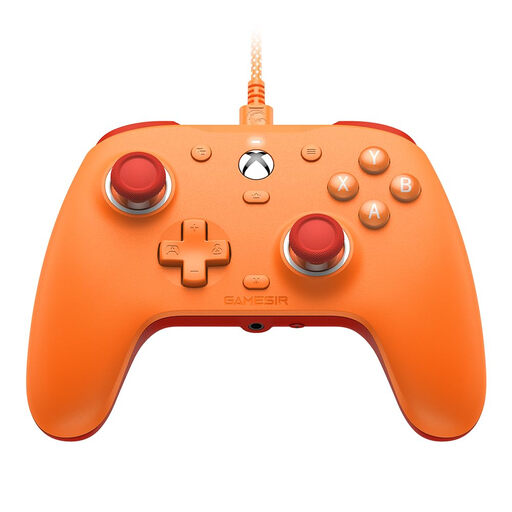
The wired G7 SE is an Xbox and Windows option with a headset socket and programmable rear buttons.
- GameSir specifies Hall Effect sticks, 3.5 mm audio, two programmable rear buttons and a detachable 3 m USB cable for the G7 SE.
- The advertised prevention of stick drift isn’t backed by independent long-term evidence.
PowerA
The Enhanced Wired Controller is a wired option for Xbox Series X|S, Xbox One and Windows.
- For the Xbox version, PowerA lists a 3.5 mm socket, volume controls with microphone mute, two programmable buttons and a detachable 3 m cable.
- These details apply to the Xbox version described here, not similarly named Switch models.
Nintendo
The Switch 2 Pro Controller is designed for Nintendo Switch 2 players who want to connect headphones to their controller.
- Nintendo lists a four-pole 3.5 mm socket and programmable GL and GR buttons.
- The Pro Controller for the original Nintendo Switch is a different model; the two controllers shouldn’t be confused.
Turtle Beach
The Recon is another wired option for Xbox and Windows, with controls for your headset.
- Turtle Beach lists a 3.5 mm headset socket and microphone monitoring for the Recon.
- Advertised audio effects are manufacturer claims, not evidence of better performance in football games.
Joybuy controllers for Xbox and Windows
This Joybuy selection includes controllers for Xbox and Windows, with wireless operation or a USB cable depending on the model.
 No image available
Microsoft Xbox Wireless Controller, Deep Pink (Xbox One/Xbox Series X|S/PC)
A good option if you’re looking for a wireless Xbox controller for Xbox One, Xbox Series X|S or PC. Check the exact version and how you plan to connect it before using your headset with the controller. Microsoft says Xbox headsets aren’t supported on PC over a Bluetooth connection.
Joybuy
 No image available
GameSir G7 SE Wired Gaming Controller, Orange (Xbox Series X|S, Xbox One, Windows 10/11)
A good fit if a USB cable can reach your seat and you’re looking for a wired controller for Xbox or Windows.
GameSir specifies Hall Effect sticks, two programmable rear buttons, a 3.5 mm audio socket and a detachable 3 m USB cable for the G7 SE. The manufacturer’s claim about stick drift isn’t backed by independent long-term evidence.
Joybuy
Frequently asked questions
Will a headset plugged into the DualSense work if the controller is connected to a PC over Bluetooth?
To use the headset socket on PC and Mac, Sony requires a wired controller connection. So, if you want to use the DualSense socket, plan to connect it via USB and also check your game’s audio settings.
Can I use an Xbox headset with a PC controller connected over Bluetooth?
No. Microsoft says Xbox headsets aren’t supported when the controller is connected to a PC over Bluetooth. Check the controller connection and audio route separately before choosing how to connect.
What should I check when choosing a wired controller?
Check that the cable reaches your seat without being stretched or getting in the way. GameSir and PowerA each specify a detachable 3 m cable for the models described here; connections and platform compatibility depend on the exact version.
Is the Nintendo Switch 2 Pro Controller the same model as the Pro Controller for the original Switch?
No, they’re different models. Nintendo lists a four-pole 3.5 mm headphone socket for the Switch 2 Pro Controller. If you have an original Switch, check its controller and audio features separately.


