If space is tight, a compact Full HD monitor is an obvious option, but screen size isn’t the only thing to consider: compare the space it takes up, including the stand, with your desk. A larger QHD monitor could be a better fit if your desk, viewing distance and device are suitable. A high refresh-rate figure doesn’t guarantee the same frame rate in your football game, or compatibility with your console.
Who should consider these options?
Gamers short on desk space
If your desk is on the small side, compare the monitor’s width and depth, including the stand, with the space you have available. The manufacturer dimensions for the 23.8-inch BenQ EX240N and Dell G2422HS differ; the figures come from BenQ Germany and Dell Germany respectively.
Console gamers weighing up frame rates
If you play on a console, check which resolution and frame rate your console, monitor connection and specific game support together. Sony says the PS5 can output at 120 Hz in supported games; that doesn’t mean every football game will do so.
Gamers looking for a larger display
If you’re considering a larger display or QHD, remember to take the space it needs and your device’s output into account. The LG 27GS75QX-B is a 27-inch QHD example; LG Germany lists its width with the stand as 613.5 mm.
What should you look for when buying?
Compact 23.8-inch Full HD monitor
A better fit if: desk space is limited and a modest screen size is all you need. Manufacturer dimensions vary even between models with a similar screen size.
The trade-off: compared with the 27-inch QHD example researched, you get less screen space and a lower resolution.
Larger 27-inch QHD monitor
A better fit if: you have enough desk space and your PC or console supports the QHD output you want.
The trade-off: according to LG Germany, the LG 27GS75QX-B measures 613.5 mm wide and 253.7 mm deep with the stand.
| Priority |
What to check before buying |
Who is this most important to? |
| Desk space |
Compare the available width and depth with the monitor’s dimensions, including the stand; if you’re using a mount, check the VESA size and how it attaches. |
If I need room for a keyboard or controller alongside my monitor, the amount of space the stand actually takes up is crucial. Around 36% of consumers say space is their top priority. |
| Frame rate and connection |
Check your console or PC, the input, the resolution you want and the modes supported by the specific game. |
If I want to use a particular frame rate, I need to know whether the game, device and connection support it together. Around 29% of consumers say frame rate and connection are their main priorities. |
| Screen size and resolution |
Consider the space available and your seating position, and check whether your device can output the resolution you want. |
If I want to see football games on a bigger or more detailed screen, I need to weigh the extra space required against the room I have. Around 21% of consumers put screen size or sharpness first. |
| Sound without extra equipment |
Check whether the specific model has speakers and, if needed, a headphone socket. |
If I don’t want to use headphones or buy extra speakers, the audio features of the exact model matter. Around 14% of consumers say sound without extra equipment is their main priority. |
Sony lists a 120 Hz option for PS5 games that support 120 Hz. So a monitor’s maximum refresh rate alone won’t tell you what frame rate your specific game can output.
Avoid common misconceptions
-
Comparing screen size alone, rather than the space it takes up
Stand depth can vary even between the researched monitors with a similar screen size, and may take up valuable desk space.
Measure the available width and depth, then compare them with the manufacturer’s full dimensions, including the stand. Only plan to use a mount if the VESA size and desk attachment are suitable.
If the stand takes up too much room, you may need a suitable mount; check that your desk can accommodate it, too.
-
Assuming 165 Hz or 180 Hz guarantees that frame rate in a game
A monitor’s maximum refresh rate doesn’t prove that your console, connection and football game all support the same mode.
Check the supported modes for your device, the input you’re using and the specific game separately. On PS5, you can check the available video output settings.
-
Assuming every gaming monitor has built-in speakers
Features vary by model: BenQ lists built-in speakers for the EX240N, while LG doesn’t list any for the 24GS65F-B.
Check the specifications for the exact model if you want to play without headphones or separate speakers.
If there are no built-in speakers, you may need headphones or a separate speaker system for sound.
A guide to relevant brands
BenQ
The MOBIUZ EX240N is an example of a compact gaming monitor with built-in speakers; the details below apply to this model.
- BenQ Germany lists a 23.8-inch Full HD screen, 165 Hz, two 2.5 W speakers and a depth of 182.6 mm with the stand.
- The advertised 1 ms figure refers to MPRT; BenQ lists 4 ms for grey-to-grey. This alone doesn’t offer an independent assessment of motion handling.
ASUS
The TUF Gaming VG249Q1A is a compact Full HD example where stand depth and connections are worth considering.
- ASUS Germany lists a 23.8-inch screen, a maximum refresh rate of 165 Hz and a depth of 17.40 cm with the stand.
- According to ASUS, there’s no height adjustment, and the HDMI input is version 1.4. These specifications refer to the German version.
Dell
The G2422HS shows which features may be worth comparing on a 23.8-inch IPS monitor with a stand.
- Dell Germany lists Full HD at 165 Hz, 100 mm of height adjustment and two HDMI inputs.
- Dell gives the depth with the stand as 18.944 cm. These details apply to the G2422HS, not the entire product range.
LG
The UltraGear examples include a 23.8-inch Full HD model and a larger 27-inch QHD model.
- LG Germany lists QHD and a width of 613.5 mm with the stand for the 27GS75QX-B; the 24GS65F-B is listed as a 23.8-inch Full HD model.
- According to LG, the 24GS65F-B has no speakers. Dimensions and features vary by model; they aren’t an independent comparison of performance.
Joybuy products for gaming at your desk
These models include compact Full HD options and portable gaming monitors. Compare the screen sizes and connection details listed with the space you have available and the device you’ll be using.
 No image available
KOORUI MB24V29FS4, 24-inch Full HD IPS monitor
A 24-inch option for gaming on a small desk; check the actual dimensions, including the stand, before buying.
Full HD, IPS, 120 Hz, 5 ms, 99% sRGB, HDMI and VGA; VESA 100 × 100 mm, tilt-adjustable.
Joybuy
 No image available
TCL 25G54, 25-inch Mini LED gaming monitor
A 25-inch Full HD option; check how much room the specific monitor takes up on your desk.
Mini LED, IPS, 144 Hz, 450 Nits, VESA DisplayHDR 400 and 93% DCI-P3, according to the product details.
Joybuy
 No image available
KTC H24B9S, 24-inch Full HD gaming monitor
A 24-inch option for Full HD gaming; check that the connections are compatible with your PC or console.
Full HD, IPS, 144 Hz, 5 ms, 1500:1 contrast ratio and 116% sRGB; HDMI and DisplayPort.
Joybuy
 No image available
UPERFECT, portable 18.5-inch Full HD gaming monitor
Its portable design and 18.5-inch screen make this a compact option; check the dimensions against the space you have in mind.
Full HD, 120 Hz, matte IPS display, USB-C and Mini HDMI. According to the product details, 120 Hz support depends on the device and cable used.
Joybuy
 No image available
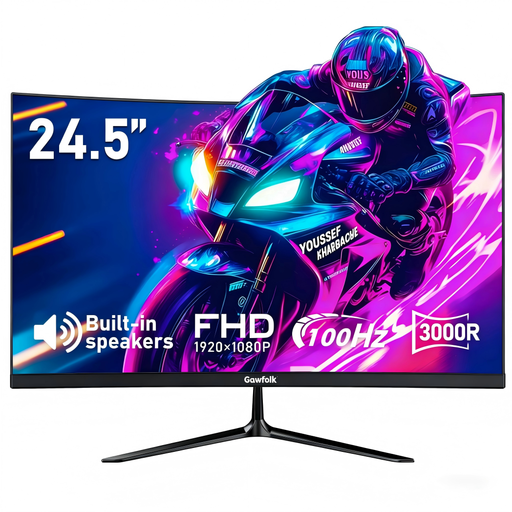
Gawfolk, curved 24.5-inch Full HD monitor
A curved 24.5-inch option for PC or PS5 gaming; check the space it needs and the connections you’ll require before buying.
Full HD, 100 Hz, built-in speakers, HDMI and DisplayPort; VESA 75 × 75 mm.
Joybuy
Frequently asked questions
Do I need a 165 Hz monitor to play football games on PS5?
No, a 165 Hz monitor isn’t essential. Sony says games that support this mode can output at 120 Hz; also check the frame rate supported by your specific game and the monitor input you’re using.
How should I set up a monitor on a small desk?
First, measure the space available and compare it with the monitor’s width and depth, including the stand. Then position the screen to suit where you sit and your eyesight. The guidance from the German Federal Institute for Occupational Safety and Health relates to screen-based work and isn’t a legal requirement for gaming at home.
What extra costs and returns policies should I consider?
Check whether you’ll need headphones or separate speakers because the monitor doesn’t have built-in speakers. In Germany, consumers generally have a 14-day right to cancel an online purchase; the Consumer Advice Centre notes that the circumstances of the specific contract determine what applies.
Do gaming monitors have an energy-efficiency label?
The European Commission includes computer monitors among the electronic displays covered by energy labelling; the scale runs from A to G. Compare the label and product information for the specific model. This is an EU market label, not an efficiency class you have to choose as a buyer.


