Players without their own screen
If you share a TV or monitor, you can still play on the Nintendo Switch 2 without it. Nintendo lists handheld, tabletop and TV modes.


If the TV or monitor in your shared bedroom is often in use, the Nintendo Switch 2 could suit your needs, with handheld, tabletop and TV modes. If you mainly play on your own screen and want to compete with friends on PS5, Xbox Series X|S or PC in supported FC modes, consider a PS5 or Xbox Series X|S. EA supports this cross-play, but not between Switch and these platforms. For local matches, you’ll also need a screen you can both use and suitable controllers. Digital-only consoles can’t play game discs.
If you share a TV or monitor, you can still play on the Nintendo Switch 2 without it. Nintendo lists handheld, tabletop and TV modes.
For a one-on-one match, the screen, game mode and controllers need to work together. Electronic Arts describes certain local play options for FC on Switch, using compatible controllers or shared Joy-Con controls.
If you want to play with particular friends, their platform matters: according to Electronic Arts, FC doesn’t support cross-play between Switch or Switch 2 and PlayStation, Xbox or PC.
First, decide whether you want to play without using the shared screen. Then consider whether you’ll play locally or online, and which controllers and services you’ll need for the way you play.
The percentages each represent the main concern of consumers choosing a football gaming console for a shared bedroom.
| Priority | What to check before buying | Who is it important to? |
|---|---|---|
| Playing without relying on the screen | Check the handheld, tabletop and TV modes, as well as the space available and the screen you plan to use. | If the TV is in use, I still want to be able to play without taking over the shared screen. Around 28% of consumers choosing a console for a shared bedroom put being able to play independently of the screen first. |
| Playing together in the room | Check the local mode for the specific game, the screen size, and which controllers are included or compatible. | For a one-on-one match, I want to know whether we’ll both be able to see the screen clearly and how the controls are shared. Playing together in person is the main priority for around 22% of consumers. |
| Playing online with friends | Check your friends’ platform and console generation, as well as the online mode you want to play. | If my friends already play on particular platforms, I want to know whether we can play FC together before choosing a console. Around 22% of consumers prioritise this platform compatibility. |
| Game format and what you’ll need afterwards | Check the disc drive, included game, storage, controllers and any online services required for the mode you plan to play. | I want to know in advance whether I can use discs and which services my game mode requires. For around 17% of consumers, what they’ll need after buying the console is their main concern. |
| Age ratings and settings | Check the USK rating for the specific game version, along with chat and purchase settings. | If children are playing, I want to take the age rating and account settings into account. Around 11% of consumers prioritise age ratings, chats and in-game purchases. |
Microsoft lists Series X models both with and without a disc drive. The Series S is digital-only, too. You can’t use game discs with a model that doesn’t have a disc drive.
Check the full model name and disc drive details on the specific product page.
You can’t use games you’ve already bought on disc with a digital-only console.
A PS5 bundle described by Sony specifically includes a download voucher for FC 26, not FC 27.
Check the game year, platform, voucher code and what’s included in the specific bundle.
You may need to buy FC 27 separately if the bundle includes a different edition.
General information about resolution or maximum frame rate doesn’t tell you what frame rate FC 27 will actually achieve. An integrated display also needs to be practical for both players.
Choose the game mode and screen you need first. Don’t assume FC 27’s performance based on general console specifications.
Some online modes require a membership. Konami also lists optional in-game purchases for eFootball.
Before you buy, check the difference between local play, online modes, any required membership and optional purchases.
Depending on the platform and game mode, you may need a separate online subscription.
The Switch 2 offers handheld, tabletop and TV modes. Nintendo lists FC 27 for this platform.
Microsoft lists digital-only Series S models, as well as Series X models with and without a disc drive. FC 27 and eFootball are listed for Xbox Series X|S.
PS5 models with or without a disc drive are options for FC 27 and eFootball. The right model for you depends, among other things, on whether you use discs and which platforms your friends play on.
These consoles suit two different scenarios: playing on a dedicated screen, or playing on the Switch 2 even when a TV isn’t always available.
 No image available
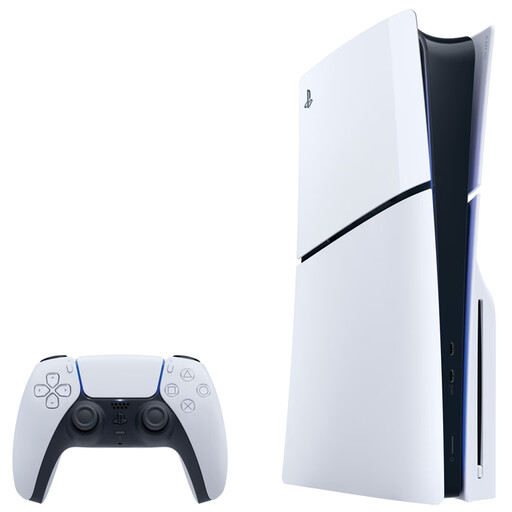
This home console is one option for playing football games on your own screen. The product description lists a disc drive, 1 TB SSD and a DualSense controller included. You’ll need a separate screen and HDMI for display output.
 No image available
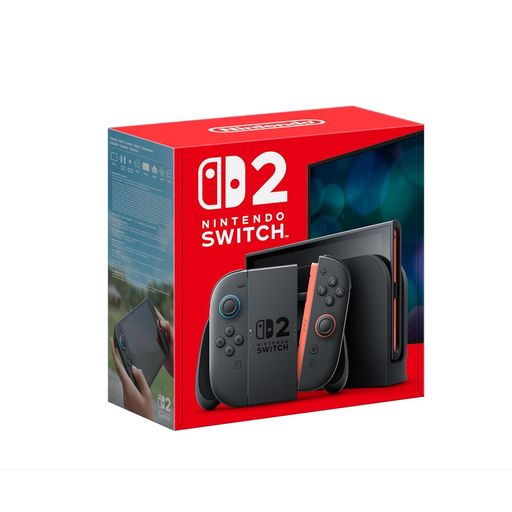
If a shared screen isn’t always available, the Switch 2 offers handheld, tabletop and TV modes for football gaming. FC 27 is listed for the platform. The product description lists a 7.9-inch display, 256 GB of storage and two Joy-Con 2 controllers. According to Electronic Arts, FC cross-play with PlayStation, Xbox and PC isn’t supported.
No. According to Electronic Arts, FC doesn’t support cross-play between Switch or Switch 2 and PlayStation, Xbox or PC. If you want to play online with particular friends, check their platform and console generation against the game mode you want to play.
It depends on the game mode and controls. Electronic Arts describes certain FC matches on Switch that use extra controllers or shared Joy-Con controls. For FC 27 on Switch 2, Nintendo lists one compatible controller per person. Check what’s included and the controller requirements for the specific version.
Yes. Nintendo lists a 3.5 mm headphone jack and Bluetooth audio. Nintendo notes that Bluetooth audio may have a delay, that a maximum of two wireless controllers can be connected at the same time, and that Bluetooth microphones aren’t supported.
Check the requirements for the specific game and online mode: Sony lists a separate PlayStation Plus subscription for online multiplayer, while Electronic Arts lists a Nintendo Switch Online membership for FC online matches on Switch. Konami describes eFootball as free-to-play, with optional in-game purchases.
The USK listing for EA Sports FC 27 on Nintendo Switch gives it an age rating of “12 and over under Section 14 of the German Youth Protection Act (JuSchG)” and mentions chats and in-game purchases involving random items. According to the USK, an age rating isn’t an educational recommendation. Check the rating for the specific game version and adjust the account settings if needed.