Which option suits you?

Cataloguers working with lots of fields

If you record identifications, characteristics and find details in a customisable form, the fields should remain easy to read at your usual text size. Arctos documents both fossil-specific entries and customisable form views.

Collection managers working with photo references

If you regularly compare fossil photographs with the corresponding record, resolution and, where appropriate, a suitable colour mode are important things to check. QHD, 4K and colour-space specifications refer to specific models; they are not measurements of fossil photographs.

Cataloguers working at different desks

If you connect a laptop or move between workstations, check the screen position and video and charging features for your devices. The German BAuA rule ASR A6 applies to screen-based workstations and teleworking within its specified professional scope.

What should you look for when buying?

27-inch QHD

A good fit if: You mainly use form fields and a few reference windows, and need text that’s easy to read. Philips lists a resolution of 2.560 × 1.440 pixels for the 27E1N5600AE/00.

The trade-off: This model has fewer pixels than the 27-inch 4K options listed here. Test your form and image details in the window layout you’ll actually use.

27-inch 4K

A good fit if: You regularly check high-resolution fossil photographs or fine image details, and can adjust the scaling for your catalogue form. ASUS, BenQ and LG list a resolution of 3.840 × 2.160 pixels for the 27-inch models featured here.

The trade-off: More pixels don’t automatically mean larger text or accurate colour assessment. Also compare the ports and stand on the specific model.

Widescreen 21:9

A good fit if: You prefer to arrange your catalogue form, notes and references in separate windows side by side, and have enough desk space. LG lists the 34U650A-B as a 34-inch model with a resolution of 3.440 × 1.440 pixels.

The trade-off: The model listed here has 1.440 vertical pixels, compared with 2.160 on the 4K models featured here. Check text size and image display together.

What matters What to check when buying Who should pay particular attention
Readability and field layout Test your form at your usual text size and check whether there’s room for notes or references alongside it. If I want to read custom field layouts alongside find notes and references, I check the form at my usual size. Around 31% of consumers put readable catalogue fields first.
Fossil photographs and details Compare your own photographs at a comfortably readable scaling level and check whether a colour mode you need suits your image workflow. When I regularly compare fine features, I want to see fossil photographs alongside the record in enough detail. Around 25% of consumers prioritise checking photographs.
Screen position Check height adjustment, tilt, desk space and potential reflections at your actual workstation. During longer data-entry sessions, I check whether I can position the screen comfortably at my desk. Around 19% of consumers prioritise screen position.
Laptop connection Check that the video output and power supply work with your laptop, monitor and intended cable. At a changing workstation, I want to connect my laptop so that the video and power functions I need work properly. Around 13% of consumers prioritise laptop connections and power supply.
Energy use during operation Compare the EU energy label and the specifications for the specific model; don’t use the efficiency class alone to estimate actual energy use. If energy use matters to me when using a monitor regularly, I check the specifications for the specific model. Around 12% of consumers place particular importance on energy use during operation.

Common selection mistakes

  • 4K doesn’t automatically make catalogue fields easier to read

    The 4K devices listed have more pixels than the QHD model documented here. That alone doesn’t tell you whether the fields will be easy to read at your chosen scaling level.

    Test your form alongside a reference window, using the text size you actually work with.

  • A wide colour gamut doesn’t guarantee accurate fossil colours

    BenQ and ASUS list colour-space coverage for specific models. These specifications don’t describe the entire process, from taking a photograph to its settings and display.

    First decide what you need to assess colour for, then check for a suitable colour mode and consider your own image workflow.

  • There’s more to USB-C than the port

    Video transmission and charging power are separate features. Both need to be compatible with your laptop and the connection you plan to use.

    Check the video and power features of your laptop and monitor, as well as the cable you’ll use.

    Monitor brands to consider

    Philips

    The Philips 27E1N5600AE/00 is a documented 27-inch QHD model with USB-C, making it an option for form-heavy work.

    • Philips says a compatible laptop can transfer video and data and charge through a single cable.
    • Its resolution of 2.560 × 1.440 pixels is lower than that of the 4K models listed here; check compatibility with your specific devices.

    LG

    The models featured offer different formats: the 27-inch 4K 27UP850K-W and the widescreen 34U650A-B.

    • LG lists USB-C and an adjustable stand for the 27UP850K-W. For the 34U650A-B, LG specifies a 21:9 format and a resolution of 3.440 × 1.440 pixels.
    • Widescreen and 4K meet different needs. Manufacturer colour specifications aren’t an independent assessment of fossil photographs.

    BenQ

    The DesignVue PD2705U is a documented 27-inch 4K model with specified colour modes and USB-C features.

    • BenQ lists 99% sRGB and Rec. 709, plus USB-C with DisplayPort Alt Mode, data transfer and 65 W Power Delivery.
    • Manufacturer specifications don’t replace checking compatibility with your laptop or assessing your own colour workflow.

    ASUS

    The ProArt PA279CRV is a documented 27-inch 4K model with colour modes and adjustable positioning.

    • ASUS lists, among other features, 99% Adobe RGB, 96 W USB-C Power Delivery and 0–130 mm of height adjustment.
    • Check whether these features are relevant to your image and laptop workflow at your actual workstation.

    Dell

    The UltraSharp U2725QE is a documented 27-inch 4K model with a Thunderbolt hub for a suitably equipped workstation.

    • Dell lists an adjustable-height stand and hub features.
    • Check that the hub features are suitable for your devices and your actual workstation.

Portable monitors at Joybuy

The Joybuy picks below are portable secondary monitors for laptop-based cataloguing. Check the resolution and ports for each model, and make sure the extra screen space suits your window layout.
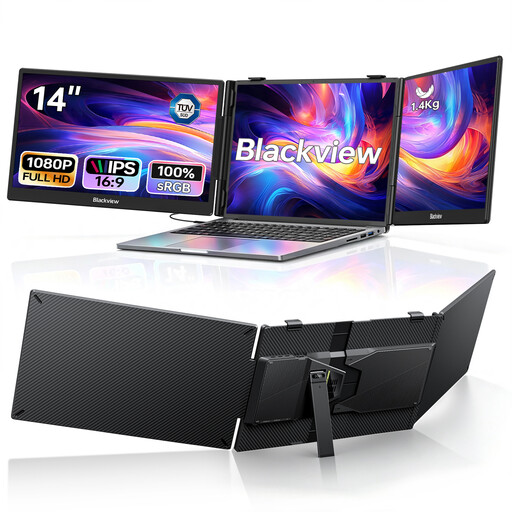
Blackview DCM5 14-inch FHD dual monitor

Blackview DCM5 14-inch FHD dual monitor

The two extra displays can show a catalogue form and references on separate laptop screens.

Specifications include two 14-inch IPS screens with 1080p, USB-C and 100W PD. Listed as compatible with 13–17,3-inch laptops, as well as Mac, Windows and Android.

Each screen is listed as FHD, so it has fewer pixels than the QHD and 4K options described here. Check that it offers enough detail for your photographs.

View at Joybuy

UFYQL M156F04 15.6-inch FHD IPS monitor

UFYQL M156F04 15.6-inch FHD IPS monitor

This model can serve as a portable secondary screen, displaying a catalogue view alongside references on a laptop.

Specifications include a 15,6-inch FHD 1080p IPS screen, USB-C and HDMI. It comes with a smart cover stand and is also listed as VESA-compatible.

FHD has fewer pixels than the QHD and 4K options described here; compare the display with your own photographs.

View at Joybuy

UPERFECT 18.5-inch 120 Hz FHD IPS monitor

UPERFECT 18.5-inch 120 Hz FHD IPS monitor

As a portable display for a laptop or PC, this model can provide an extra view for catalogue work.

Specifications include an 18,5-inch screen with 1.920 × 1.080 pixels, a matte IPS display, USB-C and Mini-HDMI. VESA compatibility is also listed.

FHD resolution is lower than that of the QHD and 4K options described here; check how readable your fields and image details are.

View at Joybuy
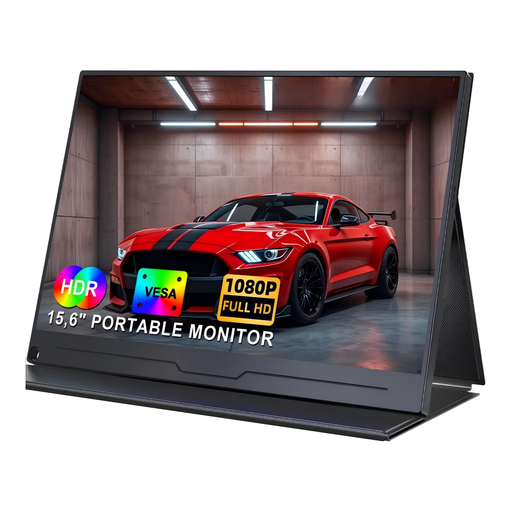
UPERFECT 15.6-inch FHD IPS monitor with dual speakers

UPERFECT 15.6-inch FHD IPS monitor with dual speakers

This portable secondary monitor is described as an extra display for catalogue entries and references when connected to a laptop or PC.

The product name lists a 15,6-inch screen, 1080p FHD, IPS, USB-C, built-in speakers and VESA.

FHD has fewer pixels than the QHD and 4K options described here; bear this in mind when checking fine photographic details.

View at Joybuy

UPERFECT 15.6-inch monitor with 100% sRGB

UPERFECT 15.6-inch monitor with 100% sRGB

This model can support catalogue work alongside reference images as a portable second screen.

Specifications include a 15,6-inch screen and 100% sRGB. It also features a built-in adjustable stand, USB-C, Mini-HDMI, speakers and VESA.

The colour-space specification doesn’t replace checking your own capture and display workflow. Make sure the ports are compatible with your devices.

View at Joybuy

Frequently asked questions

Do I need a special monitor for custom fossil fields?

No. The catalogue software you use determines which fields appear in the form and how they’re arranged. Check that your form fits on the monitor alongside references, with text at a comfortably readable size. Arctos documents customisable views as one example; this doesn’t mean other programmes have the same features.

How should I set up my screen for longer data-entry sessions?

Check the screen height, tilt, lighting and readability at your actual workstation. For workplace screen-based workstations and teleworking within its scope, ASR A6 sets out specific requirements under Germany’s Workplace Ordinance; it doesn’t apply automatically to a purely private fossil collection.

Can my laptop send video and charge through a single USB-C cable?

Only if your laptop, monitor and connection support the necessary features. BenQ specifies DisplayPort Alt Mode, data transfer and 65 W Power Delivery for the PD2705U; ASUS lists 96 W Power Delivery for the PA279CRV. Check these specifications against your laptop before buying.

How can I compare energy use, and what are my rights if something is faulty?

To compare energy use, check the EU energy label and the model-specific information in EPREL; the efficiency class alone doesn’t tell you how much energy a monitor will actually use. Under EU law, consumer purchases of faulty goods come with a minimum two-year legal guarantee. This is separate from any voluntary manufacturer’s warranty.

Can I return a monitor bought online if the catalogue form isn’t easy to read on it?

For a relevant distance contract with a business seller, you generally have a 14-day right to cancel from delivery, without having to give a reason. Exceptions apply, and you may have to pay return postage. Purchases from private individuals aren’t covered by this right to cancel.