Filming writing samples
If you mainly want to show the nib, your hand and your handwriting on the desk, a stable overhead mount and the right framing are essential.


For overhead writing samples, a USB document camera is a natural place to start if you’ll be using a computer to record. If you’d prefer to film without a computer, or want to use different angles later, consider a compact camera or a mirrorless camera. With a mirrorless model, the lens is key to getting close-up shots. Whichever you choose, check the framing from the height you can actually mount it at, see how clearly the nib appears and record a test clip to check the sound.
If you mainly want to show the nib, your hand and your handwriting on the desk, a stable overhead mount and the right framing are essential.
To show the nib and writing clearly, choose your lens, shooting distance and framing with care.
If you switch between presenting the product and showing a writing sample, plan for both clear footage and intelligible sound.
A good fit if: You mainly want to film fountain pens, hands and the writing area from above, and plan to record using a computer.
Bear in mind: Recording relies on a computer and compatible software. IPEVO lists a focus range starting at 10 cm and a capture area of 34.2 × 25.5 cm for the V4K PRO.
A good fit if: You want to record without a computer and switch between a desk view and filming yourself on camera.
Bear in mind: You can’t swap the lens for a macro lens, and the minimum focusing distance alone won’t tell you how large the nib will look in the frame.
A good fit if: You want to use different angles or shoot close-ups with carefully chosen lenses.
Bear in mind: The camera body and lens need to work well together; a kit zoom isn’t automatically suitable for macro photography.
A good fit if: You’re planning moving shots or filming outside your room as well as recording writing samples.
Bear in mind: Stabilisation isn’t a substitute for a secure fixed mount. DJI lists a minimum subject distance of 20 cm for the Osmo Pocket 3.
| What you need | What to check before buying | Who it matters most to |
|---|---|---|
| Stable desk view | Test the mounting position and framing with paper and your hands in shot; for USB models, factor in a computer and recording software. | If I want to show the whole writing sample in a small space, I look for a stable overhead view. Around 33% of consumers prioritise a desk view. |
| Detailed views of the nib and writing | Try filming the nib and writing from your planned distance; consider the focus range and the lens you’ll actually use. | If the nib needs to be clearly visible, I check the final framing rather than just the focusing distance. Around 27% of consumers put fountain pen details first. |
| Picture and voice in the room | Record a test under your intended lighting and check paper colours, possible flicker and how clearly speech comes through. | I want to show the pen, paper and spoken explanation together under my room lighting. Picture and voice are the top priorities for consumers with this focus, who make up around 27%. |
| Longer recording without a computer | Test the recording time with your chosen settings and check storage, power and any accessories you’ll need. | If I want to record a longer take without a computer, I plan the whole recording setup around that. Around 13% of consumers prioritise longer recordings without a computer. |
Focusing distance and the size of the resulting image are two different things. With a mirrorless camera, the lens you use also affects how large the nib appears in the frame.
Test the framing you want using the actual camera and lens, from a mounting height that’s practical in your room.
Smooth movement serves a different purpose from a steady overhead view of your writing area.
For stationary writing samples, start by planning a secure position and the right framing. Give more weight to a gimbal if you also want to film moving shots.
You may need a separate suitable mount for a fixed view.
USB document cameras such as the V4K PRO are designed for showing paper and objects on a computer.
The EOS R50 V is an interchangeable-lens camera designed with video in mind, while the PowerShot V1 has a built-in zoom lens.
The ZV-E10 II is an E-mount mirrorless camera designed for video, making it a flexible option for a desk setup.
The Z 30 is an interchangeable-lens option for spoken product presentations and longer recording sessions.
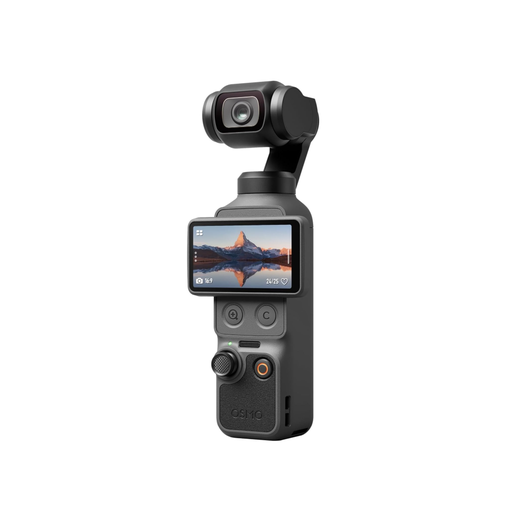
The Osmo Pocket 3 is a compact gimbal camera to consider if you’re planning moving shots as well as desk-based filming.
This selection includes webcams for computer-based reviews and cameras that record independently for product presentations and writing samples.
 No image available
Described as a webcam for PC and streaming, this is an option for computer-based reviews.
The product title lists 2160p video, PDAF autofocus, two microphones, a 75° field of view and USB-A/USB-C. Check the framing of your writing area from the position you plan to use.
 No image available
This gimbal camera is worth considering for independent recording and moving shots in review videos.
The product title lists a 1″ CMOS sensor, 4K/240fps, 3-axis stabilisation, 2× lossless zoom, 107 GB of built-in storage and a rotating 2″ screen. Check separately whether you can mount the camera securely for a fixed view of your writing.
 No image available
This webcam is an option for reviews with spoken commentary from a laptop or desktop computer.
The product details list 2560 × 1440 at 30 fps, a noise-cancelling microphone and a clip mount. Check whether it lets you get the desk view you want.
 No image available
This could be a portable option for video recording if you’re looking for a camera that works independently.
The product title lists 64 MP, autofocus, 18× zoom and a flash. The zoom specification alone doesn’t tell you the macro magnification; test the framing of the nib from the distance you plan to use.
 No image available
This compact gimbal camera is an option for independent video recording and moving shots.
The product details list a 1″ CMOS sensor, 4K/120fps, 3-axis stabilisation and a rotating 2″ touchscreen. DJI lists a minimum distance of 20 cm; that alone doesn’t guarantee the nib will appear large enough in the frame.
Set up your fountain pen and paper as you would for the test, then check the framing from the camera height you can actually use. The minimum focusing distance tells you how close a camera can focus, but not how large the nib will appear in the finished image.
The IPEVO USB models described here need a computer as part of the recording setup. IPEVO describes recording video using Visualizer or other suitable software; check the connections and system requirements for the specific model.
Start by recording a short video under the lamp you plan to use. Sony notes that adjusting the shutter speed may help reduce flicker. For 25 frames per second, Canon gives a shutter speed of 1/50 second as a general rule of thumb for filming, not a guarantee against flicker from every LED light.
According to the European Union’s consumer information, you have a legal guarantee of at least two years from the date you receive the goods, which you can claim from the seller. This is separate from any additional manufacturer’s warranty. For a specific purchase, check who your contract is with and which terms apply.
Under § 22 KunstUrhG, you generally need the consent of anyone shown before distributing or publicly displaying their image; any legal exceptions need to be considered separately. If possible, keep flatmates and recognisable personal belongings out of shot, and check with anyone shown before publishing.