Fountain pen reviewers dealing with reflections
If you’re showing glossy caps, nibs or barrels, check the light angle and diffusion with the pen and your hand in shot. NEEWER and Godox describe panels with diffusion options.


Choose an LED panel based on whether you can position it on your small desk so that the fountain pen and paper are visible on camera. A monitor light saves desk space, but it isn’t necessarily suitable for an overhead view. A separately positionable panel with a diffuser gives you more flexibility, but needs space and a suitable mount. Before focusing on maximum brightness, take a test shot to check for reflections, shadows from your hands and possible banding.
If you’re showing glossy caps, nibs or barrels, check the light angle and diffusion with the pen and your hand in shot. NEEWER and Godox describe panels with diffusion options.
When there’s little room for your camera, hands and writing paper, the key question is whether the mount lets you position the light where you need it. Elgato describes a monitor mount for the Key Light Neo, as well as a desk clamp sold separately.
If you want to show ink colours and paper details, assess the light colour with your own camera and intended settings. Manufacturers such as Elgato, NEEWER and Godox list adjustable colour temperature ranges for certain models.
First, check whether you can position the light over the pen and paper on your small desk. Then compare colour, the image it produces and power options.
| What matters when buying | What to check | Who will find this especially important? |
|---|---|---|
| Reflections and shadows from your hands | Check for a diffuser or suitable softbox, along with adjustable positioning. Test the pen and your hand movements on camera. | If I’m filming glossy parts of a fountain pen and the act of writing, I want to control reflections and shadows. Around 31% of consumers would put reflections and shadows from their hands first. |
| Mounting and desk space | Measure the desk edge and available space. Check the mount supplied with the specific version and plan where to position the camera. | If there’s already little room for my camera, paper and hands, I need to position the light within reach without blocking my writing area. Around 25% of consumers would prioritise mounting and space requirements. |
| Light colour for ink and paper | Check the colour temperature range for the specific model version and take a test video using your intended camera and white balance settings. | If I want ink and paper colours to remain easy to assess in the video, I need to match the light to my camera settings. Around 19% of consumers would make colour reproduction their main concern. |
| Flicker or banding | Record a video using your planned frame rates, shutter speeds and brightness levels. | If I want to avoid banding in the finished video, I need to test the light with my camera and the settings I’ll actually use. Around 13% of consumers would prioritise flicker-free video. |
| Power and what’s included | Check the set name, power supply, cables and any batteries needed for your planned setup. | If I want the light to work in its planned position throughout filming, I need to know in advance how it’s powered and what’s included. Around 12% of consumers would put power and included accessories first. |
The stated brightness doesn’t tell you the angle of reflections or how diffusion will affect the fountain pen.
First, check whether you can adjust the position and shape of the light to suit the pen you’re using. Only compare illuminance figures when they’ve been measured under the same conditions.
The default position on a monitor may not give you the right angle to light the pen and writing area. The monitor mount is included with the Elgato Key Light Neo; the desk clamp designed for it is sold separately.
Plan your camera position, hand movements and light angle together, and check which mount is included with the specific offer.
Power options and achievable brightness depend on the model and the particular set. A stated operating option doesn’t automatically mean that batteries or a power supply are included.
Check the package contents against your planned recording time and light position.
The Key Light Neo is a compact setup if you can position it over your filming area using a monitor mount or a suitable desk clamp sold separately.
The NL480 is a separately positionable bi-colour panel for filming when you need light from a different angle than a monitor can provide.
The LP400Bi offers a separately positionable panel with diffusion, plus mains or NP-F battery power options.
The P60x is worth considering if the panel, suitable softbox and grid will fit into your available setup.
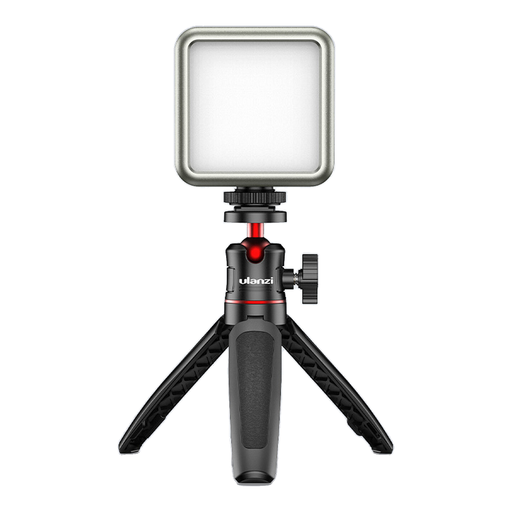
For a small desk: a compact, dimmable video light with adjustable colour temperature.
 No image available
Its compact design makes it suitable for a cramped desk. Check the light angle with the fountain pen, paper and camera in position.
Dimmable RGB LED video light with adjustable colour temperature from 2500–9500 K.
The product title lists a 2000 mAh battery and magnets on the back.
Only if you can position it over the writing area in your setup. The monitor mount is included with the Elgato Key Light Neo; Elgato describes the compatible desk clamp as a separate product. Check the angle with the camera, your hand and the paper in position.
Follow the instructions for the specific version. Godox recommends, among other things, using it in a dry, well-ventilated location and disconnecting it from the power supply before cleaning. This advice applies to the LP400Bi and doesn’t automatically apply to every LED panel.
Online consumer purchases generally come with a 14-day right to cancel, although exceptions and the start of the cancellation period depend on the circumstances. The German Consumer Advice Centre also distinguishes statutory rights for faulty goods from a voluntary guarantee.
No. According to EU information, the manufacturer uses the CE mark to declare that the product meets the applicable EU requirements. It isn’t an independent test of colour reproduction, reflection control or flicker-free filming; you should assess the specific product version separately.