
Lieferung heute & morgen

Qualitätsgarantie

Willkommens-Angebote freischalten: KOSTENLOSE Lieferung | Bis zu 80 % RABATT | Kostenlose 30-Tage-JoyPlus-Testphase
App herunterladen
A swivel and tilt TV wall mount promises ultimate flexibility: the perfect viewing angle from anywhere in the room, no distracting reflections, and a clean, modern living space. However, the path to achieving this is often fraught with pitfalls. Many buyers invest in a model that turns out to be incompatible, unstable, or impractical for daily use. Before you make a decision, it's crucial to understand the most common traps that can lead to frustration and, in the worst-case scenario, a damaged television.
The three most common mistakes when buying a TV wall mount are:
This guide will help you navigate these issues and make an informed decision based on technical facts, not marketing promises.
To find a secure and functional mount, you should carefully examine three core parameters. These determine compatibility, safety, and user convenience.
The VESA standard is the most important compatibility metric. It specifies the horizontal and vertical distance between the threaded mounting holes on the back of your TV in millimetres. For example, a TV with a VESA 400x400 standard has four mounting holes that form a 400 mm square.
How to check your VESA standard:
A mount must explicitly support your TV's VESA standard. Many models are universal and cover multiple standards (e.g., from 100x100 to 400x400 mm). Check this carefully before purchasing, especially if you are looking for a wall mount for a curved TV, as these sometimes require special adapters or a wider mounting plate.
The mount's specified maximum load capacity must significantly exceed the weight of your television. For a full-motion TV wall mount, the stability of the arm in its extended position is critical. Look for models made of solid steel with sturdy joints.
Even more important is the composition of your wall:
A space-saving mount has a minimal wall distance when retracted. An extendable TV wall mount offers more flexibility but requires a more robust wall structure due to the leverage effect.
The functionality of a swivel and tilt TV mount depends on its range of motion:
Here are some recommendations tailored to specific user profiles and their requirements.
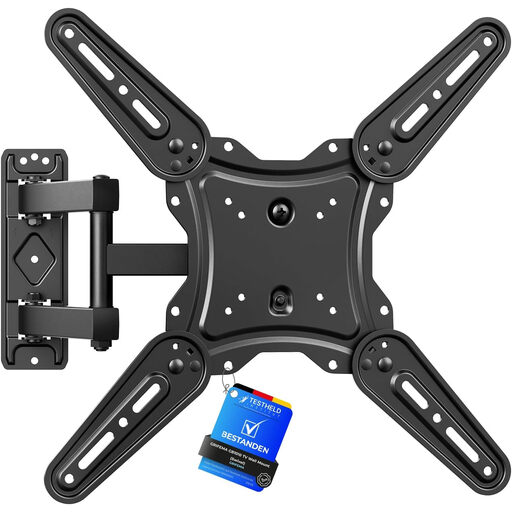
Why This Fits Their Persona: This model offers full-motion flexibility for a wide range of TV sizes (26-65 inches) at an accessible price point. It's a practical solution for living rooms or bedrooms where flexibility is desired without a major investment.
The mount covers a broad VESA range (75x75 to 400x400 mm) and clearly states its maximum load capacity of 35 kg. This minimises the risk of a VESA compatibility error for common TV models.
Offers full range of motion with a ±90° swivel and an extendable arm (up to 425 mm), providing a high degree of flexibility for its price class.
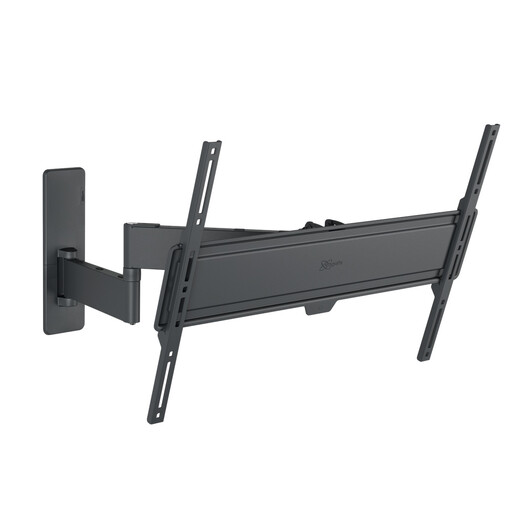
Why This Fits Their Persona: For users with large screens (up to 77 inches) and high standards for stability and ease of use. The robust construction and smooth movement are ideal for a premium home cinema setup.
This model is designed for high dynamic loads (up to 55 kg). The high-strength steel construction and precision bearings minimise the risk of sagging, even with the arm fully extended—the most common weakness in cheaper models.
The "One-Finger Movement" technology allows for exceptionally smooth positioning. The integrated cable management system ensures a clean, professional look.
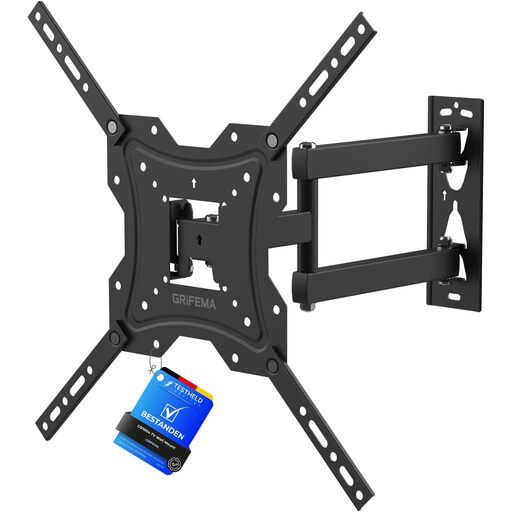
Why This Fits Their Persona: Ideal for owners of curved TVs or for rooms with challenging lighting conditions. Its explicit compatibility with curved screens and excellent adjustment options make it a safe choice for special requirements.
By clearly stating its compatibility with curved TVs, this model eliminates the uncertainty of whether a standard mount will fit. The +5° to -10° tilt function is also effective against glare, a common problem with curved displays.
The combination of swivel (±45°), tilt, and extension functions offers a high degree of adaptability. The space-saving 4 cm wall distance when retracted is another key benefit.
We've compiled a complete, up-to-date list of products that fully meet these strict selection criteria and safety standards.
1. Can I install a TV wall mount on a drywall wall? Mounting directly into the drywall (plasterboard) alone is not safe and is strongly discouraged. The board cannot support the weight, especially under the leverage of an articulating arm. The mount must always be anchored into the underlying structure (e.g., wood studs or metal profiles). Alternatively, special hollow-wall anchors can be used, but only for very lightweight TVs and fixed, non-swivelling mounts. For swivel mounts, anchoring into the load-bearing structure is essential.
2. How do I find my TV's VESA standard? The easiest method is to check the user manual or the TV's product page on the manufacturer's website. The technical specifications, including the VESA standard, will be listed there. Alternatively, you can manually measure the distance between the four screw holes on the back of your TV: first the horizontal distance, then the vertical distance, in millimetres. The result is your VESA standard (e.g., 400 x 400 mm).
3. What is the ideal wall distance for a swivel mount? The ideal wall distance depends on your needs. A small minimum wall distance (e.g., under 6 cm) provides a flat, low-profile look when the TV is not in use. A long maximum extension (e.g., over 40 cm) allows for a wide swivel range and makes it easier to access the cables on the back. For maximum flexibility, a mount with a large adjustment range between its minimum and maximum distance is the best choice.