What should you look for when buying?
LAN or Ethernet backhaul
Best if: You can run a cable to your gaming device or to an access point in the room you want to cover.
What to consider: You’ll need a suitable cable route and spare LAN ports. FRITZ! and TP-Link Deutschland describe LAN connections for additional access points and mesh units.
Wireless mesh or repeater
Best if: Running a cable isn’t possible, your existing router is suitable for your connection and there’s a halfway point with a decent signal.
What to consider: The additional wireless node also needs a good connection to the router. Placing it beyond the problem wall won’t automatically fix a weak connection back to the router.
Replace your router
Best if: Your current device doesn’t support the connection type, LAN connection or mesh expansion you need.
What to consider: Check whether you use DSL, an external fibre modem or another connection technology. A new router won’t, by itself, guarantee better reception through thick walls.
Powerline
Best if: Neither a new network cable nor a reliable wireless connection is practical, and you can test a pair of adapters in the sockets you plan to use.
What to consider: Powerline performance depends on your home’s electrical wiring and the position of the sockets. devolo warns that electrical devices can cause interference.
The guide below shows which buying priorities matter most for game updates through thick walls, and what to look out for.
| Priority |
What to check when buying |
Who is this most relevant to? |
| Coverage in the gaming room |
Compare the connection at your gaming device with the one near the router; if you’re using wireless mesh, check for a suitable midway position. |
If my gaming device barely gets a signal in the room I want to use, I need decent coverage there. Around 36% of consumers put coverage in the room they want to use first. |
| Bypass the wireless link |
Check the cable route and available LAN ports; if you’re considering powerline, test it in the sockets you plan to use. |
If I can avoid the wireless link through the walls, I want to connect my PC, console or access point by cable. Around 29% of consumers prioritise an alternative to a wireless connection. |
| Connection compatibility |
Check your connection type, any existing modem and the device’s intended operating mode. |
If I’m replacing a router, it needs to work with my internet connection and existing home network. Around 21% of consumers prioritise connection compatibility. |
| Security and ongoing performance |
Check for firmware updates and secure Wi-Fi settings; don’t confuse advertised Wi-Fi data rates with internet speeds. |
If my home network is always on, I also pay attention to updates and secure setup. Around 14% of consumers prioritise security and ongoing performance. |
Joybuy products for mesh, access points and routers
This selection includes mesh systems and access points for rooms with a weak Wi-Fi signal, as well as routers to consider if you also need to check connection type and LAN connectivity.
 No image available
TP-Link Deco BE22, 2-pack, Wi-Fi 7, dual-band
This set of two mesh units is an option if you need coverage across several rooms.
Each unit has two Gigabit WAN/LAN ports, for example, to connect a gaming device by cable.
According to the product description, the system is designed for dry indoor spaces.
View at Joybuy
 No image available
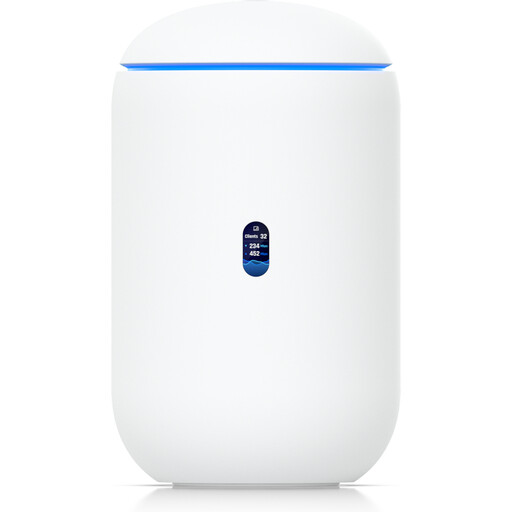
Ubiquiti UniFi Dream Router 7
This model is worth considering as a gateway with built-in Wi-Fi and router functions if you’re looking at replacing your router and want to connect wired devices.
The product description lists tri-band Wi-Fi 7, four 2.5 GbE RJ45 ports and WAN options.
The UniFi application suite is also listed as a supported feature.
View at Joybuy
 No image available
Ubiquiti U7 Mesh, 5000 Mbit/s, Power over Ethernet
This Wi-Fi access point is an option if you’re considering adding an access point closer to the room you want to use.
The product description lists a 2.5 GbE uplink with PoE support, as well as 2.4 and 5 GHz bands.
According to the description, Ethernet power requires a compatible PoE/PoE+ injector or switch.
View at Joybuy
 No image available
TP-Link Deco M4, AC1200, 3-pack
Three mesh units are an option if you need coverage across several rooms.
The description lists dual-band Wi-Fi, mesh roaming and router or access point modes.
Each unit has two Gigabit Ethernet ports if you want to connect a device by cable.
View at Joybuy
 No image available
FRITZ!Box 7530 AX, Wi-Fi 6 DSL router
This model is an option if you’re looking for a DSL router with mesh support and LAN ports.
The product title lists VDSL Supervectoring 35b and four Gigabit LAN ports.
According to the product description, it can also be used with an external fibre or cable modem via WAN. Check that it’s suitable for your connection.
View at Joybuy
Frequently asked questions
Will a Wi-Fi 7 router automatically help with downloads through thick walls?
No. A higher advertised Wi-Fi data rate doesn’t guarantee a good connection through obstacles or a faster internet connection. Check the connection at your gaming device separately from your broadband connection.
Where should I place a wireless repeater?
Choose a position where the repeater still has a decent connection to the router and can provide coverage to the room you want to use. FRITZ! recommends minimising obstacles between the router, repeater and Wi-Fi devices. If a LAN connection is possible, a wired access point can replace the wireless link back to the router.
What should I check after installing powerline adapters?
Test the pair of adapters in the sockets you actually plan to use. devolo recommends plugging them directly into wall sockets rather than using multi-way adaptors or extension leads. It also warns that electrical devices such as power supplies and dimmer switches can interfere with data transmission.
How does a slow internet connection affect my choice of router?
A new router won’t increase the agreed speed of your broadband connection. Test your connection before buying hardware; the Federal Network Agency provides a desktop app and a procedure for obtaining proof of your connection speed.
Can I use my own device with a fibre connection in Germany?
The Federal Network Agency confirms that you can choose your own end device at the network termination point, including on passive optical fibre networks. Still, check that the specific device is technically compatible with your connection and whether you need an external modem.


