
Lieferung heute & morgen

Qualitätsgarantie

Willkommens-Angebote freischalten: KOSTENLOSE Lieferung | Bis zu 80 % RABATT | Kostenlose 30-Tage-JoyPlus-Testphase
App herunterladen
The search for the right gaming accessories can quickly become overwhelming. The market is flooded with products that advertise impressive specs and flashy designs. But not every expensive upgrade automatically leads to a better gaming experience. Often, it's hidden flaws or exaggerated marketing claims that lead to disappointment and unnecessary expenses.
As your Joybuy Product Recommendation Officer, I'm here to help you identify these pitfalls. We'll focus on the objective criteria that truly matter, so you can make an informed decision for your gaming setup.
Common Pitfalls When Buying Gaming Accessories:
Wireless Gaming Headset, constantly active lighting can drastically reduce battery life and offers no gameplay advantage.To ensure your new accessory is a true upgrade, you should examine three core areas: compatibility, performance metrics, and ergonomics.
The most important question before buying is: Will the device work flawlessly with my platform? Pay close attention to the specific connections.
Gaming Headphones with Mic that have a built-in sound card, 7.1 surround sound, and RGB lighting. This is a common choice for PC Gaming Accessories.PS5 Accessories, Xbox Accessories).Performance data isn't just marketing fluff; it has a direct impact on your gameplay.
Gaming Monitor 240Hz displays motion more clearly and reduces motion blur. The response time (ms) should be as low as possible (ideally 1ms) to minimize ghosting. A Curved Monitor can also enhance immersion by better filling your peripheral vision.Buying a Gaming Setup also means investing in comfort for long sessions.
RGB Mousepad can enhance aesthetics, but the surface and build quality are what matter. A smooth cloth surface allows for quick movements, while a non-slip rubber base provides stability. Stitched edges prevent fraying and increase durability.Here are some recommendations tailored to specific needs and budgets that avoid the pitfalls mentioned.
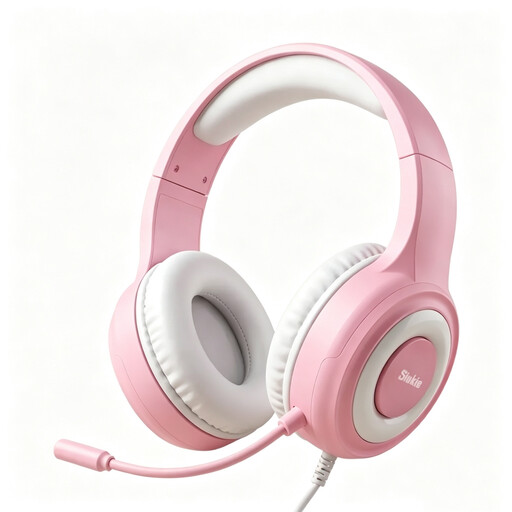
Why This Fits Their Persona: Ideal for gamers seeking a reliable, cross-platform audio solution without a large budget. It covers all the basic requirements for communication and in-game sound.
It bypasses the "universal compatibility" pitfall by offering clear, wired connection options (USB & 3.5mm) that work on PC, PS4, PS5, Xbox, and Switch without hidden adapters.
50mm drivers for a solid sound foundation and a noise-cancelling microphone for clear team communication. The LED lighting is powered separately via USB and does not affect audio performance.
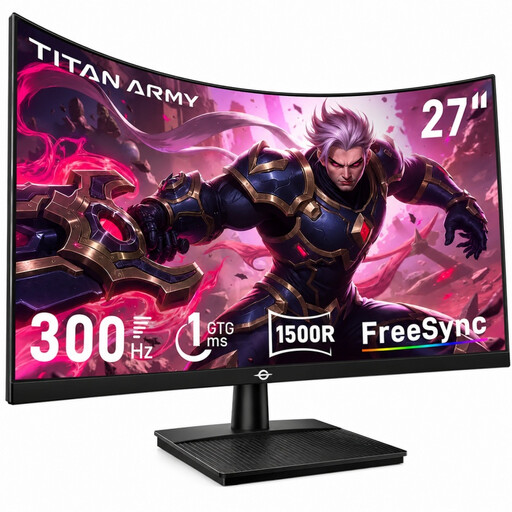
Why This Fits Their Persona: Designed for players where every millisecond counts. The extremely high refresh rate and fast response time are at an esports level, providing a clear advantage in fast-paced FPS games like CS2 or Valorant.
This monitor focuses on verifiable performance metrics (300Hz, 1ms GTG) instead of vague marketing terms. It delivers the exact specifications relevant for competitive gaming without unnecessary extra costs.
The combination of a 300Hz refresh rate and 1ms GTG response time ensures exceptionally smooth and sharp visuals. The 1500R curvature supports an immersive viewing experience.
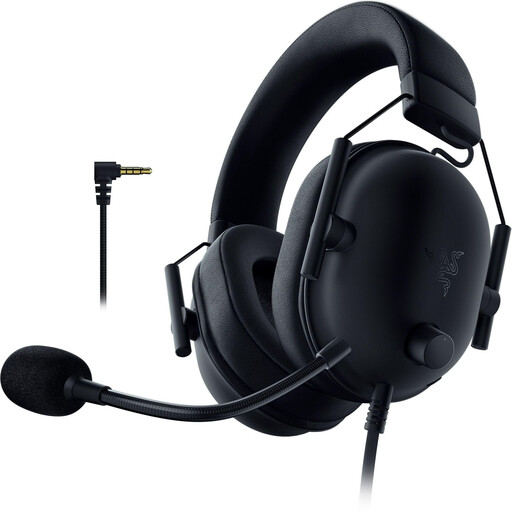
Why This Fits Their Persona: Perfect for PS5 and PS4 players looking for a straightforward, sonically impressive, and officially supported audio solution. The lightweight design is built for long gaming sessions.
The official PlayStation license guarantees seamless plug-and-play compatibility. There are no nasty surprises with incompatible features or required adapters.
The Razer TriForce 50mm drivers deliver clear, detailed sound that harmonizes well with the PS5's 3D Audio. The low weight of around 240-260 grams ensures excellent comfort.
We've curated a complete, real-time updated list of products that fully meet these strict selection criteria and safety regulations.
Pay attention to the connection type. A headset with a 3.5mm jack will work on both systems but may not utilize all features. For full functionality (e.g., 7.1 sound on PC), USB models are often required. For wireless devices, ensure the 2.4GHz dongle is explicitly compatible with the PS5.
Its importance depends on the games you play. For fast-paced, competitive games (FPS, racing), the difference between 60Hz and 144Hz or even 240Hz is clearly noticeable and can provide a real advantage. For slower strategy or role-playing games, a high Hz rate is less critical but still improves overall visual fluidity.
It depends on your priorities. Wired headsets offer a latency-free, reliable connection and never need to be charged. Wireless headsets (using 2.4GHz technology) provide maximum freedom of movement with what is now very low latency. However, you must be mindful of battery life and are likely to pay a higher price. For competitive players where every millisecond counts, a wired connection often remains the safest choice.