
Lieferung heute & morgen

Qualitätsgarantie

Willkommens-Angebote freischalten: KOSTENLOSE Lieferung | Bis zu 80 % RABATT | Kostenlose 30-Tage-JoyPlus-Testphase
App herunterladen
Choosing the right gaming accessories can significantly impact your performance and comfort. However, the market is flooded with marketing buzzwords and exaggerated specs that often create more confusion than clarity. Many gamers invest in expensive equipment only to find it doesn't deliver the expected benefits. This guide will help you identify the most common pitfalls and make informed decisions.
Before making a purchase, it's crucial to understand common marketing traps that can lead to unnecessary spending.
Focus on the technical features that actually make a difference, rather than being swayed by marketing hype.
The sensor is the heart of any gaming mouse. Pay less attention to the maximum DPI value and more to the quality of the optical sensor itself. Models like the PixArt PAW3395 or the Logitech HERO sensor are known for their precise tracking without smoothing or acceleration. What's important is a wide, adjustable DPI range (e.g., 400 to 6,400 DPI) that allows you to tailor the sensitivity to your game and screen resolution. Another relevant metric is IPS (Inches Per Second), which indicates the maximum speed at which the sensor can still accurately track movement.
The type of switches in your mouse and keyboard determines the tactile feedback, response time, and durability.
The connection type affects latency and flexibility.
Here are some recommendations tailored to specific user needs, taking the above criteria into account.
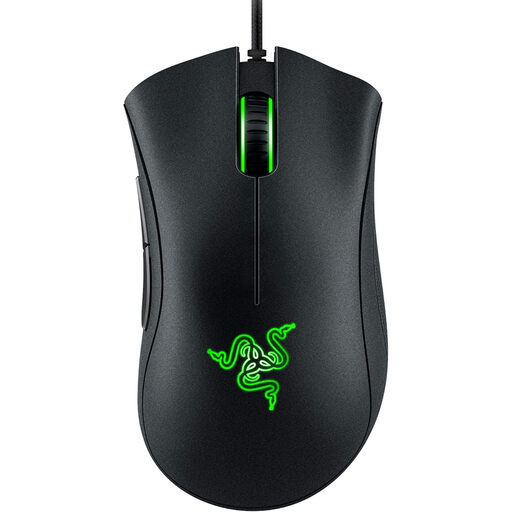
Why it's a great fit: Ideal for beginners who want a reliable and ergonomic mouse without unnecessary and expensive extras. It focuses on the fundamentals that are crucial for a good gaming experience.
This model sidesteps the DPI myth with a practical 6,400 DPI sensor, which is perfectly sufficient for most users. As a wired mouse, it also eliminates any latency or battery concerns.
The proven ergonomic shape provides high comfort during long gaming sessions. According to Razer, the switches are rated for up to 10 million clicks, promising excellent durability.
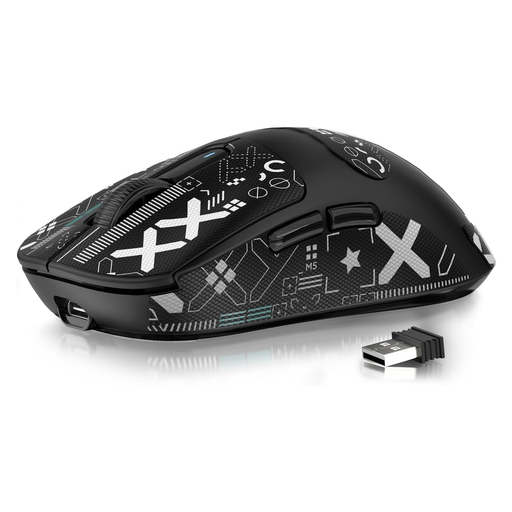
Why it's a great fit: Designed for players who prioritize speed and precision. Its extremely low weight allows for quick directional changes and minimizes arm fatigue.
This mouse debunks the assumption that wireless has to be slow with a low-latency 2.4 GHz connection. At just 49 grams, it avoids the trap of heavy, cumbersome mice and focuses on maximum agility.
Equipped with the high-end PAW3395 sensor for top-tier precision. The tri-mode connectivity (USB, 2.4G, Bluetooth) also offers flexibility for various use cases.
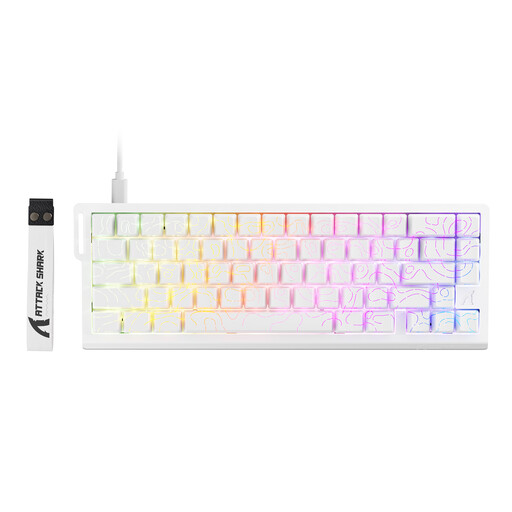
Why it's a great fit: For gamers seeking the latest keyboard technology to gain a competitive edge. The magnetic switches allow for unprecedented customisation and responsiveness.
Instead of relying on a fixed switch type, this keyboard offers adjustable actuation points from 0.1 mm to 3.4 mm. It thus avoids the "one-size-fits-all" trap of standard mechanical keyboards.
The Rapid Trigger feature enables instant key actuation and reset, allowing for faster and more precise inputs in games like Valorant or CS2. The 8000 Hz polling rate ensures near-instantaneous signal transmission.
We've curated a comprehensive, up-to-date list of products that meet these strict selection criteria.
1. Is a mechanical keyboard really necessary for gaming? A mechanical keyboard isn't strictly necessary, but it offers clear advantages in terms of response time, tactile feedback, and durability. The precise actuation can make a difference in fast-paced games. However, for casual gamers, high-quality mecha-membrane or membrane keyboards can also provide a satisfactory performance.
2. How important is the weight of a gaming mouse? Weight is a subjective yet crucial factor. A lightweight gaming mouse (under 70 grams) is often preferred by players who use low DPI settings and make large, sweeping arm movements, as it reduces fatigue. Heavier mice may be preferred by players who want more stability and control for smaller wrist movements. Some models, like the Logitech G502 Hero, even offer customisable weights.
3. What does a high polling rate mean for gaming accessories? The polling rate, measured in Hertz (Hz), indicates how often a device (mouse or keyboard) reports its position or status to the computer. A standard polling rate of 1000 Hz means 1000 reports per second (every 1 ms). Some modern pro gaming equipment offers polling rates up to 8000 Hz, which theoretically reduces latency to 0.125 ms. While this difference is barely perceptible to most players, it can be relevant in the professional esports scene.