
Lieferung heute & morgen

Qualitätsgarantie

Willkommens-Angebote freischalten: KOSTENLOSE Lieferung | Bis zu 80 % RABATT | Kostenlose 30-Tage-JoyPlus-Testphase
App herunterladen
Gaming accessories should suit your game, device and everyday routine. However, eye-catching lighting, big numbers on the packaging or terms such as “Pro” do not automatically lead to a sensible buying decision. If you are planning a new gaming setup, you should first check the technical specifications and how you will actually use the equipment.
A gaming keyboard with a US layout can be impractical for German users who regularly use umlauts, special characters or German keyboard shortcuts. Look for QWERTZ, ISO-DE or an explicit “German Layout” designation. The type of connection is also important for headsets: USB, 3.5 mm jack, Bluetooth and 2.4 GHz wireless offer different levels of compatibility and functionality.
An RGB keyboard or illuminated headset can add visual appeal to your setup. However, lighting says nothing about switch quality, sound, latency or durability. For a mechanical keyboard, factors such as switch type, key layout, hot-swap compatibility and connectivity are more important.
A high refresh rate on a gaming monitor only offers a practical advantage if your gaming PC and graphics card can deliver a corresponding number of frames. Likewise, a large headset is not automatically more comfortable. Weight, earcup shape, padding and cable management have a greater impact during extended use than individual marketing terms.
For German desks, a QWERTZ keyboard is usually the simplest choice. A full-size keyboard with a number pad takes up more space, but offers advantages for office applications, spreadsheets and certain strategy games. TKL and 75 per cent models save space, while 60 per cent keyboards are particularly compact, although they may omit function keys, arrow keys or the number pad.
Mechanical keyboards are available with linear, tactile and clicky switches, which differ in feel and noise. A hot-swap keyboard allows compatible switches to be replaced without soldering. Check whether 3-pin or 5-pin switches are supported. A wired USB-C connection does not require battery charging and is straightforward for a fixed PC workstation.
A wired gaming headset with a 3.5 mm connection may be compatible with PC, PlayStation, Xbox or Nintendo Switch, provided the relevant port is available. A wireless gaming headset offers greater freedom of movement, but requires a battery and, where applicable, a base station or USB receiver.
Compare driver size, frequency range, weight, microphone type and padding. These specifications describe the technical equipment, but do not guarantee that the sound will suit your personal preference. During longer gaming sessions, the volume should be kept moderate and regular breaks taken. Also check whether the microphone is detachable or can be muted.
A 27-inch monitor with Full HD resolution offers a larger viewing area, while higher resolutions may also be worth considering at this size. The key factor is the combination of resolution, refresh rate and graphics card performance. Depending on the compatible hardware, adaptive-sync technologies can synchronise image output.
Before buying, check the connections, such as HDMI or DisplayPort, as well as the ergonomic options. A VESA mount measuring 100 × 100 mm makes it easier to attach the monitor to an arm. For a home office and gaming setup, adjustability, viewing distance and the available desk width are also relevant.
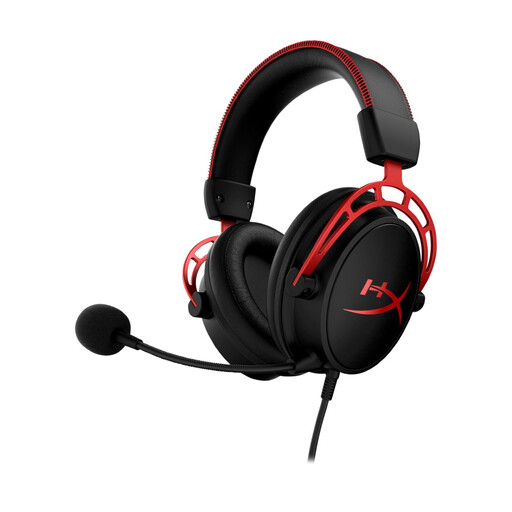
Why this product suits this profile: The wired 3.5 mm connection is ideal for users who want to get started without battery maintenance or wireless pairing. According to the product details, it is compatible with PC, PS5, PS4, Xbox and Nintendo Switch.
There is no battery or wireless base station to factor into your setup. The detachable microphone can be removed when not in use.
50 mm drivers with separate chambers, a detachable microphone and a stated weight of 336 g.
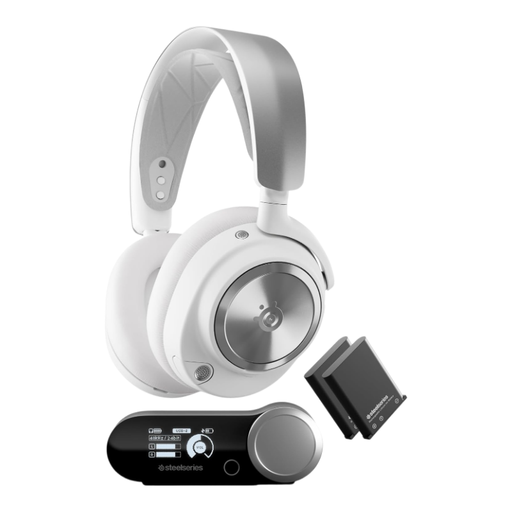
Why this product suits this profile: For users with a PC, console and mobile device, this model offers a base station and Bluetooth 5.0. Its features are aimed at people who need audio adjustment and multiple connection options.
The connection types and supplied base station are clearly specified. Buyers can check in advance whether a USB-A port and device compatibility suit their setup.
40 mm drivers, a detachable microphone, ANC and a stated frequency range of 20 Hz to 20 kHz.
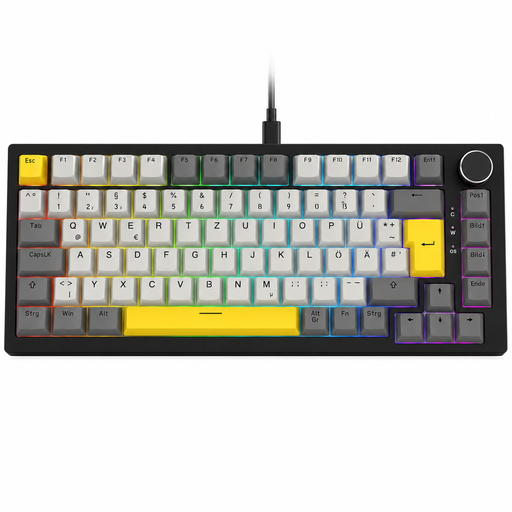
Why this product suits this profile: The 75 per cent format with 82 keys is designed for users who want a German keyboard with function and arrow keys, while freeing up space for mouse movements.
The specified German QWERTZ layout helps prevent the common mistake of ordering a US layout. Hot-swap functionality supports future adjustments with compatible 3-pin switches, without soldering.
USB-C cable, RGB lighting, volume control, gasket-mount design and stated dimensions of approximately 327 × 136 × 40 mm.
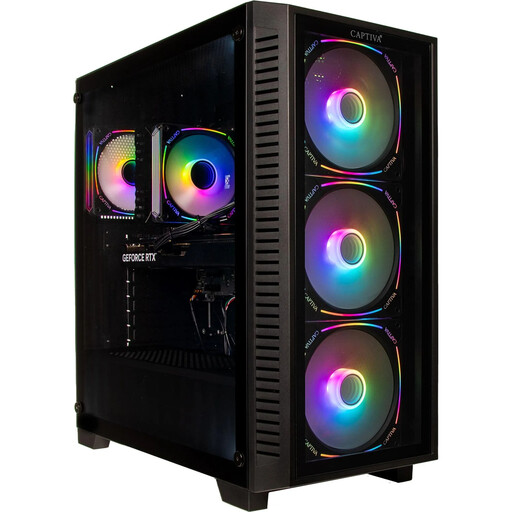
Why this product suits this profile: This system is designed for users who want to combine gaming, streaming and more demanding applications in one device. The available DisplayPort and HDMI connections make it easier to plan a multi-monitor setup.
The product details list the processor, graphics card, RAM, SSD, power supply and operating system. This makes it easier to compare the specifications with your monitor and games before buying.
AMD Ryzen 7 7800X3D, NVIDIA GeForce RTX 5070 Ti with 16 GB, 32 GB DDR5 and 2 TB NVMe SSD, according to the product details.
We have put together a complete, regularly updated list of products that fully meet these strict selection criteria and the safety regulations applicable in the EU.
Before buying gaming accessories, make sure you can tick off the following points:
For German text and office tasks, a QWERTZ keyboard with an ISO-DE layout is usually the obvious choice. If you want to save space, you can choose a 75 per cent or TKL model. A number pad is particularly useful for spreadsheets, simulations and certain workflows.
Lifespan depends on usage, materials, switch type, care and transport. On keyboards, replaceable switches can improve maintainability. Cables, connections, padding and batteries are typical points of wear. Manufacturer specifications such as a stated key lifespan should be viewed as a technical guideline rather than a general guarantee of how long the product will last.
Wireless devices reduce the number of cables on your desk and are practical if you regularly change seating positions. However, you need to check battery life, charging time, wireless standard and replacement or charging options. For a fixed PC workstation, wired PC accessories may be the more suitable solution thanks to their straightforward power supply and setup.