
Lieferung heute & morgen

Qualitätsgarantie

Willkommens-Angebote freischalten: KOSTENLOSE Lieferung | Bis zu 80 % RABATT | Kostenlose 30-Tage-JoyPlus-Testphase
App herunterladen
Choosing the right gaming accessories can be overwhelming. The market is flooded with products promising high performance, but not every item lives up to its marketing hype. As your Joybuy Product Recommendation Officer, I'm here to help you identify the crucial features and navigate common marketing traps, ensuring you make an informed decision for your PC setup.
Before you invest in new equipment, be aware of three common misconceptions that often lead to regrettable purchases.
When making your choice, focus on objective, technical specifications that have a direct impact on performance and comfort.
The heart of any mechanical keyboard is its switches. They determine the typing feel, noise level, and response speed. The three main types are:
Another key feature is hot-swap capability. A hot-swap keyboard allows you to change out the mechanical switches without any soldering. This offers maximum flexibility to customise the typing feel to your preferences or easily replace faulty switches.
With a gaming mouse, the DPI count isn't the only thing that matters. Pay attention to the following points:
Here are some product recommendations tailored to specific user profiles and the criteria mentioned above.

Why This Fits Their Persona: Ideal for users who want full control and customisability. Its tri-mode connectivity (Bluetooth, 2.4G, wired), large battery, and TFT status display cover all use cases from gaming to productivity.
This model avoids the "style over substance" trap by offering true enthusiast features, like a hot-swap PCB for 3- and 5-pin switches and a gasket-mount structure for a cushioned typing feel.
Comprehensive customisability from switches to macros and display readouts; flexible connectivity for various devices.
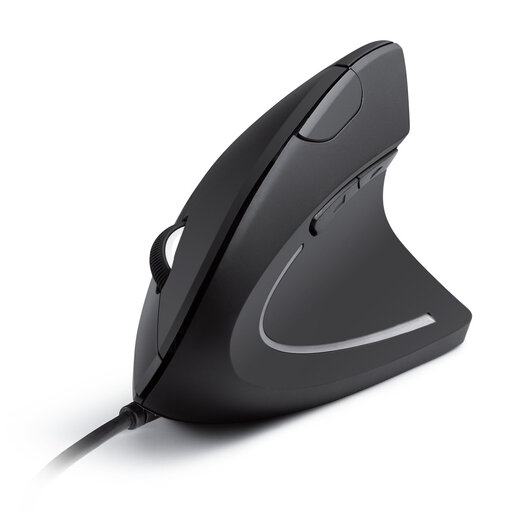
Why This Fits Their Persona: Perfect for users who spend long hours at the computer and prioritise comfort. The vertical design promotes a natural "handshake" position, which reduces strain on the wrist and arm.
This product clearly prioritises ergonomics and healthy posture over an aggressive gaming aesthetic. It avoids the trap of sacrificing comfort for a flashy design, actively preventing fatigue.
The vertical design reduces muscle strain. The additional forward/back buttons simplify web and document navigation.
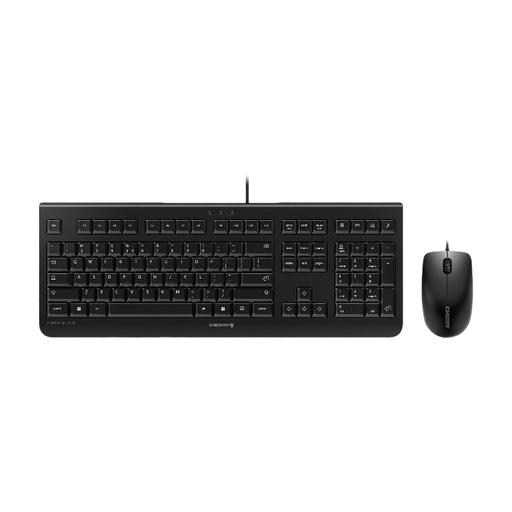
Why This Fits Their Persona: A solid and reliable Keyboard and Mouse Set for daily use and casual gaming. It offers the proven quality of an established brand at an accessible price point.
This set deliberately forgoes expensive "gaming" features like RGB lighting, focusing instead on durability and functionality. According to the manufacturer, the keys are rated for up to 10 million keystrokes.
Plug-and-play functionality with no driver installation; durable, abrasion-resistant key legends and practical hotkeys for office applications.
We've compiled a full, up-to-date list of products that fully meet these strict selection criteria and safety standards.
The main difference lies in the technology beneath the keys. Regular (rubber dome) keyboards use a rubber membrane that pushes a contact on a circuit board when a key is pressed. Mechanical keyboards use an individual, spring-loaded switch for every single key. This results in a more precise and consistent typing feel, greater durability, and a wide range of customisation options through different switch types.
The DPI number is less important than marketing often suggests. It simply indicates how sensitive the mouse is to movement. An extremely high DPI value makes the cursor very fast and difficult to control. More important are a precise sensor that doesn't lose tracking during fast movements, a high polling rate for lag-free transmission, and a shape that fits your hand comfortably. Most gamers use settings between 800 and 3200 DPI.
No, this feature is limited to what are known as hot-swap keyboards. On conventional mechanical keyboards, the switches are soldered directly onto the printed circuit board (PCB). Replacing them requires technical skill and soldering equipment. If you want the flexibility to try out different switch types, you should specifically look for a keyboard with a hot-swap feature.