
Lieferung heute & morgen

Qualitätsgarantie

Willkommens-Angebote freischalten: KOSTENLOSE Lieferung | Bis zu 80 % RABATT | Kostenlose 30-Tage-JoyPlus-Testphase
App herunterladen
Gaming and computer accessories should suit your device, your intended use and your existing workspace. In practice, unclear connection standards, exaggerated performance claims and impractical designs often lead to unsuitable purchases. This applies just as much to gaming controllers and mice as it does to headsets, keyboards, DisplayPort cables or an iPhone charging cable.
This buying guide explains which details matter before you buy and which product features can be compared objectively.
A product may be described as compatible with PCs, consoles, smartphones or tablets, but not every function is available on every device. When choosing a controller, you should therefore look beyond “wireless” and check the specific operating system, platform and connection method.
With a USB headset, it is also important to check whether your computer has a suitable USB-A or USB-C port. A DisplayPort 2.1 cable can only deliver its technical capabilities if the graphics card and monitor support the desired standard, resolution and refresh rate.
A gaming mouse with 7200 DPI offers an adjustable sensitivity range. However, this does not automatically mean that an extremely high DPI setting is suitable for every application. Sensor type, polling rate, button layout and shape are also important.
The same applies to a 16K DisplayPort cable: this figure describes a transmission limit supported according to the product specifications. Actual image output also depends on the signal source, display, compression technology and refresh rate being used.
RGB lighting and additional buttons are easy to see, while cable sheathing, switch characteristics and weight often receive less attention. For long gaming or work sessions, however, a suitable casing, a stable connection and practical controls all matter.
The same applies to a portable jump starter: you should not only consider peak current and battery capacity. Suitability for 12-volt vehicles, compatible engine sizes, safety information and the included accessories, such as jump leads, are also important.
Before placing your order, it is worth taking a quick inventory:
A USB-C to Lightning cable is designed for Apple devices that are compatible with Lightning. According to the product specifications, the Wozinsky WUCLC2 supports charging of up to 36 W, data transfer at 480 Mbit/s and a length of 2 metres. The actual charging power also depends on the power adapter and Apple device.
For demanding monitors, bandwidth and certification details are relevant. According to the manufacturer, the Wozinsky WPS-16AYL series features DisplayPort 2.1, 80 Gbit/s, VESA certification and support for up to 16K at 60 Hz, 8K at 120 Hz and 4K at 240 Hz. The source device and display must support these values too.
When choosing a gaming mouse with 7200 DPI, you should check the entire range of functions. This includes:
A high polling rate can be useful for fast inputs, but depending on the model it can also increase energy consumption. For office applications, precise, finely controlled movement and a comfortable palm rest are often more important than the maximum DPI figure.
A mechanical gaming keyboard with blue switches provides tactile feedback and an audible click. This can be desirable when typing, but may be distracting in a shared office. A 60% layout saves space, but does without a number pad and separate function keys.
With a gaming headset with microphone, the connection, microphone position, cable length and volume control are all crucial. A USB headset for PC can usually be connected directly, but depends on a suitable USB port being available. The volume should be set so that listening for extended periods remains comfortable.
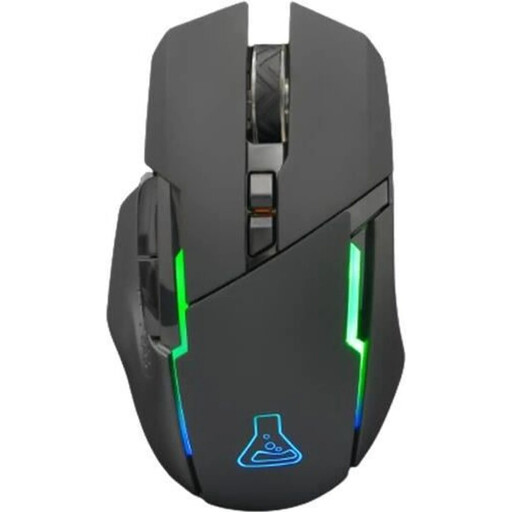
Why this product suits the profile: This mouse combines 2.4 GHz wireless connectivity, six buttons and an adjustable optical sensor ranging from 400 to 7,200 DPI. It is therefore suitable for PC users who want to access essential functions without installing additional drivers.
The product details provide specific figures for DPI, weight, number of buttons, connection and battery life. This makes it easier to assess whether the mouse is right for your workspace.
2.4 GHz wireless connection, six buttons, 400–7,200 DPI and up to 32 hours of battery life according to the product specifications.
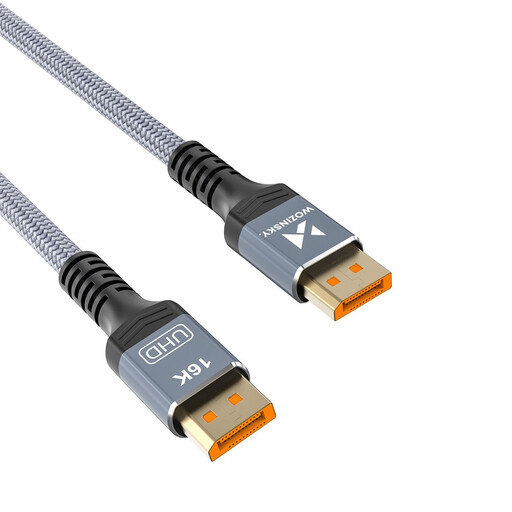
Why this product suits the profile: VESA certification, triple shielding and the stated bandwidth make it easier to choose a cable for compatible gaming PCs and high-refresh-rate monitors.
The details for 80 Gbit/s, DisplayPort 2.1 and supported resolutions are clearly separated. This prevents the cable specification from being confused with the monitor’s actual performance.
VESA certified according to the product specifications, with 80 Gbit/s bandwidth, HDR, HDCP and DSC support, plus a length of 1 metre.
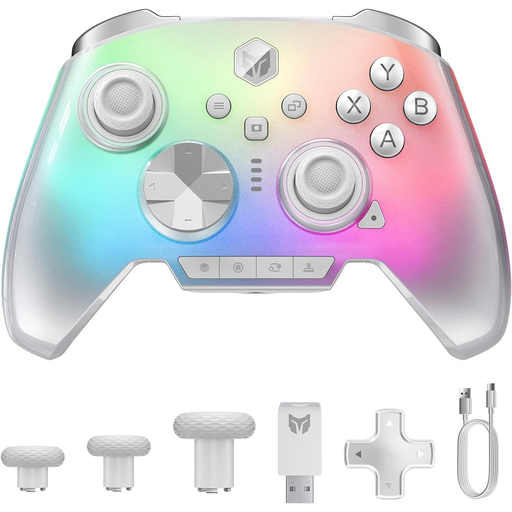
Why this product suits the profile: This controller is designed for users who switch between PC, Switch 2, iOS and Android and need several input options.
The platforms and connection features are listed in the product details. Before buying, you should still check whether the function you want is supported on the relevant platform.
According to the product name, a 2,000 Hz polling rate, Hall-effect or microswitch triggers, a 3.5 mm audio connection and a 6-axis gyroscope sensor.
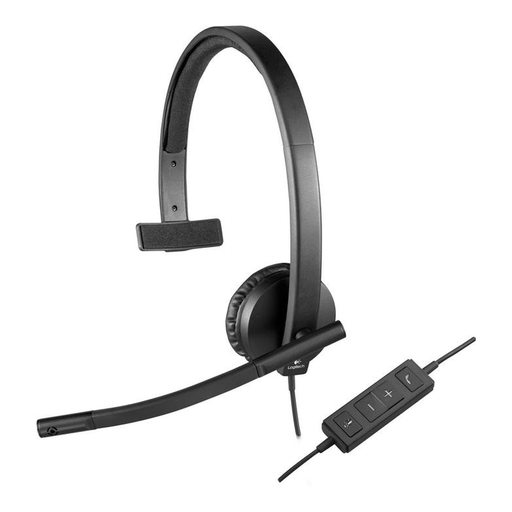
Why this product suits the profile: This wired mono headset is designed for PC, Mac and laptop use. It features USB-A, a microphone boom and in-line controls for volume and muting.
It connects directly via USB-A, so no separate audio adapter is required. You should check in advance that it is compatible with the port available on your device.
USB-A connection, microphone with mute indicator, in-line volume control and replaceable faux-leather ear cushions according to the product description.
We have put together a complete, regularly updated list of products that fully meet these strict selection criteria and the safety regulations applicable in the EU.
For Apple device owners, a 2-metre iPhone charging cable such as the Wozinsky WUCLC2 can provide more freedom of movement at your desk or when you are out and about. Look out for damaged power adapters, sharp bends and the restriction to Lightning devices.
If space is limited, you could consider a Bluetooth keyboard with touchpad. According to the specifications, the foldable VoxorAI-B033 model features 63 keys, a touchpad, Bluetooth connectivity and compatibility with iOS, Android and Windows. This type of layout is practical for tablets and smartphones, but does not replace a full-size keyboard in every situation.
For vehicle owners, a portable jump starter with 12-volt support is a separate accessories category. The WOLFBOX JS24 is specified as offering, among other features, 4,000 A, 65 W charging, 88.8 Wh and suitability for certain petrol and diesel engines. Before use, check these details against your own vehicle and follow the safety instructions.
For PC gamers, a suitable mouse, keyboard and headset are usually the most important components. For consoles, a compatible gaming controller can provide additional benefits. The key is to check your ports, platform and seating position first, rather than choosing based solely on lighting or maximum figures.
Lifespan depends on the switch type, cable strain, battery, cleaning and daily usage time. Cables should not be pulled out by the lead, and devices should be protected from moisture and excessive heat. With wireless products, the ageing of the integrated battery is another relevant factor.
Wireless mice and keyboards need energy for their wireless modules and batteries. Battery life depends, among other things, on lighting, polling rate and usage. A wired USB headset or keyboard does not need to be charged separately, but it does occupy a port and limits freedom of movement.