Players short on desk space
If you want your desk free again after gaming, or don’t want to reserve a monitor for a console all the time, handheld and hybrid play are important factors to consider.


First, check that your chosen games are available for the device and decide whether you can use an external screen permanently. A Switch 2 or gaming handheld lets you play without keeping a monitor space permanently occupied; Xbox Series S and PS5 need an external screen. With handheld PCs, you’ll also need to check each game’s compatibility, while discs, storage requirements and extra accessories can all affect your choice.
If you want your desk free again after gaming, or don’t want to reserve a monitor for a console all the time, handheld and hybrid play are important factors to consider.
If you want to play a particular historical adventure, check which platform version is available. Releases for PC, PS5, Xbox and Switch 2 are separate purchase options.
If you already own games, check whether they’re tied to an account, a particular platform or a physical disc. If you own discs, make sure the console you choose has a disc drive.
First, compare the availability of your chosen games, then decide whether you’d rather play on the built-in display or a monitor you already own. The figures refer to consumers choosing a gaming device for historical adventures on a small desk; each person is assigned to a single row according to their main purchase consideration.
| Consideration | What to check before buying | Who should pay particular attention? |
|---|---|---|
| Desk space and play mode | Measure the space available and decide whether you want to play on the built-in display or a monitor you already own. | If I don’t want to keep desk space free for a console, a built-in display or flexible play mode is important. Around 33 % of consumers say desk space is their main consideration. |
| Availability of your chosen games | Check which platform version is available for each game. If you’re considering a Steam Deck, also check the compatibility status of each title. | If I want to play a particular historical adventure, I want to identify the right version before buying a device. Around 33 % of consumers put their chosen games first. |
| Games you already own | Check that your discs and digital libraries are compatible with the device’s disc drive and platform. | If I want to keep playing games I’ve already bought, I check for a disc drive, platform compatibility and, for Steam games, whether they’re suitable for the device. Around 20 % of consumers say their existing games collection is their main consideration. |
| Additional requirements | Check how much storage you need, whether you’ll need a screen or stand, and what’s included with the specific version. | If I need to budget for games or suitable accessories as well as the device, I want to know what else I’ll need before buying. Around 14 % of consumers prioritise ongoing costs and equipment. |
Compatibility depends on the game. Valve’s ‘Playable’ rating may mean you need to make manual adjustments; ‘Unsupported’ isn’t a sound basis for buying.
Check the Steam Deck compatibility status of each game you want to play before choosing the device.
Sony’s PS5 Digital Edition and the Xbox Series S don’t have a disc drive. You therefore can’t use existing discs as the installation source for these versions.
Check your games collection against the exact console and disc drive version. If a game isn’t available on a compatible disc, you may need to buy a digital version.
Nintendo’s game page states that Assassin’s Creed Shadows on Switch 2 requires a full download over the internet.
Check the details for the specific game version and make sure you have internet access and enough free storage.
For players who want to switch between handheld and TV play and are looking for a suitable Switch 2 game.
The Xbox Series S is a digital home console for players with an external screen and suitable Xbox games in mind.
The PS5 Slim is an option if you have an external screen and enough space, and the adventures you want to play are available for PS5.
The Steam Deck OLED is worth considering if you want to play games from your Steam library on the go.
The ROG Xbox Ally is aimed at buyers looking for a portable Windows PC for PC games and their launchers.
This selection includes handheld and hybrid devices, as well as retro consoles for playing with or without a monitor taking up permanent desk space. For each model, check whether the specific historical adventures you want to play are available and suitable for it.
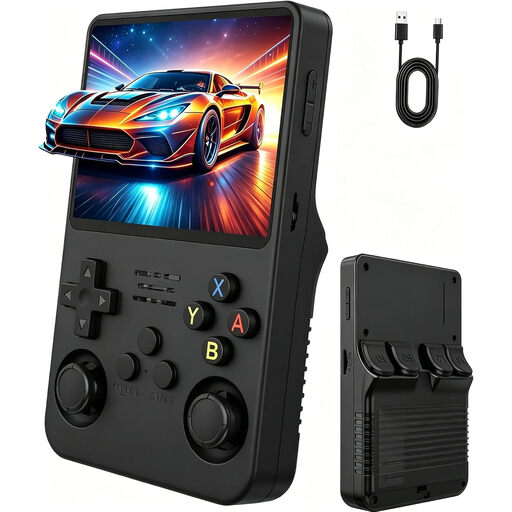 No image available
Described as a portable handheld with its own display. Before buying, check that the games you want are available on the device.
The product description lists a 3.5-inch IPS display, two joysticks and pre-installed adventure games.
 No image available
Handheld, tabletop and TV modes give you different ways to make the most of the desk space and screen available.
The product description lists a 7-inch OLED display, 64 GB of internal storage and an adjustable stand. Check that the games you want are available for this console version.
 No image available
Handheld, tabletop and TV modes make this console suitable for playing in different places. Assassin’s Creed Shadows is listed for Switch 2; Nintendo’s game page states that it requires a full download over the internet.
The product description lists a 7.9-inch display and 256 GB of internal storage. Nintendo specifies microSD Express for expanding game storage.
 No image available
This model needs an external screen, so it’s only suitable if you can connect a monitor, TV or projector at your desk.
The product description lists 20,000+ classic games, 23 emulators, 4K HDMI output and two wireless controllers. Check whether the specific historical adventures you want are included or available another way.
No, not if you choose a device with a built-in display and a compatible version of the game you want to play. Xbox Series S and PS5 are home console options that need an external screen; with handheld PCs, you should also check that each game is compatible.
Nintendo specifies microSD Express for expanding game storage. According to Nintendo, other microSD cards can be used to copy Switch screenshots and videos; using microSD Express requires a system update over the internet.
Yes. Nintendo’s German game page states that the full game must be downloaded over the internet. Make sure you have internet access and enough free storage.
If you buy from a business seller, EU consumer information states that you have a legal right to a minimum two-year guarantee from the seller, starting when you receive the goods. This is separate from any voluntary manufacturer’s warranty; the same rules don’t apply in the same way to private sales.
Check the age rating of the specific game, not just the console. According to the USK, retailers must comply with the sales restrictions associated with the ratings. The rating doesn’t indicate whether a game is educationally suitable.