Who should take care when choosing?

Console players gaming on a TV

If you mainly play on a console, the exact console generation matters to make sure the controller works with your device. Nintendo, for example, confirms that the older Switch Pro Controller can be used wirelessly with Switch 2, but notes that you can’t use its HOME button to wake the console from sleep mode.

PC players on the sofa

If your PC is connected to a big screen, the connection needs to reach where you sit. Also check whether your particular game supports the controller and the features you want. PlayStation says that using the DualSense’s haptic feedback on PC requires both a compatible game and a USB connection.

Players embarking on long adventures

For long gaming sessions, a comfortable grip and a suitable way to recharge are important. Nintendo gives the fully charged Switch Pro Controller a battery life of around 40 hours, though this can be shorter depending on the software and features you use.

What should you look for when buying?

Buying priority What to check Who is it important for?
Compatibility with your device and game Check the console or PC, full model name, supported connection and whether the game supports the controller. If you want to avoid choosing a controller for the wrong console or an unsupported game, check the exact compatibility first. Around 36 % of consumers put this first.
Connection from your seat Check which wireless connection is supported by your specific device, or measure the distance to your seat if you’re using a cable. If you play some distance from your PC or console, you need a connection that reliably reaches where you sit. Around 29 % of consumers prioritise a connection that reaches their seat.
Comfort and power Consider how the controller feels in your hands, whether it uses a rechargeable battery or replaceable batteries, and how you’ll charge it. For longer adventures, you’ll want to play comfortably and plan for any charging breaks. Around 21 % of consumers prioritise comfort and power.
Extra features Check whether the game supports the feature you want and whether it’s included with the exact model version. If you want to use particular extra buttons or haptic feedback, the feature needs to work with your game and device. Around 14 % of consumers prioritise these extras.

Avoid common buying mistakes

  • Assuming “for PC” or “wireless” means full compatibility

    Connection types and available features vary by model, platform and game. According to PlayStation, the DualSense’s haptic feedback on PC requires a compatible game and a USB connection.

    Check the full model name, your device, the game you want to play and the connection type you’ll use. If you’re going wired, make sure the cable can reach from your device to where you sit.

  • Assuming Switch and Switch 2 controllers are interchangeable because their names are similar

    According to Nintendo, the older Switch Pro Controller can be used wirelessly with Switch 2, but its HOME button can’t wake the console from sleep mode. Nintendo says the Switch 2 Pro Controller is only compatible with Switch 2.

    Before buying, check which console generation you have and whether you need the features of each model.

  • Assuming handheld accessories will work as TV controllers

    The CRKD Nitro Deck+ is described as an accessory for Switch and Switch OLED, not as a universal gamepad for consoles connected to a TV.

    Check your console model, the TV connection you need and what’s included in the box. CRKD’s described docked-mode setup requires a compatible HDMI adapter, so check whether it’s included in the specific bundle.

Key brands to consider

Sony PlayStation

DualSense controllers are suited to PS5 and compatible PC games.

  • PlayStation lists adaptive triggers and haptic feedback as DualSense features.
  • According to PlayStation, haptic feedback on PC requires a compatible game and a USB connection.

Microsoft Xbox

Xbox Wireless Controllers are designed for Xbox, as well as compatible Windows and other devices.

  • Xbox lists USB, Bluetooth and the Xbox Wireless Adapter as connection options on Windows.
  • According to Xbox, audio through the controller and connected accessories aren’t supported over Bluetooth on Windows.

Nintendo

The Switch Pro Controller and Switch 2 Pro Controller are designed for different console generations.

  • Nintendo confirms that the older Switch Pro Controller can connect wirelessly to Switch 2.
  • The older controller can’t wake Switch 2 from sleep mode with its HOME button; Nintendo says the Switch 2 Pro Controller is only compatible with Switch 2.

8BitDo

The Ultimate 2 models differ in the platforms listed by the manufacturer.

  • The manufacturer lists Windows and Android among the platforms supported by the Ultimate 2 Wireless, and says it comes with a built-in charging dock.
  • Using the Ultimate 2 Bluetooth with Switch 2, as listed by the manufacturer, requires a firmware update. Manufacturer claims about precision are not independent performance tests.

PowerA

The Enhanced Wired Controller is a wired option for Xbox Series X|S, Xbox One and Windows.

  • PowerA lists two mappable extra buttons and a detachable 3-m USB cable.
  • A wired connection limits where you can sit if the cable doesn’t reach your gaming spot.

Controllers at Joybuy

This selection includes controllers for Nintendo Switch and Switch 2, Xbox and Windows PC, as well as PS5 and compatible PC games.

Nintendo Switch Pro Controller, Black

Nintendo Switch Pro Controller, Black

For Nintendo Switch in TV or tabletop mode, if you’re looking for a wireless Pro Controller with a rechargeable battery.

Can be used wirelessly with Switch 2; according to Nintendo, the older controller’s HOME button can’t wake the console from sleep mode.

Nintendo gives the battery life as around 40 hours on a full charge, though it may be shorter depending on the software and features you use.

View at Joybuy

Microsoft Xbox Series X/S Wireless Controller, Pulse Red

Microsoft Xbox Series X/S Wireless Controller, Pulse Red

For Xbox Series X|S, Xbox One or Windows PC, if you want to use a wireless Xbox controller.

The product description lists Xbox Wireless and Bluetooth, as well as two AA batteries included.

According to Xbox, audio through the controller isn’t supported over Bluetooth on Windows.

View at Joybuy

PlayStation DualSense Wireless Controller, Midnight Black, with USB cable

PlayStation DualSense Wireless Controller, Midnight Black, with USB cable

For PS5 or compatible PC games, if you’re looking for a DualSense with haptic feedback and adaptive triggers.

The product description lists Bluetooth and USB-C. According to PlayStation, haptic feedback on PC requires a compatible game and a USB connection.

View at Joybuy
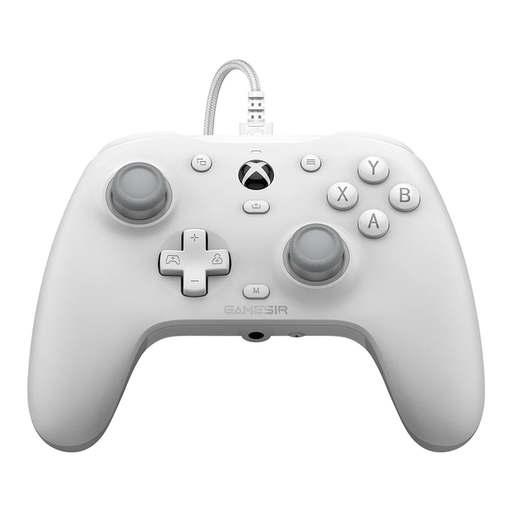
GameSir G7 HE Wired Controller, White

GameSir G7 HE Wired Controller, White

For Xbox Series X|S, Xbox One or Windows 10/11, if you prefer a wired connection.

The product description lists Hall Effect sticks and a 3-m USB-C cable. Check that the cable will reach where you sit.

View at Joybuy

Nintendo Switch 2 Pro Controller

Nintendo Switch 2 Pro Controller

For Nintendo Switch 2, if you’re looking for a wireless Pro Controller with extra GL and GR buttons.

The product description lists HD Rumble 2, motion controls and a headphone jack. Nintendo says this model is only compatible with Switch 2.

View at Joybuy

Frequently asked questions

Is Bluetooth enough for all DualSense features on PC?

No. According to PlayStation, the game needs to support each feature; haptic feedback on PC also requires a USB connection. Check support for the specific game you want to play.

Can I use a Switch Pro Controller with Switch 2 in TV mode?

Yes. Nintendo confirms that the older Switch Pro Controller can be used wirelessly with Switch 2. However, you can’t use its HOME button to wake the console from sleep mode. Nintendo says the Switch 2 Pro Controller is only compatible with Switch 2.

What should I check first if I have connection problems?

Check that your controller is compatible with your device using the connection type you’ve chosen, and that it’s in pairing mode. For Bluetooth problems on Windows, Microsoft also lists range and low battery levels as possible causes.

What should I do with used controller batteries?

In Germany, used batteries must not be put in household rubbish. The Federal Ministry for the Environment says that used portable batteries can be returned free of charge to retailers or local authority collection points.