First, choose a controller that suits your console or PC and the game you want to play. Then decide whether you prefer the freedom of wireless play or a wired connection, and whether you’ll actually use extra buttons or supported haptic features. If it’s hard to see the screen in a bright room, changing your controller or its buttons won’t help: check the screen position and brightness settings separately.
Finding the right controller for you
Players with a specific platform
If you play on a particular console or PC, check that both the controller and the game you want to play are compatible before choosing a model. Microsoft, Sony and Nintendo each list the devices their controllers support, along with any conditions.
Players who want quick access to actions or specific feedback
If you want to reach frequently used actions more easily, assignable extra buttons may be worth considering. Haptics and adaptive triggers, on the other hand, depend on whether the game supports them. Sony also specifies a USB connection for DualSense haptics on PC.
Players in a bright room
If it’s hard to see the game, check your screen and its position separately from your choice of controller. Nintendo explains that you can adjust the Switch’s brightness in handheld and tabletop modes.
What to consider when buying
Start by confirming which platform and game you want to use the controller with. Then compare how it works and connects. Being able to see the screen in a bright room is a separate consideration.
| Consideration |
What to check before buying |
Who it matters most to |
| Platform and game compatibility |
Check the platform list for the exact model and confirm that the game you want to play supports the controller. |
If I play on a particular console or PC, I want to avoid buying a controller that won’t work with my game. Around 39% of consumers put platform and game compatibility first. |
| Access to actions and feel |
Compare assignable extra buttons and check whether the game supports the haptics or trigger features you want. |
If I want to reach frequent actions more easily or use supported feedback features, I check what the specific controller and game offer. Around 23% of consumers prioritise controls and feel. |
| Connection and power |
Check the cable route, connection requirements and power source. With the Xbox Wireless Controller, remember to factor in batteries or a compatible rechargeable option. |
If I want to move freely while playing or avoid cables, I also check how the controller is powered. Around 23% of consumers say connection and power are their main considerations. |
| Visibility in a bright room |
Check the screen position and the settings on your display. The Nintendo Switch has brightness settings for handheld and tabletop modes. |
If I want to see the game clearly in bright surroundings, I check the screen and display settings first rather than expecting a different controller to help. Around 15% of consumers prioritise visibility in a bright room. |
Common buying pitfalls
-
Expecting a new controller to solve visibility problems in a bright room
Adapting to ambient light is a display issue, not a gamepad feature. Changing your controller won’t change how clearly you can see the screen.
Check the screen position and display settings separately from your choice of controller. On the Nintendo Switch, you can adjust screen brightness in handheld and tabletop modes.
-
Assuming similarly named controllers are interchangeable
Compatibility can vary between platforms, even within the same product family. Nintendo says the Switch 2 Pro Controller can only be used with Switch 2. Platform compatibility also varies between Ultimate 2 models.
Before deciding, compare the full model name, platform list and any firmware updates that may be required.
-
Assuming Bluetooth automatically supports every feature
Microsoft says controller audio isn’t supported over Bluetooth on Windows with the Xbox Wireless Controller. For DualSense haptics on PC, Sony requires a supported game and a USB connection.
Check the connection required for the specific feature you want to use.
Depending on the feature you want, you may need a suitable cable or adapter.
Key brands to consider
Microsoft Xbox
The Xbox Wireless Controller is designed for Xbox and compatible PCs, and is a good fit if you want wireless play or to switch between devices.
- Microsoft lists textured grips and a hybrid D-pad among the features of the Xbox Wireless Controller.
- According to Xbox Support, controller audio isn’t supported over Bluetooth on Windows. USB or a supported Xbox Wireless Adapter are possible connection options.
Sony PlayStation
The DualSense is designed for PS5 and compatible PC games, and is worth considering if game-specific trigger and haptic features matter to you.
- Sony lists USB and Bluetooth connections for compatible devices.
- Sony says haptic feedback on PC requires a supported game and a USB connection. Adaptive triggers only work when the game supports them.
Nintendo
The Switch Pro Controller and Switch 2 Pro Controller are designed for different generations of Nintendo consoles.
- Nintendo says the original Switch Pro Controller can be used wirelessly with Switch 2.
- Nintendo says the Switch 2 Pro Controller won’t work with the original Switch. The older Switch Pro Controller can’t wake Switch 2 from sleep using the HOME button.
8BitDo
The Ultimate 2 Bluetooth Controller is designed for compatible Switch and Windows systems, and is worth considering if you want customisable controls and a charging dock.
- 8BitDo lists extra assignable buttons and profiles among its features.
- According to 8BitDo, a firmware update is required for the stated Switch 2 compatibility. Check the exact Ultimate 2 model, as platform compatibility can vary.
GameSir
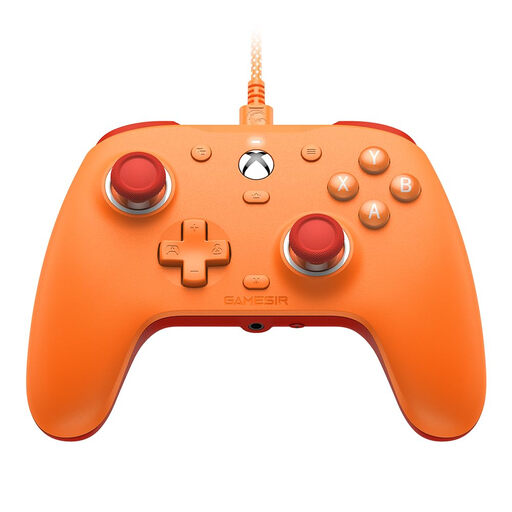
The G7 SE is a wired option for Xbox and Windows PC, and is worth considering if you want assignable rear buttons.
- The GameSir guide specifies a USB-C wired connection. Hall Effect sticks are a feature of the G7 SE model.
- The G7 SE is wired, so it isn’t a wireless alternative. Hall Effect sticks don’t guarantee that a controller will never fail under any circumstances.
Joybuy products
This selection includes controllers for Nintendo Switch and Switch 2, Xbox, PS5 and compatible PC games. Before buying, check that the specific model is compatible with the game you want to play.
 No image available
Nintendo Switch Pro Controller – Black
For Nintendo Switch. Nintendo also confirms that the original Switch Pro Controller can be used wirelessly with Switch 2.
Nintendo lists motion controls and HD Rumble among its features. The older controller’s HOME button can’t wake Switch 2 from sleep.
Joybuy
 No image available
Microsoft Xbox Wireless Controller, Pulse Red
For Xbox One, Xbox Series X|S and compatible Windows PCs, if you want to play wirelessly.
The controller uses two AA batteries. Xbox Support says controller audio isn’t supported over Bluetooth on Windows.
Joybuy
 No image available
PlayStation DualSense Wireless Controller, Midnight Black (USB cable included)
For PS5 and compatible PC games, if you want to use game-specific extra features.
Sony says haptic feedback on PC requires a supported game and a USB connection. Adaptive triggers only work when the game supports them.
Joybuy
 No image available
GameSir G7 SE Wired Gaming Controller, Orange
For Xbox Series X|S, Xbox One and Windows 10/11, if a wired connection suits your gaming set-up.
Wired USB-C connection. The product title lists Hall Effect sticks and a 3.5 mm audio jack. The G7 SE isn’t a wireless alternative.
Joybuy
 No image available
Nintendo Switch 2 Pro Controller
For Nintendo Switch 2, if you want to use the extra GL/GR buttons or the C button.
Nintendo says this model can’t be used with the original Nintendo Switch.
Joybuy
Frequently asked questions
Can I use any PC controller for my fantasy game?
No. Check that the specific game supports the controller and review the system requirements for the exact model. Having a compatible connection doesn’t necessarily mean that all the inputs you want to use will be supported.
How do I connect a GameSir G7 SE?
According to the GameSir guide, connect the USB-C cable to a compatible Xbox system or Windows PC. The G7 SE is wired, not a wireless alternative.
Will the Switch 2 Pro Controller work with my original Switch?
No. Nintendo says the Switch 2 Pro Controller can only be used with Switch 2. The original Switch Pro Controller, however, can connect wirelessly to Switch 2.
Do I need to think about power when buying an Xbox Wireless Controller?
Yes. The standard Xbox Wireless Controller uses two AA batteries. Decide whether you want to use batteries or a rechargeable option that’s compatible with the controller.
What are my rights when buying a controller online in Germany?
For a typical online purchase from a business seller, you generally have 14 days from delivery to cancel, although exceptions may apply. If the product is faulty, your statutory rights against the seller are separate from any voluntary guarantee. Your Europe explains the right to cancel, and the Verbraucherzentrale says that new goods generally come with a two-year statutory guarantee.


