What to consider when choosing
Check the platform and game first, then consider the controls and connection from your seat. If your screen reflects light in a bright room, assess the screen and the direction of the light separately from your choice of controller.
| Buying priority |
What to look for |
Who is it important for? |
| Platform and game |
Check the console generation, PC operating system and whether the specific game supports the controller. |
If I play on PC and perhaps on a console too, the game needs to support my inputs. That’s why around 33% of consumers put platform and game compatibility first. |
| Grip and buttons |
Compare the button layout and feel in your hands; check whether you can change the button mapping in the game. |
For longer exploration and dialogue sections, I want the buttons I need to be easy to reach. Around 27% of consumers prioritise how a controller feels to use. |
| Connection and power |
Measure the cable length you’ll need, or check the wireless connection, required ports and included accessories. |
If I sit further away from my PC, the cable or wireless connection needs to reach me. Around 20% of consumers say connection and power are their main concern. |
| Screen visibility in daylight |
Assess the screen position, incoming light and reflections separately from your controller purchase. |
In a bright room, I want to see the picture without distracting reflections; a different controller won’t fix that. Around 20% of consumers say screen visibility in daylight is their main concern. |
BenQ Germany identifies direct light, reflections and sharp differences in brightness as possible causes of glare. Choose your controller based on the platform, controls and connection, and consider the screen environment separately.
Controllers at Joybuy
The following Joybuy listings include a selection of controllers for PC, Xbox, PlayStation and Nintendo Switch 2. Before buying, check that the specific model works with your platform and game.
 No image available
Razer Wolverine V3 Tournament Edition White
For Xbox Series S/X or PC if you’re looking for a controller for these platforms; check that your specific game supports it.
The product name specifies USB and the White edition.
View at Joybuy
 No image available
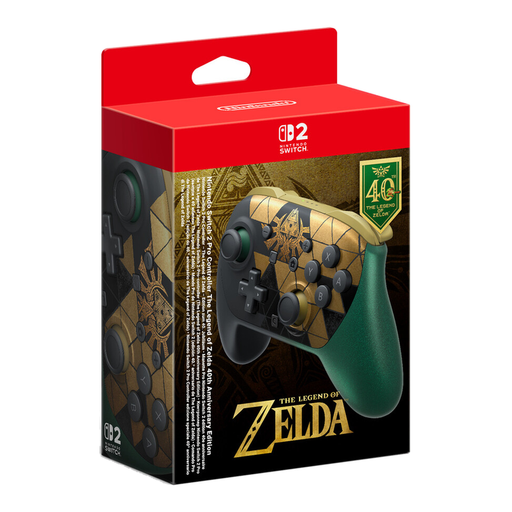
Nintendo Switch 2 Pro Controller – The Legend of Zelda 40th Anniversary Edition, 2026
For Nintendo Switch 2 if you’re looking for a controller for this console generation. According to Nintendo, this Pro Controller doesn’t work with the original Switch.
Features listed in the product name: HD Rumble 2, Mouse Controls, Amiibo and GameChat.
View at Joybuy
 No image available
Game controller with dual vibration and gyro for Switch and PC
For Switch or PC players looking for a controller with vibration and gyro; check compatibility with your specific game.
The product name lists Switch and PC, as well as dual vibration and gyro.
View at Joybuy
 No image available
Microsoft Xbox Wireless Controller, Deep Pink (Xbox One/Xbox Series X/S/PC)
For Xbox One, Xbox Series X/S or PC if you’re looking for a wireless controller for one of these platforms.
The product name specifies the wireless version and the Deep Pink colour.
View at Joybuy
 No image available
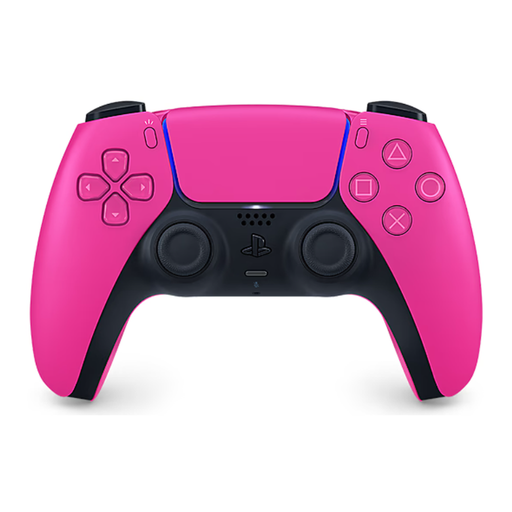
Sony PlayStation DualSense Wireless Controller V3, Hyperpop Nova Pink Edition
For PS5 or supported PC games. According to Sony, haptic feedback on PC depends on game support and requires USB.
The product name specifies the wireless version and the Hyperpop Nova Pink variant.
View at Joybuy
Frequently asked questions
Can I use every PS5 controller on PC with all its features?
No, the features available depend on the device and game. Sony lists USB and Bluetooth as ways to connect DualSense to Windows; haptic feedback on PC requires a supported game and a USB connection.
How do I connect an Xbox Wireless Controller to Windows?
According to Xbox Support, you can connect using a suitable USB data cable, Bluetooth or Xbox Wireless. An adapter may be required for Xbox Wireless, so check which connection your PC supports.
Will a controller with lights help with reflections in a bright room?
No, lighting on a controller won’t change reflections on the screen. BenQ Germany identifies light, reflections and differences in brightness as possible causes of glare, so assess the screen and incoming light separately.
Should I allow for any extra accessories to connect the controller?
It depends on the controller, your device and the connection you choose. Check whether you have a suitable USB cable, any wireless adapter you need and a way to charge the controller. Make sure the connection will reach your seat, too.
What statutory rights do I have if a controller bought in Germany is faulty?
For claims relating to defects in movable goods, the standard limitation period under § 438 BGB is generally two years from delivery. The Federal Ministry of Justice and the Federal Office of Justice set out this period in the legislation; statutory exceptions may apply. This is separate from any voluntary manufacturer’s guarantee.


