Headphones connected directly to the controller
You want to connect a wired headset to the controller on a compatible console, and check before you buy how game audio is transmitted.


Start by choosing a controller that works with your console or PC, then check separately how game audio reaches your headphones. A socket on the controller won’t necessarily work with every connection type. Haptics, freedom of movement and power are other things to consider.
You want to connect a wired headset to the controller on a compatible console, and check before you buy how game audio is transmitted.
You play on PS5 and want to use haptic feedback and adaptive triggers in games that support them.
You switch between devices or connection types, so you need to check input compatibility and headphone audio separately.
First, check the platform and the actual audio route. Then weigh up whether haptics or wireless gaming matters more to you.
| Buying consideration | What to check before buying | Who it matters most to |
|---|---|---|
| Platform and game | Check the console or operating system, as well as support from the specific game. | If I switch between devices, I want to be sure the controller works with my system and the game. Around 29% of consumers put platform and game compatibility first. |
| Headphone audio route | Check the plug standard and documented audio functionality for the specific console or PC connection. | If I want to use a wired headset, what matters to me is whether game audio actually comes through with the specific controller connection. Around 29% of consumers prioritise the headphone audio route. |
| Haptic gameplay | Distinguish the manufacturer’s information about haptics and triggers from support offered by the game and connection mode. | When playing a story-driven game, I want to be able to use feedback such as vibration or adaptive triggers, if the game supports them. Haptics are the main priority for around 24% of consumers. |
| Freedom of movement and power | Consider wired or battery-powered operation, along with the stated battery life and the conditions it depends on. | During longer gaming sessions, I want to decide whether a cable will get in the way or whether I’ll need to plan for charging breaks. Around 18% of consumers focus mainly on freedom of movement and power. |
Connecting a controller via Bluetooth doesn’t automatically mean game audio will come through its headset socket. Sony requires a wired controller connection to use the DualSense headset socket on PC. For a headset connected to an Xbox controller on Windows, Xbox Support describes connecting via an Xbox Wireless Adapter.
Before buying, check the combination of controller, device, connection mode and headphones.
Depending on your setup, you may need a different audio route, an adapter or a wired connection.
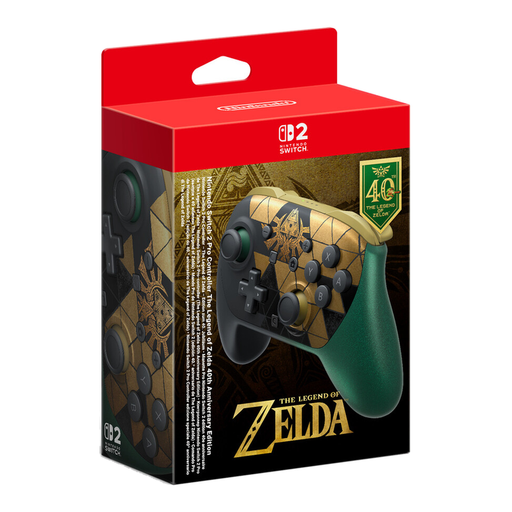
Nintendo says the Switch 2 Pro Controller is compatible only with Nintendo Switch 2. Nintendo doesn’t list a headphone socket for the original Switch Pro Controller, so you’ll need to plan the audio route separately.
Check the console generation and the controller’s full name before placing your order.
COMPUTER BILD’s gamepad rankings, published on 3 September 2026, assess controllers overall. They don’t automatically tell you whether a particular model will work with your platform and headphone setup.
Use test rankings as an additional guide only after checking platform compatibility and the audio route.
A good option for PS5 players who want to use haptics and adaptive triggers in games that support them.
A good option for Xbox consoles and supported Windows devices if you want to use a wired headset with your controller.
The controllers for the original Switch and Switch 2 differ in generation and headphone connectivity.
The G7 HE is a wired option for supported Xbox consoles and Windows PCs.
The Ultimate 2 Bluetooth Controller is worth considering if you want to switch between supported Switch hardware and Windows.
The models below include controllers for Nintendo Switch 2 and the original Switch, PS5, and Xbox and Windows PC setups. Check the headphone audio route for your device and preferred connection.
 No image available
For playing Switch 2 games with headphones: Nintendo lists a CTIA-compliant 3.5 mm headphone socket on the Switch 2 Pro Controller.
Nintendo also lists assignable GL and GR buttons. According to Nintendo, this model is compatible only with Switch 2.
 No image available
For the original Switch, if you want HD Rumble and are planning the headphone audio route separately.
Nintendo lists HD Rumble and an estimated battery life of around 40 hours. Actual battery life depends on use and software. Nintendo doesn’t list a headphone socket for this model.
 No image available
For PS5 adventures, if you want to use haptic feedback and adaptive triggers in games that support them.
Sony lists a 3.5 mm headset socket. According to Sony, using it on PC requires a wired controller connection. Haptics depend on the game and connection mode.
 No image available
For Xbox or a supported Windows PC, if a wired connection suits you.
GameSir specifies USB-C wired operation, Hall Effect sticks and two lockable rear buttons. The product description also lists a 3.5 mm audio socket. Check the audio route for your specific device and setup.
No. Sony requires a wired controller connection to use the headset socket on PC and Mac. Whether other game features work also depends on the device and the game.
No. Nintendo describes the Switch 2 Pro Controller as compatible only with Nintendo Switch 2. So check the console generation and the full model name before buying.
For Xbox Series X|S and Xbox One, Microsoft describes connecting a compatible 3.5 mm headset to a paired Wireless Controller. For use with a Windows device, Xbox Support lists an Xbox Wireless Adapter. If you can’t hear anything, also check the audio route and headset settings.
The EU consumer portal explains that ordinary online purchases of goods generally come with a 14-day withdrawal period from delivery and at least two years of legal guarantee from receipt. The right to withdraw and the legal guarantee are separate rights; purchases from private individuals aren’t covered by the same rules.