Choose a controller to suit your console or PC first, then decide where you want to plug in your headphones. A 3.5 mm socket won’t necessarily work with every connection type: to use the DualSense headset socket on a PC, the controller must be connected by cable. Adaptive triggers and haptic feedback also require a supported game.
Which controller is right for you?
Players who plug headphones into their controller
If you want to use a wired headset directly with your gamepad, check the socket, plug and connection type together. PlayStation, Xbox and Nintendo each specify requirements for their platforms and models.
Players with a dedicated console
If you already own a PS5, Xbox or Switch 2, confirmed compatibility with that specific platform should come before any extra controller features. PlayStation, Xbox and Nintendo each detail which platforms their controllers support.
PC players using separate audio
If your headphones are plugged directly into your PC, you can focus more on the controller’s connection and feel. PlayStation says the DualSense must be connected via USB to use its headset socket on PC; 8BitDo lists 2.4 GHz or USB connections for Windows.
What should you look for when buying?
PS5 and DualSense
A good fit if: You play on PS5 and want to use a compatible wired headset with the controller.
The trade-off: On PC, the headset socket requires a wired controller connection; extra haptic features depend on the game.
Xbox
A good fit if: You want to connect a compatible 3.5 mm headset directly to an Xbox Wireless Controller.
The trade-off: The 3 m cable specified by PowerA for its wired Enhanced Wired Controller limits where you can sit; on PC, check that audio works with the specific connection you plan to use.
Nintendo Switch 2
A good fit if: You have a Switch 2 and a headset with a four-pole 3.5 mm plug that meets the CTIA standard.
The trade-off: Nintendo says the Switch 2 Pro Controller is compatible with the Switch 2 only.
Windows PC with separate audio
A good fit if: Your headphones stay connected to your PC and you want to connect the 8BitDo Ultimate 2C Wireless via 2.4 GHz or USB.
The trade-off: The manufacturer’s specifications don’t confirm audio transmission through this gamepad, so plan to connect your headphones separately.
| Priority |
What to look for when buying |
Who values this? |
| Platform compatibility |
Check the console, PC operating system and full controller model name; confirm that the game supports any extra features. |
I want the controller to work with the console or PC I already use before I consider extra features. Around 36% of consumers put compatibility with their platform first. |
| Headphone and chat connection |
Check where the headphones connect, that the plug is compatible, and that audio and microphone functions work with your platform and connection type. |
I want to be able to connect my existing headset without relying on the socket alone. Around 29% of consumers prioritise a working headphone connection. |
| Seating position and ease of use |
For a wired controller, compare the stated cable length with the distance to your seat; for wireless use, check the available connections and power supply. |
For longer gaming sessions, it’s important that the connection works with where I sit. Around 21% of consumers pay particular attention to freedom of movement and ease of use. |
| What’s included and cover |
Check what comes with the specific offer and how the controller is powered; distinguish optional extras from your statutory rights. |
If I don’t want to budget for extra cables, batteries or protection plans, I check what’s included and the terms before buying. Around 14% of consumers pay particular attention to follow-on costs and cover. |
Avoid common buying mistakes
-
Assuming a 3.5 mm socket will carry audio with every connection type
PlayStation says the DualSense headset socket requires a wired controller connection on PC and Mac.
Check the platform, connection mode and where you plan to plug in your headphones together.
-
Confusing the Switch Pro Controller with the Switch 2 Pro Controller
Nintendo says the Switch 2 Pro Controller is compatible with the Switch 2 only. Similar model names are therefore not enough to confirm compatibility.
Check the full model name against your console and the headphone connection you want to use.
-
Confusing a voluntary guarantee with your statutory rights
The Verbraucherzentrale distinguishes between statutory consumer rights and a voluntary guarantee with its own terms and conditions.
Read what any additional cover includes and check what rights you have against the seller.
Key brands at a glance
The right model depends mainly on your platform, headset connection and connection type. Details about individual features apply to the product ranges and requirements described.
PlayStation
The DualSense is worth considering for PS5 and supported PC games if a headset connection and game-dependent haptics matter to you.
- PlayStation lists adaptive triggers and haptic feedback.
- According to PlayStation, the headset socket requires a wired connection on PC; haptics on PC require USB and game support.
Xbox
Xbox Wireless Controllers are available for Xbox and other specified platforms; compatible 3.5 mm headsets can be connected directly.
- Xbox confirms that compatible headsets can be connected directly to the controller.
- A Bluetooth connection to a PC alone doesn’t confirm that headset audio will be transmitted through the controller socket.
Nintendo
The Switch 2 Pro Controller is designed for Switch 2 players with a compatible CTIA headset.
- Nintendo lists a four-pole 3.5 mm headphone socket and assignable GL/GR buttons.
- Nintendo says this model is compatible with the Switch 2 only, so it shouldn’t be confused with the older Switch Pro Controller.
PowerA
The Enhanced Wired Controller is a wired option for Xbox and Windows, with a headset socket.
- PowerA lists a 3.5 mm audio socket, volume controls, microphone mute and a detachable 3 m USB cable.
- The cable limits where you can sit.
8BitDo
The Ultimate 2C Wireless is worth considering for Windows if you connect your headphones separately to your PC.
- 8BitDo lists 2.4 GHz and USB for Windows, and Bluetooth for Android.
- Audio transmission through the controller isn’t confirmed for this use case.
Controllers at Joybuy
This selection includes controllers for PS5, Xbox, Switch 2 and Windows PCs, with either a headset socket or a separate audio connection.
 No image available
PlayStation DualSense Wireless Controller Midnight Black with USB cable
For PS5 games with a wired headset connected to the controller; on PC, the controller must be connected by cable to use the headset socket.
Includes a 3.5 mm audio socket and USB cable. Adaptive triggers and haptic feedback depend on support from the game you’re playing.
View at Joybuy
 No image available
Microsoft Xbox Series X/S Wireless Controller Shock Blue
For Xbox with a compatible headset connected to the controller socket; if using it with a PC, check that audio works with your chosen connection.
Includes a 3.5 mm headset socket; the listed platforms include Xbox One, Xbox Series X|S and Windows PC. Two AA batteries are listed.
View at Joybuy
 No image available
Nintendo Switch 2 Pro Controller
For Switch 2 if you want to connect a compatible headset to the controller socket. Nintendo lists compatibility with the Switch 2 only.
The headphone socket is specified for four-pole 3.5 mm plugs that meet the CTIA standard. GL/GR buttons and HD Rumble 2 are also listed.
View at Joybuy
 No image available
GameSir G7 HE Wired Controller, Black
For Xbox or Windows PC if you’re looking for a wired controller with a headset socket.
Features Hall Effect sticks, a 3.5 mm audio socket and a 3 m USB-C cable. The wired connection limits where you can sit.
View at Joybuy
 No image available
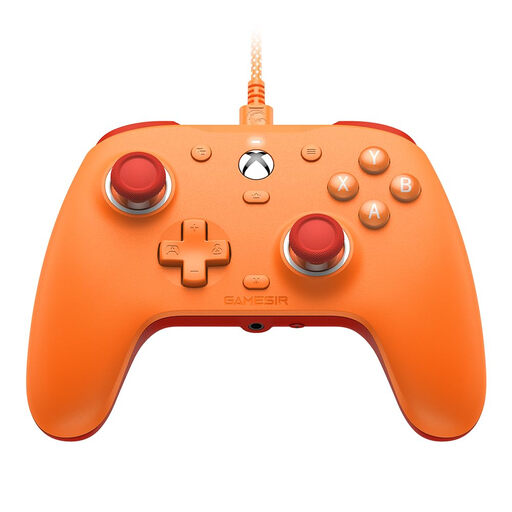
GameSir G7 SE Wired Gaming Controller, Orange
For Xbox or Windows PC if you want a wired connection and a 3.5 mm audio socket.
Features Hall Effect sticks and an ergonomic design. The wired connection limits where you can sit.
View at Joybuy
Frequently asked questions
Will headphones connected to a DualSense work on a PC over Bluetooth?
No, not through the headset socket: PlayStation says it requires a wired controller connection on PC and Mac. Also check that the game supports the controller features you want to use.
Can I use the Switch 2 Pro Controller with an older Nintendo Switch?
No. Nintendo says the Switch 2 Pro Controller is compatible with the Nintendo Switch 2 only. For an older Switch, you’ll need a supported controller and a compatible headphone connection.
Which plug do I need for the Switch 2 Pro Controller’s headphone socket?
Nintendo specifies a four-pole 3.5 mm plug that meets the CTIA standard. Check that your headset uses this connection before buying.
Is a voluntary guarantee the same as your statutory rights?
No. Your statutory rights apply against the seller; a guarantee is a voluntary offer subject to its own terms. If something is faulty, you may be entitled to a repair or replacement.
Can I cancel an online controller purchase in Germany?
Online purchases generally come with a 14-day right to cancel, starting from the day you receive the goods. You must tell the seller you’re cancelling; simply returning the goods isn’t enough.


