First, choose a controller that’s compatible with your console or PC. Then check whether your headphones will connect to the controller, the console or directly to your PC. PlayStation requires a wired connection to use the DualSense headset socket on PC and Mac; according to Nintendo, the Nintendo Switch 2 Pro Controller only works with Switch 2. After that, you can weigh up button customisation, cables and power for longer gaming sessions.
Which controller is right for you?
Console gamers
If you use a particular console, check its exact generation and the full model name before buying. Nintendo, for example, distinguishes between the Switch Pro Controller and the Switch 2 Pro Controller: the older Pro Controller can be used wirelessly with Switch 2, but the Switch 2 Pro Controller doesn’t work with the original Switch.
Gamers with wired headsets
If you want your game audio to come through the controller, the connection, platform and connection type all need to be compatible. PlayStation requires a wired controller connection to use the DualSense headset socket on PC and Mac; Xbox explains how to connect compatible 3.5 mm headsets to suitable Xbox Wireless Controllers.
Gamers on long quests
For longer gaming sessions, assignable extra buttons, the need for a cable and power supply can all affect how comfortable a controller is to use. Nintendo, GameSir and 8BitDo list different assignable buttons on certain models; check that their position and function suit the games you play.
What should you look for when buying?
Start by checking platform compatibility and how your audio will connect. Once those are sorted, compare button customisation and power options for longer gaming sessions.
| What to consider |
What to check |
Who should pay particular attention? |
| Platform compatibility |
Check the console or PC, the full model name and compatibility with the games you play. |
If I play on a particular console, I mainly want to be sure the controller is compatible with that console generation. Around 36% of consumers put platform compatibility first. |
| Audio connection to your headphones |
Check the socket and plug type; on PC, also check which controller connection supports audio. |
If I want to plug my wired headphones directly into the controller, I first check that this works on my platform. Around 29% of consumers prioritise how audio connects to their headphones. |
| Comfort during long quests |
Check the position and customisation options for extra buttons, and consider whether they’ll be useful in the games you play. |
On long quests, I want frequently used actions to be within easy reach and to be able to customise the button layout. Around 21% of consumers prioritise comfort and button customisation. |
| Power and convenience |
Check the connection, charging options and what’s included; if you’re using a cable, consider how it will run across your gaming area. |
If I want to avoid interruptions for charging and understand the effort involved in power and accessories, I compare wired and battery-powered options. Around 14% of consumers put these considerations first. |
Common buying mistakes
-
Choosing a “Pro Controller” without checking the console generation
According to Nintendo, the Switch 2 Pro Controller only works with Switch 2. The older Switch Pro Controller, on the other hand, can be used wirelessly with Switch 2.
Before ordering, check the full model name against your console. If the model isn’t compatible, you may need to buy another controller.
-
Assuming a headset socket works with audio over every connection type
According to PlayStation, you need a wired connection to use the DualSense headset socket on PC and Mac. So having a socket doesn’t necessarily mean audio will work with every connection type.
Check the audio connection and controller connection separately. You may need a USB cable to use it with a PC; otherwise, you’ll need to plan for a different way to connect your audio.
-
Assuming the Switch 2 Pro Controller has a headphone socket
Nintendo lists a four-pole 3.5 mm socket on the Switch 2 Pro Controller, following the CTIA standard. This specification doesn’t apply to the older Switch Pro Controller.
If you want to plug your headphones into the controller, check the exact model and socket standard. With a different model, you may need to use a separate audio connection.
-
Confusing optional extra cover with your statutory rights
Optional extra cover isn’t the same as your statutory rights if goods are faulty. The Verbraucherzentrale points out that you can make a claim against the seller if there’s a fault.
Before taking out extra cover, compare what it covers and excludes with your existing statutory rights.
Brands and model ranges at a glance
PlayStation
The DualSense is designed for PS5 and can also be used with supported PCs.
- PlayStation lists haptic feedback and adaptive triggers as DualSense features.
- On PC, features depend on game support; a wired connection is required to use the headset socket on PC and Mac.
Xbox / Microsoft
The Xbox Wireless Controller is designed for Xbox consoles and supported Windows PCs.
- Xbox Support explains how to connect a compatible 3.5 mm headset to an Xbox Wireless Controller with a suitable socket.
- For audio on a Windows PC, check the specific connection type; having a socket alone doesn’t confirm that audio will work.
Nintendo
Nintendo offers different Pro Controllers for the original Switch and Switch 2.
- Nintendo lists assignable GL and GR buttons and a four-pole 3.5 mm headphone socket following the CTIA standard on the Switch 2 Pro Controller.
- According to Nintendo, the Switch 2 Pro Controller only works with Switch 2. The older Switch Pro Controller doesn’t have the headphone socket specified for the newer model.
GameSir
The G7 SE is a wired alternative for Xbox and supported Windows PCs.
- GameSir lists a 3.5 mm audio socket, Hall Effect sticks and two assignable back buttons.
- A USB cable connection is required. The manufacturer’s claim about preventing stick drift isn’t an independently verified durability measure.
8BitDo
The Ultimate 2C Wireless is aimed at Windows gamers who connect their headphones separately.
- 8BitDo lists assignable L4/R4 buttons, as well as 2.4 GHz wireless and USB for Windows.
- The model overview doesn’t list a 3.5 mm audio socket; it lists Bluetooth for Android, not as a connection option for Windows.
Controllers at Joybuy
This selection includes controllers for Switch, PS5, Xbox and PC. For each model, check separately how to connect your headphones and which connection type is required.
 No image available
Gaming controller with dual vibration and gyro for Switch and PC
For gamers looking for a controller for Switch or PC with gyro and dual vibration.
View at Joybuy
 No image available
BIGBIG WON Rainbow 2 Pro Wired
For PC, Nintendo Switch and PS4 gamers who prefer a wired connection.
The product name specifies a wired version with macros, turbo and customisable buttons.
View at Joybuy
 No image available
Nintendo Switch Pro Controller – Black
For gamers with the original Switch who connect their headphones using a separate audio connection.
Nintendo estimates that this model has a battery life of around 40 hours. According to Nintendo, the controller can also be used wirelessly with Switch 2.
View at Joybuy
 No image available
PlayStation DualSense Wireless Controller – Midnight Black
For PS5 gamers or supported PC use, if haptic feedback and adaptive triggers are relevant to the game.
The controller has a 3.5 mm audio socket; PlayStation requires a wired connection to use the headset socket on PC and Mac. On PC, haptic feedback and adaptive triggers depend on game support. The product name states that a USB cable is included.
View at Joybuy
 No image available
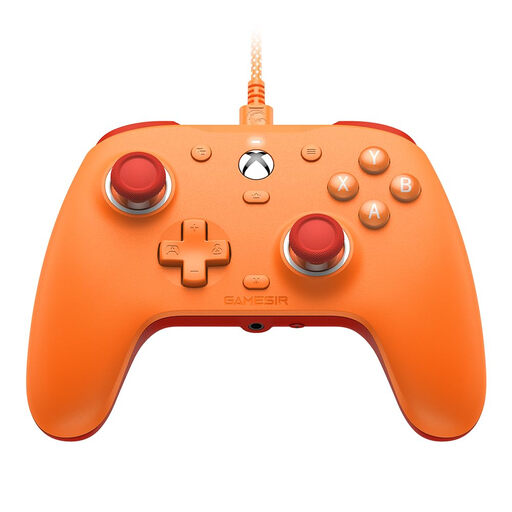
GameSir G7 SE Wired Gaming Controller (Orange)
For Xbox or Windows gamers looking for a wired model with a 3.5 mm audio socket.
The product name lists Xbox Series X|S, Xbox One, Windows 10/11 and Hall Effect sticks. GameSir describes this model as wired; two assignable back buttons are listed for this model range.
View at Joybuy
Frequently asked questions
Does the DualSense headset socket work over Bluetooth on a Windows PC?
No. PlayStation requires a wired controller connection to use the headset socket on PC and Mac. If you’re using a wireless connection for control, you’ll need to use a separate, supported audio connection.
Can I use the Switch 2 Pro Controller with the original Switch?
No. According to Nintendo, the Switch 2 Pro Controller only works with Switch 2. The older Switch Pro Controller, on the other hand, can be used wirelessly with Switch 2, according to Nintendo.
What should I know about using Bluetooth headphones with Switch 2?
Nintendo doesn’t support Bluetooth microphones over this Bluetooth audio connection; in addition, you can connect a maximum of two wireless controllers at the same time. Audio may be delayed, depending on the Bluetooth device.
How do I connect and charge the Switch 2 Pro Controller?
Nintendo describes wireless pairing or connecting the controller to the dock while the console is docked. A USB charging cable is included with the controller; Nintendo says it takes around three hours to charge fully.
What are my rights in Germany if an online-bought controller isn’t suitable or is faulty?
Online purchases generally come with a 14-day right to cancel, which, according to the Verbraucherzentrale, you must notify the retailer about. If there’s a fault, statutory warranty rights against the seller are separate from a voluntary manufacturer’s guarantee. For purchase contracts from 31 July 2026, choosing a repair may extend the warranty period once by 12 months, subject to the statutory conditions.


