
Lieferung heute & morgen

Qualitätsgarantie

Willkommens-Angebote freischalten: KOSTENLOSE Lieferung | Bis zu 80 % RABATT | Kostenlose 30-Tage-JoyPlus-Testphase
App herunterladen
A disorganized work or gaming area can disrupt focus and hinder efficiency. Cable clutter, a lack of space for multiple monitors, and insufficient storage are common challenges. A gaming corner desk is often the key solution for creating order and establishing a functional command center for gaming, streaming, or your home office.
This article serves as your guide. We will present various models with specific features to provide an objective basis for your decision. The goal is to help you find a desk that perfectly matches your spatial constraints and technical requirements.
Choosing the right desk depends on your individual needs. Three key criteria can make the decision easier.
Before making a decision, it's essential to precisely measure the intended space. An L-shaped desk makes optimal use of corners and provides a generous work surface. This is particularly advantageous for multi-monitor setups or if you want to physically separate your work and gaming areas. Pay attention to the leg dimensions in the product descriptions and check if the model is reversible to ensure maximum flexibility in your room layout.
A modern setup requires numerous power connections for monitors, PCs, consoles, and peripherals. A desk with power outlets and USB ports reduces the need for external power strips and significantly simplifies cable management. A gaming desk with LED lighting can also customize the room's atmosphere for a more immersive experience. When using integrated power sources, it's important to note the manufacturer's power specifications. They are typically designed for low-power devices like chargers or lamps, not for high-power equipment.
A tidy desk promotes focus. A corner desk with drawers, shelves, or an integrated file cabinet offers valuable storage for accessories, documents, and gaming equipment. A PC desk with a monitor stand is another important feature. It positions the screen at an ergonomically correct eye level, which can help relieve neck and back strain. At the same time, the stand creates additional space under the monitor for speakers, a console, or other low-profile devices.
Here is a selection of models that meet different requirements for space, function, and organization.
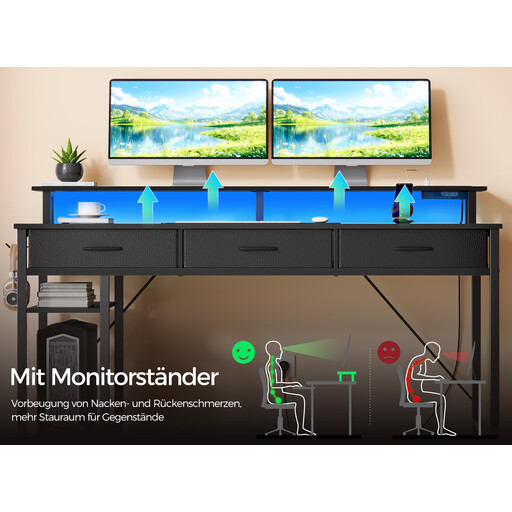
What sets this model apart: This model is designed as an all-in-one solution, integrating numerous features into a single piece of furniture. It includes a built-in charging station, customizable LED lighting, and versatile storage options. The L-shape is reversible, allowing the desk to be flexibly adapted to left or right corners.
Advantages:
Who is this model for? Ideal for gamers and content creators looking for an all-in-one solution that combines organization, power supply, and ambient lighting in one large gaming desk.
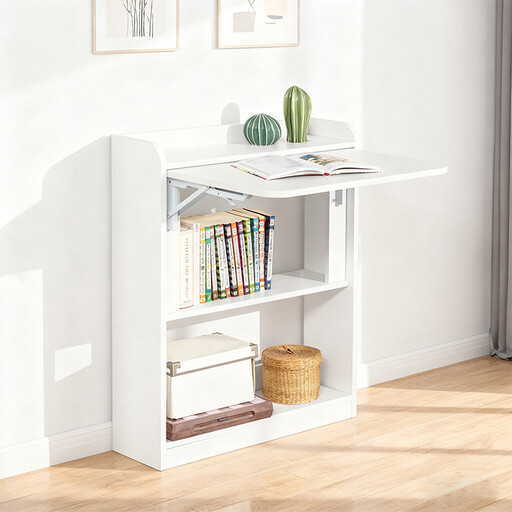
What sets this model apart: The SoBuy desk is a space-saving solution for small rooms. Its desktop can be folded away when not in use, transforming it into a slim wall shelf. Despite its compact dimensions, it offers practical storage with three integrated compartments.
Advantages:
Who is this model for? Suitable for users in small apartments or rooms who need a functional workspace that can almost completely disappear when needed. It serves as a compact home office computer desk or a temporary gaming station.
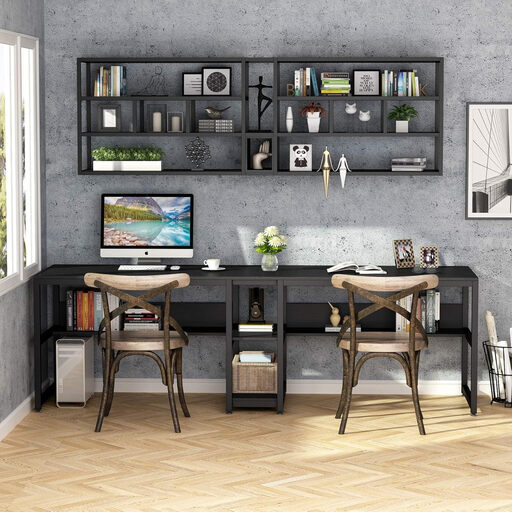
What sets this model apart: With a length of 200 cm, this desk is designed for two people. It offers a continuous, linear workspace suitable for two separate work or gaming stations. A centrally located shelf and a lower bookshelf provide structure and storage.
Advantages:
Who is this model for? Perfect for couples, roommates, or individuals who need an extra-large workspace, for example, to run a work PC and a gaming setup side-by-side.
The models presented here cover specific use cases. If you are looking for other configurations, especially a PC desk with a monitor stand in various designs, it's worth taking a look at our broader assortment.
? Discover a wider selection in our Desk with Monitor Shelf category.
The required space varies greatly depending on the model. Measure the length of the two walls in the corner where the desk will be placed. Compare these measurements with the leg dimensions in the product description. Models with a reversible design offer the advantage that the longer side can be assembled on either the left or right, which simplifies placement.
Integrated power outlets and USB ports are designed for connecting low-power devices such as monitors, smartphones, desk lamps, or speakers. Manufacturers typically warn against plugging in high-wattage devices (e.g., space heaters, electric kettles), as this can lead to overheating or a fire hazard. Always adhere to the manufacturer's safety instructions.
Yes, an L-shaped desk is an excellent choice for a home office computer desk. The L-shape allows for a clear separation between your work and personal areas. For example, you can use one side for your work laptop and documents, while the other side remains reserved for personal projects or gaming. This promotes a structured workflow and a better work-life balance.