
Lieferung heute & morgen

Qualitätsgarantie

Willkommens-Angebote freischalten: KOSTENLOSE Lieferung | Bis zu 80 % RABATT | Kostenlose 30-Tage-JoyPlus-Testphase
App herunterladen
A new gaming corner desk can be the centrepiece of your setup—or a source of constant frustration. The market is filled with models that make big promises but often fail to meet basic requirements. Before you make a decision, it's crucial to understand the common pitfalls that can lead to a bad purchase. As your Joybuy Product Recommendation Officer, I'm here to help you cut through the noise and make an informed choice.
Many buyers focus on aesthetics and overlook critical design flaws. These three issues are the most common sources of disappointment:
To avoid these pitfalls, focus on these three objective criteria. They determine the durability and functionality of your new desk.
A desk's stability is directly linked to its materials. Look for these specifications:
Modern desks offer more than just a work surface. Thoughtful technical integration is a clear hallmark of quality.
A tidy desk promotes focus. The type of storage should match your needs.
Here are some models tailored to specific user profiles that meet the quality criteria mentioned above.
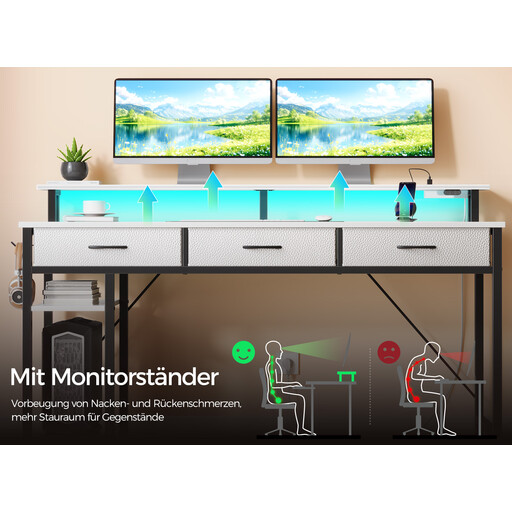
Why It's a Good Fit: This model is an all-in-one solution. It combines a stable L-shape with a fully integrated tech unit, specifically tailored for gamers who want a clean and immersive setup without cable clutter.
The integrated power strip with 2 outlets and 2 USB ports is a practical feature, not a gimmick. The app-controlled RGB lighting adds real atmospheric value. The steel frame ensures the necessary stability.
Complete technical integration (power, USB, LED) and an ergonomic monitor stand in one package. The reversible design also offers maximum setup flexibility.
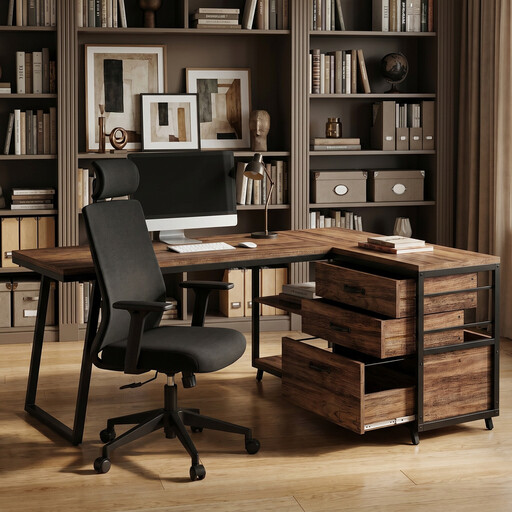
Why It's a Good Fit: For home office users who value organisation and ample closed storage. The industrial style is professional and blends well into modern living and work spaces without looking like a pure gaming desk.
This model skips potentially superfluous features like LEDs and focuses on the essentials: a stable work surface and maximum storage via three drawers and additional shelves. The reversible design prevents fitting issues.
Extensive, organised storage with a combination of closed drawers and open shelves. The flexible, reversible assembly allows for a perfect fit in any room.
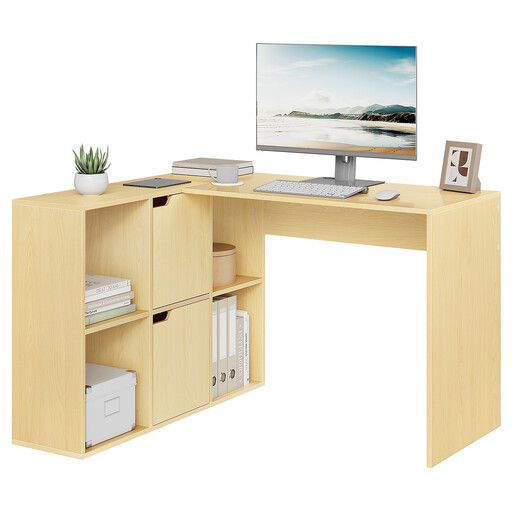
Why It's a Good Fit: Ideal for students or a first home office where maximising space on a limited budget is the priority. The minimalist design offers a large work surface and plenty of open storage for books and materials.
This model focuses on core functions: a stable L-shape and ample storage. It deliberately omits expensive extras like integrated electronics, investing instead in a solid basic construction with six compartments.
An excellent ratio of workspace and storage for the price. The six open compartments provide outstanding organisation for anyone who likes to keep their essentials within easy reach.
We have compiled a complete, up-to-date list of products that fully meet these strict selection criteria and safety standards.
The load capacity varies greatly depending on the model and construction. Simple models made only of engineered wood often support just 40-50 kg. In contrast, models with a reinforced steel frame can often hold 80 kg or more. Always check the maximum load capacity in the manufacturer's specifications before placing heavy items like a large PC tower on the desktop.
That depends on your personal use case. For gamers who want to create an immersive atmosphere, high-quality, app-controlled RGB lighting can be a worthwhile feature. For a pure home office computer desk, it's often an unnecessary extra. If you do opt for it, look for customisable colours and brightness to maximise its value.
Yes, absolutely. Many modern gaming desks are designed to be multifunctional. A corner desk in black or with a subtle wood finish, in particular, can fit seamlessly into a professional work environment. The generous work surface, the ergonomic benefits of a monitor stand, and clever cable management solutions are just as advantageous in a home office as they are for gaming.