
Lieferung heute & morgen

Qualitätsgarantie

Willkommens-Angebote freischalten: KOSTENLOSE Lieferung | Bis zu 80 % RABATT | Kostenlose 30-Tage-JoyPlus-Testphase
App herunterladen
A new gaming corner desk is meant to be the centrepiece of your setup, but the sheer number of options can be overwhelming. Too often, what seems like a great deal turns out to be a costly mistake. Before you choose a model, it's crucial to understand the common pitfalls that can severely limit its day-to-day usability.
Many users report three central problems after their purchase:
This guide will help you avoid these pitfalls and find a functional gaming corner desk that meets your standards for stability, features, and design.
To make an informed decision, you should evaluate three core parameters. These will determine whether a PC corner desk will look and perform well in your gaming room or home office for the long term.
The foundation of any good desk is its stability. Look for the following features:
A modern desk with power outlets and USB can significantly simplify cable management. Here, the details are what count:
An L-shaped gaming desk should adapt to your space and needs, not the other way around.
Here are some recommendations tailored to different requirements and room situations.
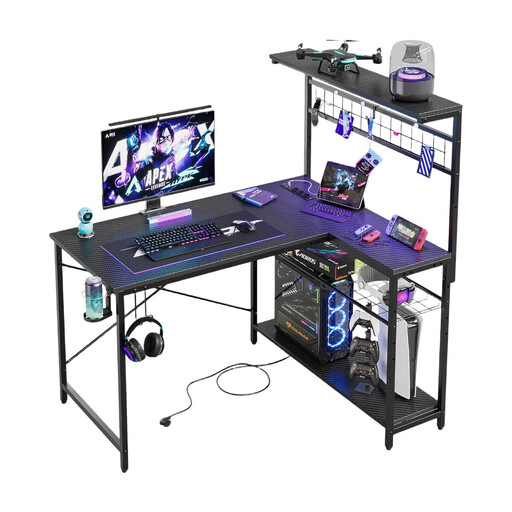
Why This Fits Their Persona: With its compact L-shaped design, this model makes optimal use of space in small rooms or nooks. It offers a full-featured corner solution with integrated functions without overwhelming the room, making it ideal for a first gaming setup.
Despite its compact dimensions, the steel frame provides essential stability. The integrated power outlets and LED strip are practically placed and designed as useful features, not just gimmicks.
Reversible design for maximum flexibility in room layout; integrated power strip with USB ports.
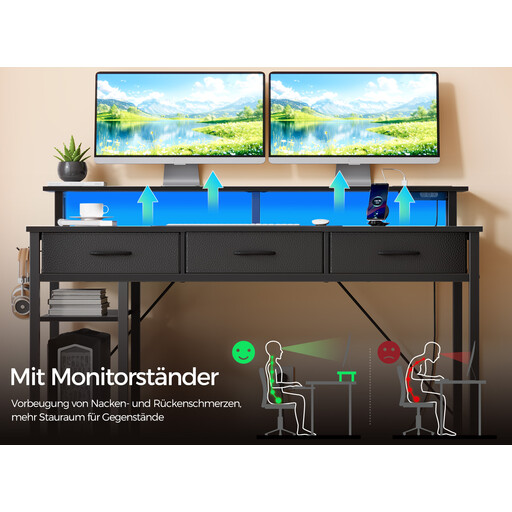
Why This Fits Their Persona: This model is a complete solution for users who want a fully-equipped setup without compromise. It combines a power supply, app-controlled RGB lighting, drawers, and shelves into a single, well-designed piece of furniture.
The integrated features here are high-quality: the LED strip is app-controlled and syncs with music, and the fabric drawers are designed for daily use. The layout is well-thought-out, avoiding impractical arrangements.
Comprehensive features including app-controlled LEDs and a file drawer; ergonomic monitor stand to reduce neck strain.
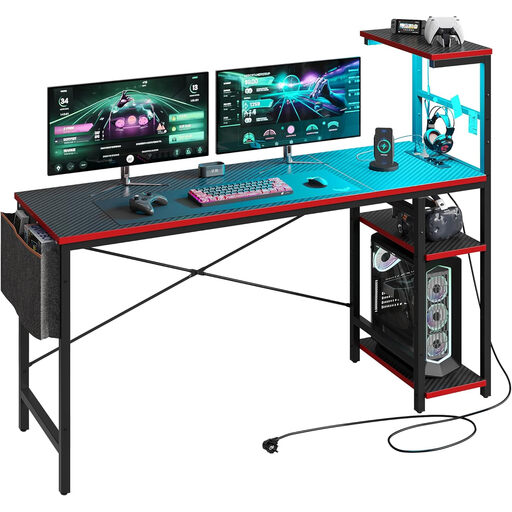
Why This Fits Their Persona: The generous 155 cm work surface is ideal for multi-monitor setups used for both home office work and demanding gaming. The design is functional and blends well into a combined living and working space.
This model offers a large, stable work surface that isn't restricted by impractical shelves. The X-shaped bracing ensures a high load capacity, which is necessary for heavy work and gaming equipment.
Very large work surface for maximum freedom in equipment layout; reversible assembly for a left or right corner setup.
A tidy setup doesn't stop at the desk. The right power strip is crucial for professional power delivery and avoiding cable clutter. We have curated a selection of products that meet strict selection criteria and safety standards.
1. How much weight can a gaming corner desk support? The maximum load capacity varies by model and construction. It typically ranges from 50 kg to 100 kg (110 to 220 lbs) for the main work surface. Always check the manufacturer's specifications in the product description. A solid desk should easily support the weight of two monitors, a PC case, and other accessories.
2. Is an L-shaped desk better for gaming than a straight desk? This depends on your personal workflow and preferences. An L-shaped gaming desk is ideal for multitasking, streaming, or if you want to physically separate your work and gaming areas. It offers more surface area to arrange multiple monitors and peripherals neatly. A straight desk may be sufficient if you focus on a single-monitor setup and prefer a more minimalist approach.
3. How do I care for the surface of a gaming desk, especially one with a carbon fibre texture? Most surfaces, including those with a carbon fibre texture, are easy to maintain. Use a soft, slightly damp cloth for cleaning. Avoid harsh cleaning agents or abrasive sponges, as they can damage the surface. For stubborn stains, a mild, neutral cleaner can be used. Always wipe the surface dry afterwards.