
Lieferung heute & morgen

Qualitätsgarantie

Willkommens-Angebote freischalten: KOSTENLOSE Lieferung | Bis zu 80 % RABATT | Kostenlose 30-Tage-JoyPlus-Testphase
App herunterladen
A new gaming desk is an investment in your setup and your well-being. However, the market is flooded with models whose marketing promises often don't hold up in practice. Before you make a decision, it's crucial to understand the common pitfalls that can lead to disappointment and unnecessary expense.
As your Joybuy Product Recommendation Officer, I have analysed the most common issues that buyers encounter. This guide focuses on the objective criteria that truly matter, helping you find a desk that is both functional and durable.
Many desks look impressive in product photos but reveal their weaknesses only after daily use. Pay special attention to these three points:
To avoid a bad purchase, you should focus on verifiable, technical specifications. These three aspects are crucial for the longevity and functionality of your desk.
A desk's stability is directly dependent on the materials used. A desktop made from MDF (E1-Grade) or P2-grade engineered wood is more resistant to sagging than basic particleboard. Even more important is the frame: look for a construction made of steel or metal with sufficient thickness. A key feature for stability, especially on wider desks, is the inclusion of diagonal cross braces (often called X-braces) on the back. These effectively prevent side-to-side wobbling.
The right shape depends on your available space and your needs. A classic rectangular desk is versatile but inefficient for using corners. This is where an L-shaped desk or a corner gaming desk offers significant advantages. It maximises the work surface without dominating the room and allows for a logical separation between your work and gaming areas. For those using a desk for home office purposes, this can noticeably improve productivity. Pay attention to the dimensions and check if the model can be assembled reversibly to fit flexibly into left or right corners.
A modern workspace needs power. A desk with power outlets and USB ports is not a luxury but a necessity for a tidy setup. Integrated power strips and USB hubs eliminate cable clutter on the floor and keep charging cables within easy reach. Equally important is a well-designed cable management system, such as grommets in the desktop or under-desk cable trays. A computer desk with shelves also provides structured storage for a PC tower, consoles, or other peripherals, ensuring better airflow around your hardware.
Here are some models tailored to specific user profiles that successfully avoid the pitfalls mentioned above.
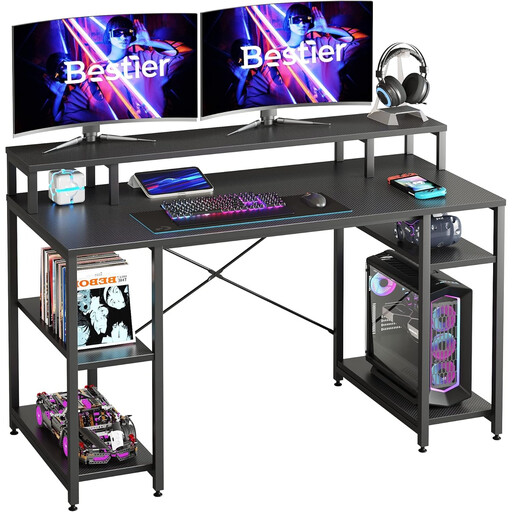
Why This Fits Their Persona: Ideal for users who need a large, stable surface for a dual-monitor setup. The combination of workspace and built-in ergonomics makes it perfect for long gaming sessions and productive workdays.
It solves the ergonomics problem with its integrated monitor stand and the stability issue with its metal frame and X-shaped cross brace. The large surface area prevents any lack of space.
Generous 140 cm wide work surface. Adjustable shelves offer flexible storage for a PC tower or accessories.
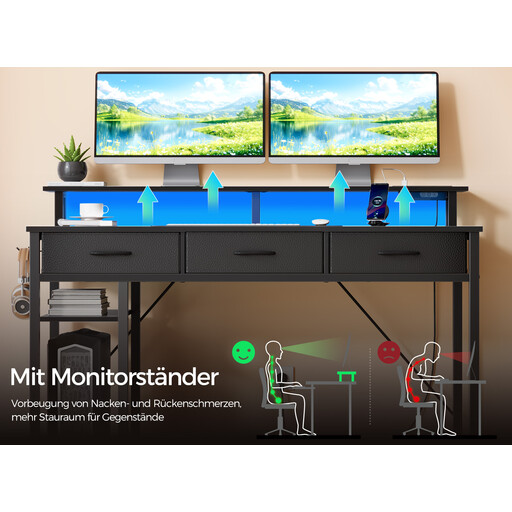
Why This Fits Their Persona: Perfect for users looking for a fully-equipped command centre. This desk integrates power, lighting, and storage in one package, maximising space with its L-shaped design.
The integrated features are high-quality and practical: the charging station is built directly into the desk, and the RGB LEDs are app-controlled. These aren't cheap gimmicks, but genuinely useful functions.
Integrated charging station with 2 power outlets and 2 USB ports. Reversible corner design for flexible left or right-side setup.
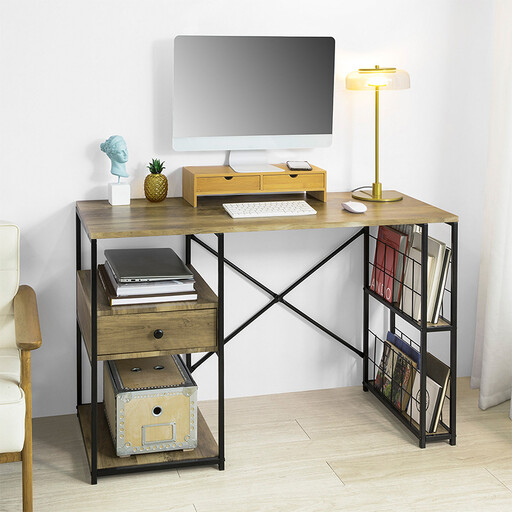
Why This Fits Their Persona: Optimal for smaller rooms or apartments where every centimetre counts. This desk utilises vertical space to create maximum storage on a minimal footprint.
Instead of relying on a wide, space-consuming surface, this model focuses on functional, vertical storage. The sturdy metal frame ensures the necessary stability despite its compact design.
High space efficiency thanks to integrated shelves and a drawer. The storage unit can be assembled on either the left or right side.
We have compiled a complete, up-to-date list of products that fully meet these strict selection criteria and relevant safety regulations.
A good benchmark is a load capacity of at least 50 kg for the desktop. This ensures the desk can safely support the weight of a heavy PC tower (approx. 15-20 kg), two monitors (approx. 10-15 kg), and other accessories without sagging or becoming unstable. Always check the manufacturer's specifications for maximum load capacity.
From an ergonomic perspective, it is highly recommended. A monitor stand positions the screen at eye level, which promotes an upright posture and reduces strain on the neck and shoulders. It also creates valuable space on the desk surface, under which you can store your keyboard, mouse, or other devices.
The main advantage of an L-shaped desk is its efficient use of corner space, which often goes unused. It provides a significantly larger total surface area and allows you to create two separate zones—for example, one for gaming and another for work or study. This promotes organisation and creates a clear structure at your workstation.