
Lieferung heute & morgen

Qualitätsgarantie

Willkommens-Angebote freischalten: KOSTENLOSE Lieferung | Bis zu 80 % RABATT | Kostenlose 30-Tage-JoyPlus-Testphase
App herunterladen
A gaming desk is the functional foundation for any PC setup. Unlike a conventional office desk, it is designed for the specific needs of gamers and power users. The choice of the right model depends on objective criteria such as dimensions, material stability, ergonomic features, and integrated functions. These factors determine not only its longevity but also the efficiency and comfort of its use, whether for gaming or in a home office.
The decision to buy a computer desk should be based on an analysis of its technical specifications. The following parameters are relevant for making an informed choice.
The available space and the planned layout of your peripherals define the required desk size. A depth of at least 60 cm is recommended to ensure an adequate viewing distance from the monitor. The width depends on the number and size of your monitors. For multi-monitor setups or streaming activities, an L-shaped corner gaming desk can be a practical solution to maximise your workspace.
Stability is a crucial quality feature. A powder-coated steel frame offers high load capacity and torsional rigidity. For the desktop, materials like P2-grade particleboard are a common standard. A surface finish, such as a carbon fibre texture or a melamine resin seal, increases scratch resistance and simplifies cleaning. Pay attention to the manufacturer's specified maximum load capacity to ensure the safety of your expensive hardware.
Long sessions require an ergonomic workstation design. A desk with a monitor stand positions the screen at eye level, which can help relieve neck and back strain. Adjustable feet are an important detail for levelling the desk on uneven floors and preventing any wobble.
Modern gaming desks often offer useful additional features that optimise your setup:
Here, we present three models that stand out for their different functional focuses.
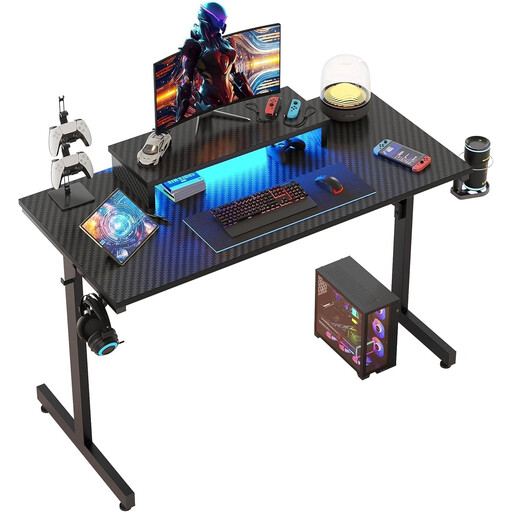
Why We Recommend This Product The Bestier Gaming Desk combines a compact design with essential gaming features. With a width of 106.6 cm, it is well-suited for smaller rooms without compromising on functionality. The integrated monitor stand and RGB lighting offer direct added value to the gaming experience.
Advantages:
Who It's For: This model is a great choice for teenagers and gamers looking for a functional PC desk for a room with limited space. It offers the core features of a gaming setup in a space-saving format.
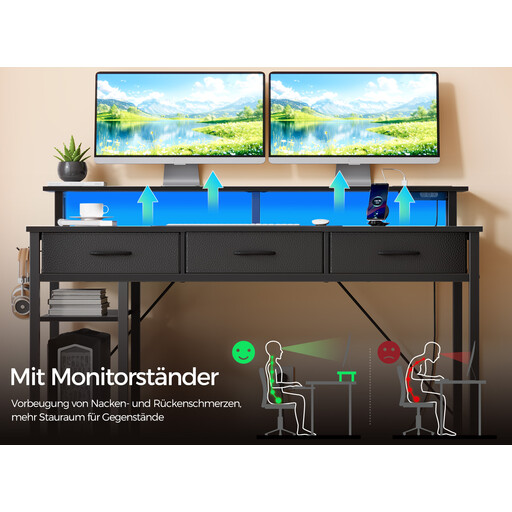
Why We Recommend This Product The Rolanstar desk is an all-in-one solution that combines a workspace, storage, and power supply. Its reversible L-shaped design allows for flexible adaptation to any room, while the integrated charging station significantly simplifies cable management.
Advantages:
Who It's For: Ideal for streamers, content creators, and home office users who need a multifunctional workstation with plenty of storage and an integrated power supply. The corner gaming desk layout is perfectly suited for multi-monitor setups.
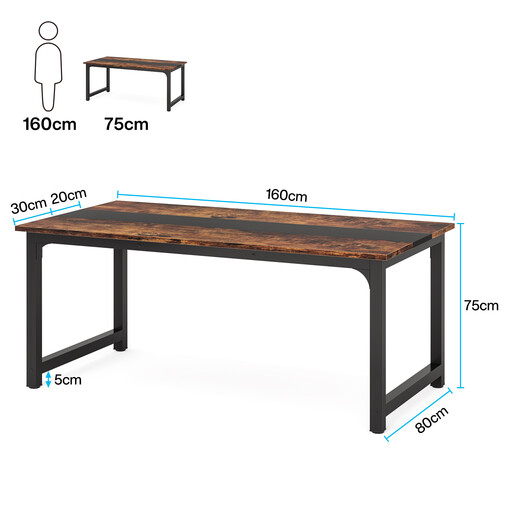
Why We Recommend This Product The Tribesigns desk focuses on the essentials: maximum workspace and high stability. With its generous dimensions of 160 x 80 cm, it offers ample space for complex setups without being restricted by additional attachments.
Advantages:
Who It's For: This model is the right choice for users who prioritise a large and stable work surface. It is suitable as a home office desk for professional purposes as well as a foundation for an extensive gaming setup where integrated features like LEDs are intentionally omitted.
If the models presented here do not exactly meet your requirements, you can find a wider selection of configurations, sizes, and designs in our main category. There, you can filter specifically for features such as shape, material, or additional functions.
Discover more models in the Gaming Computer Desk category.
1. What should you look for when choosing the material for a gaming desk? A sturdy steel frame is the foundation for longevity and load capacity. For the desktop, a P2-grade particleboard or MDF board is a good standard. A durable surface finish (e.g., melamine or a carbon fibre laminate) protects against scratches and makes cleaning easier.
2. Is a monitor stand on a PC desk useful? Yes, a monitor stand can be beneficial from an ergonomic perspective. It positions the screen at eye level, which promotes an upright posture and can reduce neck strain. Additionally, it creates valuable space on the desktop surface for a keyboard, mouse, or other devices.
3. What is the advantage of a desk with integrated power outlets? A desk with power outlets and USB ports significantly simplifies cable management. It eliminates the need for power strips on the floor, reduces visible cable clutter, and provides convenient access to power for monitors, charging accessories, and peripherals directly at your workstation.