
Lieferung heute & morgen

Qualitätsgarantie

Willkommens-Angebote freischalten: KOSTENLOSE Lieferung | Bis zu 80 % RABATT | Kostenlose 30-Tage-JoyPlus-Testphase
App herunterladen
A disorganized gaming or workspace can disrupt concentration and reduce efficiency. Cable clutter, a lack of space for monitors and peripherals, and insufficient surface area are common problems. A well-chosen gaming desk is the foundation for a tidy and functional setup, whether for intense gaming sessions or productive workdays in your home office.
As your Joybuy Product Recommendation Officer, I've made it my mission to provide you with clear, factual information. This article serves as a guide to help you choose a desk that is perfectly tailored to your needs for space, function, and organization.
Selecting the right model depends on several factors. The following points will help you define your requirements and make an informed decision.
The shape of the desk is a key factor in how efficiently you can use your space.
Modern desks often offer more than just a flat surface. Integrated features can significantly boost functionality.
A tidy desk promotes focus. Shelves, hooks, and raised monitor stands are crucial for an organized setup. A computer desk with integrated shelves provides space for a PC tower, consoles, games, or files. Hooks for headphones and cup holders create additional order on the desktop.
Based on the criteria above, we have curated a selection of models that stand out for their functionality and design.
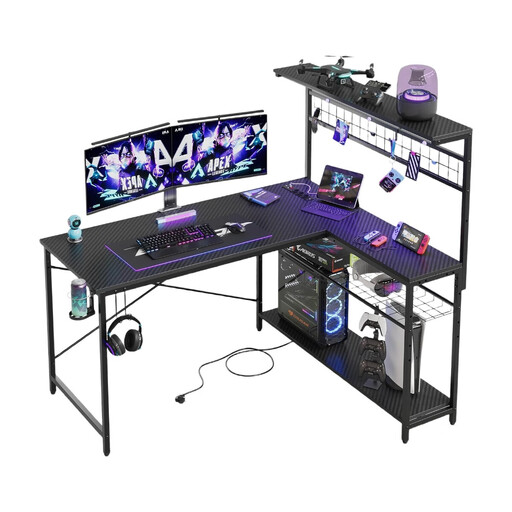
Why It Stands Out This model combines a reversible L-shape with a comprehensive set of features. The integrated RGB lighting with 7 colors and 22 modes creates a dynamic atmosphere, while the built-in power strip with USB ports ensures clean cable management.
Key Features
Who It's For Gamers and home office users looking for an all-in-one solution for a corner space. Ideal for anyone who values atmospheric lighting and a tidy setup without cable mess.
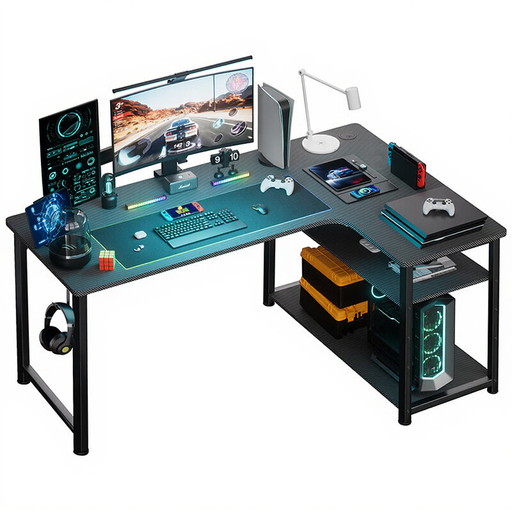
Why It Stands Out The COMHOMA desk is a compact L-shaped desk that delivers functionality in a small footprint. It also integrates a power outlet and USB charging ports directly into the desk's structure, making it a practical choice for smaller rooms or apartments.
Key Features
Who It's For Users with limited space who still want the benefits of a corner desk. It's well-suited as a combined work and gaming station in dorm rooms or smaller offices.
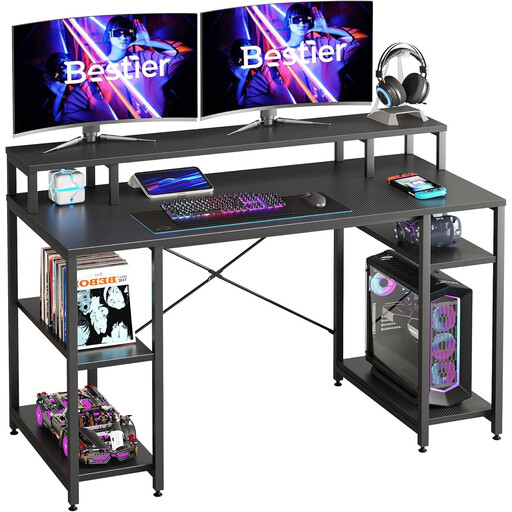
Why It Stands Out This model focuses on a generous, straight 140 cm wide work surface and an ergonomic design. The raised monitor stand positions the screen at eye level, which can improve neck posture, while also creating additional space on the desk.
Key Features
Who It's For Users who need maximum desk width for extensive hardware. It's a great choice as a spacious office desk for a home office or as a central gaming desk for demanding PC gamers.
The models presented here already cover many use cases. However, if you are looking for specific configurations, different sizes, or other designs, it's worth taking a look at our broader selection. Discover more models in our gaming desks with shelves category.
A good gaming desk is defined by three core features: stability, a sufficiently large and durable surface, and thoughtful cable management. Additional features like integrated power outlets, LED lighting, cup holders, and headphone hooks enhance comfort and organization.
The ideal size depends on your setup. For a single-monitor setup, a width of 120 cm to 140 cm is usually sufficient. If you use two or more monitors, a width of at least 140 cm or an L-shaped desk is recommended, as it offers more surface area for arranging your equipment.
Yes, a corner gaming desk can be very worthwhile, especially if you use your space for multiple purposes. It allows for a clear separation between gaming and work areas, offers more surface space, and makes efficient use of room corners that might otherwise go unused. This leads to a more organized and spacious feel.