
Lieferung heute & morgen

Qualitätsgarantie

Willkommens-Angebote freischalten: KOSTENLOSE Lieferung | Bis zu 80 % RABATT | Kostenlose 30-Tage-JoyPlus-Testphase
App herunterladen
Choosing the right gaming desk is a foundational decision for any setup. The wrong model can not only disrupt your aesthetic but also severely compromise ergonomics and functionality. Many buyers focus on visual features and overlook crucial construction details, which often leads to disappointment and unnecessary expense. This guide highlights the most common pitfalls and explains which core parameters truly matter.
Before diving into models and features, it's important to understand the typical problems that only become apparent after assembly and during daily use with many off-the-shelf desks.
To avoid these pitfalls, you should base your selection on objective criteria. The following three parameters are crucial for the longevity and functionality of your setup.
The foundation of any good desk is its stability. Look for the following features:
An ergonomic workspace helps prevent postural damage. A desk with a monitor riser is a key feature here.
Modern desks are more than just a surface; they act as a central hub for technology and organisation.
Based on the criteria mentioned, we have identified several models that represent a suitable solution for different user profiles and requirements.
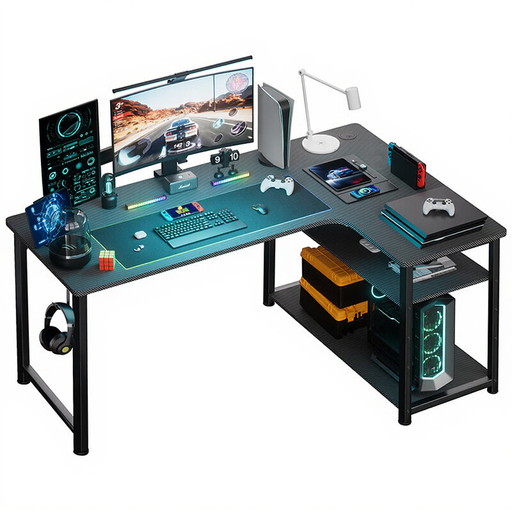
Why This Fits Their Persona: Ideal for users who need a desk for both home office and gaming, making optimal use of a corner space. The L-shape naturally separates work and play areas.
It solves the cable chaos dilemma with integrated power outlets and USB ports. The sturdy steel construction and generous corner shape provide a wobble-free and spacious work surface.
Maximum space utilisation due to L-shape; integrated power supply for a tidy surface; adjustable shelves for flexible storage.
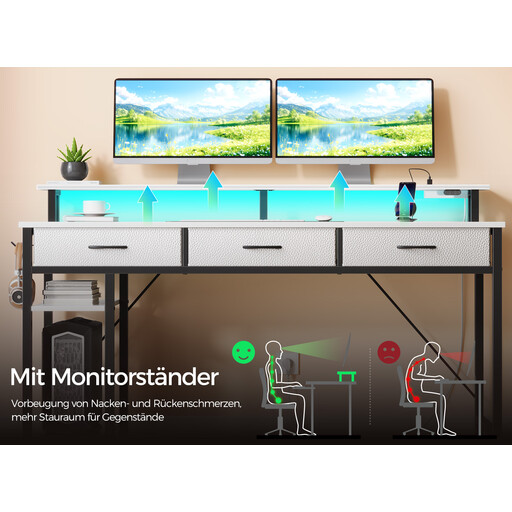
Why This Fits Their Persona: Perfect for gamers and streamers who want an immersive setup with customisable RGB lighting and an all-in-one charging station. All technical components are integrated for a seamless experience.
Sidesteps the trap of impractical features by offering smart RGB lighting with app control and music sync. The carbon fibre texture is applied to a sturdy steel frame, avoiding the stability trap.
Fully integrated tech package (LED, power, USB); ergonomic monitor riser for two monitors; ample storage space via drawers and side shelves.
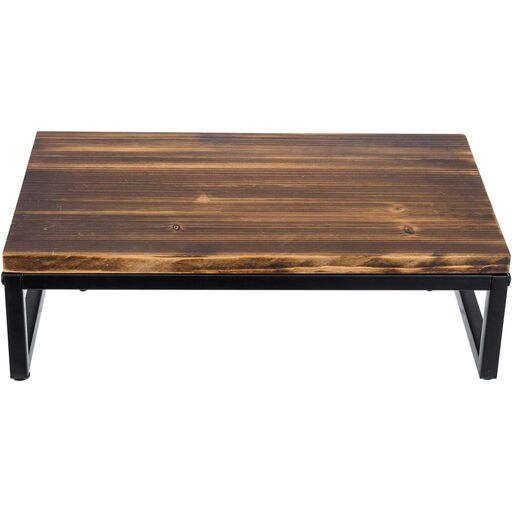
Why This Fits Their Persona: For users who already own a simple desk and want to upgrade it for better ergonomics and aesthetics. The focus is on high-quality materials (solid wood) and clear function rather than integrated tech.
This product bypasses the stability trap by using solid wood and a steel frame with a high load capacity of 45 kg. It is a pure, functional solution for improving ergonomics without fragile add-on features.
Improves the ergonomics of any existing desk; made from durable solid wood and steel; creates additional storage space under the monitor for a keyboard or laptop.
We've compiled a full, up-to-date list of products that fully meet these strict selection criteria and UK/EU safety regulations.
Safety is the most important criterion here. The integrated power supply module must bear a CE marking. This confirms that the product complies with applicable EU directives. Also, check if the number of outlets and USB ports is sufficient for your setup and if they are positioned for easy access without restricting your workspace.
The ideal height depends on your body height and your chair. Most desks have a fixed height of about 75 cm. Ergonomically, it's optimal if your forearms rest on the desktop at a right angle with your shoulders relaxed. If you are very tall or short, a height-adjustable model can be a worthwhile investment. Alternatively, an adjustable office chair can help you find the correct sitting posture.
The term "carbon fibre look" usually refers to a plastic film or a laminate with a corresponding texture applied to an engineered wood panel. It is not real carbon fibre. The scratch resistance varies greatly depending on the quality of the coating. While it can be more durable than a simple paint finish, it is not immune to scratches from sharp objects. Using mousepads and coasters is still recommended to protect the surface in the long term.