
Lieferung heute & morgen

Qualitätsgarantie

Willkommens-Angebote freischalten: KOSTENLOSE Lieferung | Bis zu 80 % RABATT | Kostenlose 30-Tage-JoyPlus-Testphase
App herunterladen
A new gaming desk is more than just a piece of furniture; it's the command centre for your setup. But the market is flooded with models whose marketing promises often don't hold up to reality. As a Joybuy Product Recommendation Officer, I'll help you identify the crucial features and avoid common purchasing pitfalls, ensuring your investment pays off in the long run.
Many buyers focus on visual appeal and overlook fundamental functional flaws. These three mistakes frequently lead to disappointment:
To avoid the problems mentioned above, you should check three technical aspects before buying. These define the durability and functionality of your future home office computer desk or gaming setup.
The foundation of any good desk is its construction. Look for a frame made of powder-coated steel, which offers high torsional rigidity. Z, K, or X-shaped leg designs are not just a visual feature; they significantly contribute to stability by better absorbing lateral forces. The desktop should have a minimum thickness of 15 mm and be made from a robust material like MDF or particleboard with a scratch-resistant coating (e.g., a carbon fibre texture). Adjustable feet are a must to compensate for uneven floors and guarantee a wobble-free stand.
Choosing the right shape depends on your available space and your usage habits.
Modern desks offer more than just a surface. A PC desk with power outlets and USB ports is a crucial advantage for a clean setup. It allows you to directly connect monitors, your PC, and peripherals without needing extra extension cords. A desk with LED lighting can significantly enhance the atmosphere. Look for a gaming desk with RGB system that can be controlled via remote or an app and offers various colours and brightness levels to prevent glare.
Based on the criteria above, we have identified a few models that are well-suited for specific needs.
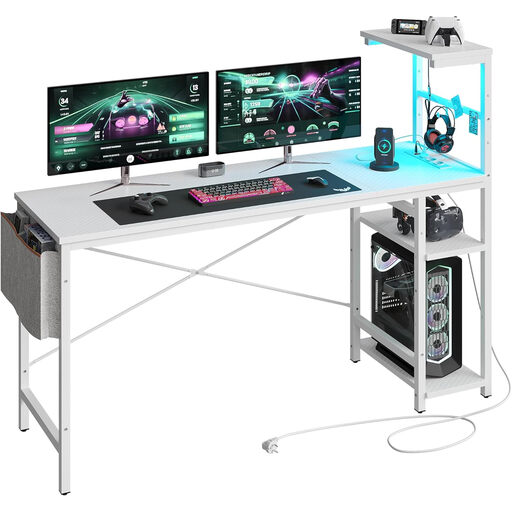
Why this model is a great fit: Ideal for smaller rooms or dedicated corners in a home office. It provides a compact yet fully functional base with integrated ports and atmospheric lighting, without overwhelming the space.
The X-shaped brace ensures solid stability, while the integrated power outlets and LED strip directly solve the problems of cable clutter and impractical add-ons.
The adjustable shelves can be mounted on either side, allowing for high flexibility in adapting to the room's layout.
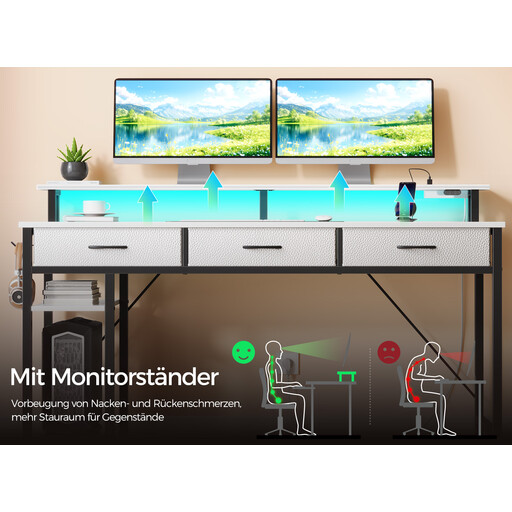
Why this model is a great fit: For users who need an all-in-one workstation with maximum storage and full integration. Perfect for setups with multiple monitors, consoles, and extensive peripherals.
This model combines a robust steel frame with thoughtful storage (drawers, shelves) and a fully equipped power station, making separate, often unstable solutions redundant.
A comprehensive storage solution with three fabric drawers and two side shelves; the app-controlled RGB lighting with a music sync mode creates an immersive atmosphere.
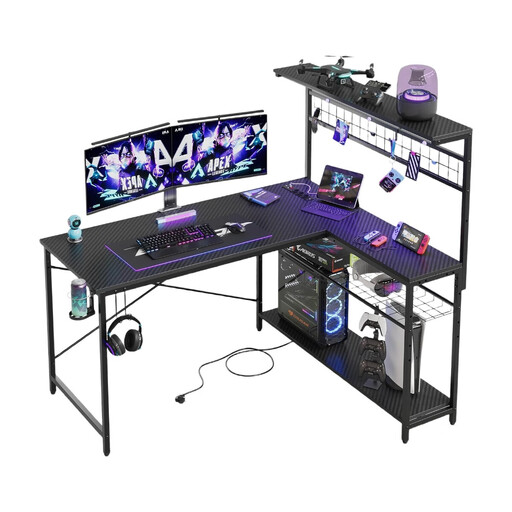
Why this model is a great fit: The L-shaped design is perfect for users who want a clear separation between their gaming and work areas. It makes optimal use of corners and creates two defined zones on a single, stable platform.
The L-shape provides an inherently stable and large work surface. The integrated RGB lighting is discreetly placed under the monitor shelf, providing atmosphere without being glaring or intrusive.
The reversible design allows the long side to be assembled on either the left or right. The 4-tier shelf utilises vertical space for additional storage.
After choosing the right desk, the appropriate lighting is the next step toward a perfect setup. Good illumination of the workspace prevents eye strain and promotes concentration.
We have compiled a complete, up-to-date list of products that fully meet these strict selection criteria and German safety regulations.
A solid gaming desk should have a load capacity of at least 50 kg to safely hold a PC, two monitors, and accessories. For more elaborate setups with heavy PC cases or multiple large screens, models with a load capacity of 80 kg or more are recommended. Always check the manufacturer's specifications.
A corner gaming desk model is not inherently better, but it offers specific advantages. It is ideal for filling unused room corners and creating a large, continuous surface. This allows for a clear separation of zones, e.g., one for the gaming setup and another for work or study. For smaller rooms or setups with only one monitor, however, a classic rectangular desk may be the more practical and space-saving solution.
With a gaming desk with RGB lighting, you should pay attention to the control options. A remote control or app control offers flexibility in colour choice and brightness. It is important that the lighting is dimmable to avoid glare in the dark. Also, ensure that the electrical components, especially the power supply, bear the CE marking for certified safety in the EU.