
Lieferung heute & morgen

Qualitätsgarantie

Willkommens-Angebote freischalten: KOSTENLOSE Lieferung | Bis zu 80 % RABATT | Kostenlose 30-Tage-JoyPlus-Testphase
App herunterladen
A clean setup without cable clutter and with enough space for all your devices is the foundation for focused work and intense gaming. A gaming desk with power outlets promises just that: a central hub that combines organisation and functionality. But the market is flooded with models whose marketing promises are often more style than substance. Before you make a decision, it's important to know the common pitfalls that can quickly turn a supposed upgrade into a costly mistake.
As your Joybuy Product Recommendation Officer, I'm here to help you navigate the jungle of offers. We'll focus on the facts and show you what really matters.
The 3 Most Common Mistakes When Buying a Gaming Desk:
To avoid these pitfalls, you should focus your attention on three core areas. These determine the longevity, safety, and daily utility of your new workspace.
The cornerstone of any desk is a stable base. Look for a frame made of powder-coated steel. This material offers high strength and is protected from scratches and corrosion by the coating. Additional stability features are crucial:
A large computer desk requires an especially robust substructure to support the larger surface without vibrations.
A desk with USB ports and power outlets must comply with European safety standards. Check the following points:
A modern workspace should adapt to you, not the other way around. Ergonomic features and smart storage are therefore not luxury extras, but essential functional elements.
We have analysed several models that are suitable for different needs based on objective features.
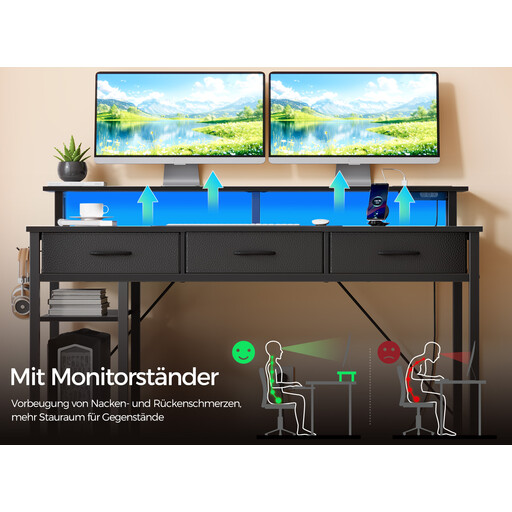
Why This Fits Their Persona: Ideal for users seeking an all-in-one workstation for a complex gaming and home office setup. The corner design makes optimal use of space, while the integrated power supply, LED lighting, and versatile storage create a tidy and immersive environment.
The combination of a steel frame and reversible construction ensures stability and adaptability. The integrated power strip with 2 outlets and 2 USB ports centralises cable management.
Comprehensive features: Gaming desk with LED lighting (app-controlled), monitor riser, 3 fabric drawers, and 2 side shelves. The reversible design allows the shelves to be mounted on the left or right side.
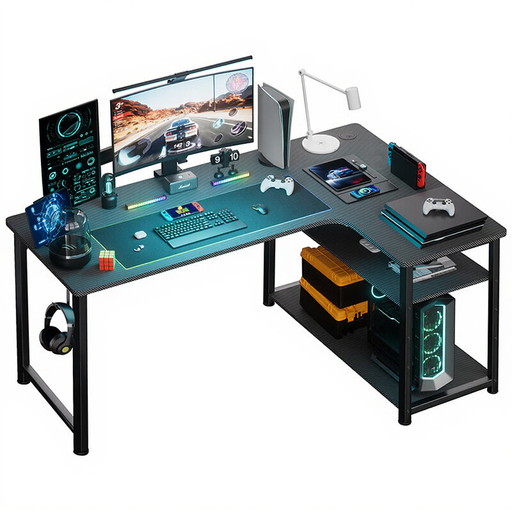
Why This Fits Their Persona: Perfect for budget-conscious buyers looking for a functional corner solution with essential features. This desk offers a generous work surface and the necessary power supply without bloating the budget with elaborate extras.
Focuses on the essentials: a stable L-shaped frame, an integrated shelf, and a safe power supply. It avoids the pitfall of paying for superfluous gimmicks that don't enhance core functionality.
Excellent value for money. Offers an L-shaped work surface, integrated power outlets and USB charging ports, and an adjustable shelf for organising office and gaming essentials.
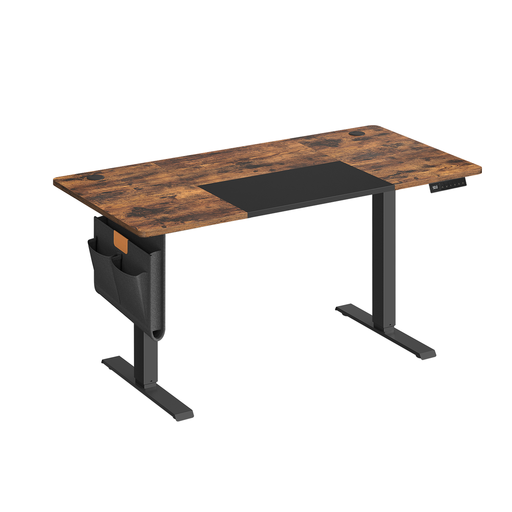
Why This Fits Their Persona: For home office users or creative professionals who prioritise ergonomics and a healthy work style. Switching between sitting and standing is effortless thanks to the quiet motor and memory function, promoting focus and well-being.
Invests in what matters: a sturdy steel frame and a reliable, quiet motor for height adjustment. Instead of optical gimmicks, this modern home office desk focuses on functional ergonomics.
Stepless electric height adjustment (72-120 cm) with 4 memory presets. Includes practical details like a USB-C port, cable management, an organiser pouch, and a hook for a tidy setup.
We have compiled a complete, up-to-date list of products that fully meet these strict selection criteria and comply with all relevant safety regulations.
The maximum load capacity varies greatly depending on the model and construction. A solid desk with a steel frame can often support between 50 kg and 100 kg. However, it's crucial to check the manufacturer's specifications. Pay attention to separate weight limits for the desktop, shelves, and monitor riser, as these often differ. Distribute the weight evenly and do not exceed the limits to ensure stability.
Yes, as long as they comply with current standards. Be sure to look for the CE marking on the product or its packaging. This confirms conformity with EU safety standards. Use the integrated ports only for low-power devices like monitors, PCs, laptops, and chargers. High-power appliances like heaters or kettles should always be plugged directly into a wall socket to prevent overloading and fire hazards.
LED lighting is primarily an aesthetic feature that can enhance the atmosphere of your gaming area. Modern systems often offer app control, music synchronisation, and a wide range of colours. Functionally, it offers no direct advantage but can contribute to immersion and visually upgrade your setup. Whether the investment is worth it depends on your personal preferences. Check that the lighting is subtly integrated and doesn't cause glare while working or gaming.