
Lieferung heute & morgen

Qualitätsgarantie

Willkommens-Angebote freischalten: KOSTENLOSE Lieferung | Bis zu 80 % RABATT | Kostenlose 30-Tage-JoyPlus-Testphase
App herunterladen
A tidy workspace or gaming station starts with smart cable management. A gaming desk with power outlets promises just that: a central, integrated solution for power and charging ports that ends the cable clutter under your desk. However, the market is flooded with models whose practical utility doesn't always live up to the marketing promise. As your Joybuy Product Recommendation Officer, I'll help you identify the crucial features and steer clear of common purchasing pitfalls.
Many buyers invest in a desk that seems perfect at first glance, only to find a few months later that fundamental flaws severely limit its usefulness. Here are three common problems:
To make an informed decision, you should focus on the objective parameters that determine the longevity and functionality of your new desk.
Before you decide on a model, check three crucial aspects. These will determine whether the desk is a long-term asset to your setup or a short-term disappointment.
A desk's stability is directly dependent on its material and construction. A powder-coated steel frame is often the most reliable choice here. Pay attention to the thickness of the frame's material and look for additional crossbars (e.g., X- or K-shaped struts) that prevent wobbling.
The desktop is usually made of composite materials like MDF or particle board. The thickness of the desktop (at least 15 mm recommended) and the quality of the surface coating are crucial here. A melamine or carbon-fiber-textured coating offers good protection against scratches and is easy to clean. Always check the manufacturer's specified maximum load capacity and plan for a buffer, especially if you're setting up heavy equipment like multiple monitors or a large PC tower.
A computer desk with USB ports and power outlets is extremely practical, but the quality of the components is critical.
The shape and layout of the desk should suit your space and work habits. An L-shaped desk or a corner gaming desk model makes optimal use of corners and can separate work from gaming areas.
A PC desk with shelves or integrated drawers helps maintain order. A raised monitor shelf is particularly useful. It positions the screen at eye level, which is proven to reduce strain on the neck and back while freeing up valuable space on the main work surface. A gaming desk with LEDs can enhance the atmosphere, but make sure the controls (via app or remote) are flexible and that the lights can be completely deactivated when needed.
Here are some recommendations tailored to specific needs that avoid the pitfalls mentioned.
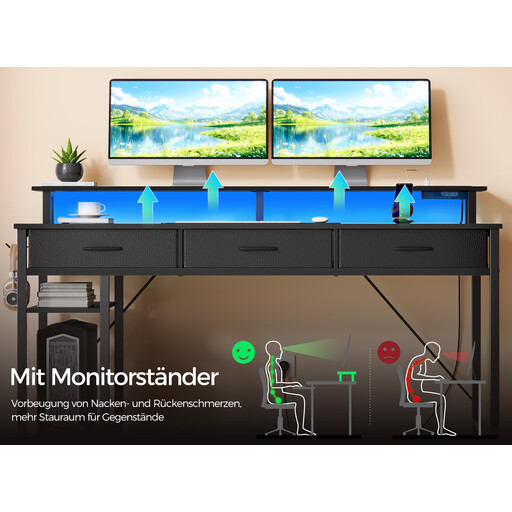
Why This Fits Their Persona: This model is an all-in-one solution that combines gaming features like customizable RGB LEDs with practical home office elements such as drawers, a file cabinet, and an integrated charging station. Ideal for users who need a single desk for both work and play.
The powder-coated steel frame provides essential stability. The integrated power supply is clearly specified for low-power devices, which prevents false expectations and improper use.
Fully Integrated Setup: Offers power, USB, LED lighting, a monitor stand, and storage in one package. Reversible Design: Can be assembled for left- or right-side orientation depending on the room layout.
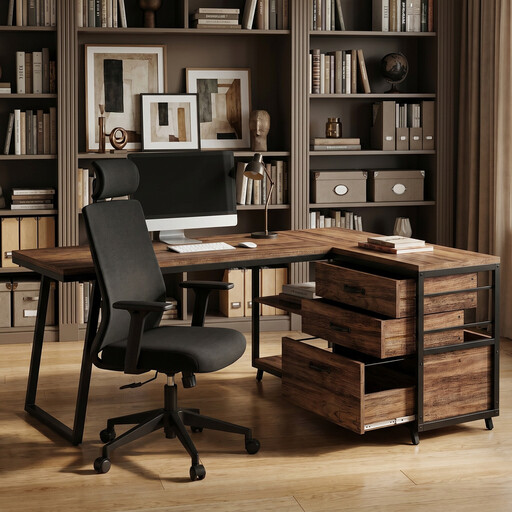
Why This Fits Their Persona: Perfect for small rooms or unused corners. The L-shaped design maximizes workspace without dominating the room. The focus is on organization with three drawers and open shelves, ideal for a tidy home office.
This model forgoes potentially fragile electronic gimmicks and focuses on solid mechanical construction with a sturdy metal frame and practical, built-in storage.
High Space Efficiency: The reversible L-shaped design adapts flexibly to any corner. Ample Storage: Three drawers (including one for files) and two shelves offer exceptional organizational potential.
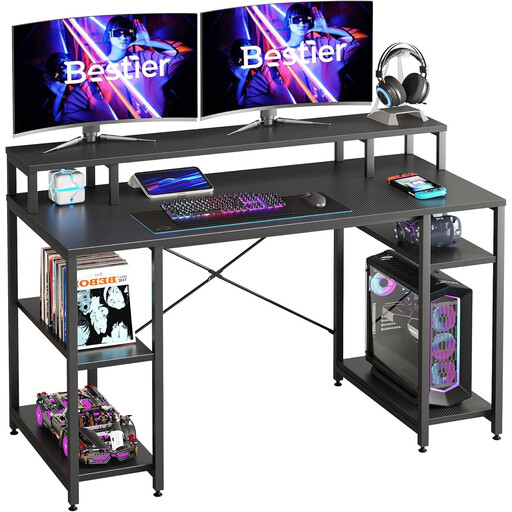
Why This Fits Their Persona: For users who prefer a large, uncluttered workspace without distractions. At 140 cm wide, the desk offers ample space for two monitors and accessories. The focus is on ergonomics and stability, not integrated electronics.
By omitting integrated electronics, it bypasses the risk of subpar components. Instead, stability is maximized with an X-shaped crossbar, making it a reliable foundation for expensive equipment.
Ergonomic Design: The raised monitor stand promotes correct posture. Flexible Storage: The lower shelves are adjustable and can be adapted to the size of a PC tower or other equipment.
We have compiled a complete, up-to-date list of products that fully meet these strict selection criteria and safety regulations.
The load capacity is typically designed for standard office and consumer electronics like PCs, monitors, speakers, and chargers. You can find the exact maximum wattage in the product specifications. It is important not to exceed this limit and not to connect high-power appliances like heaters or kitchen devices to avoid overheating or damage.
Yes, on most models with high-quality LED systems, the lighting can be completely turned off using the included remote control or a smartphone app. This allows the desk to be used in a neutral environment for home office use without distracting light effects.
Read the assembly instructions carefully. Ensure that all cables are routed correctly and without risk of being pinched. Before the first use, you should check that all connections are secure. Always keep liquids away from the electrical connections and ensure the desk is placed on a level, stable surface to guarantee safety.