
Lieferung heute & morgen

Qualitätsgarantie

Willkommens-Angebote freischalten: KOSTENLOSE Lieferung | Bis zu 80 % RABATT | Kostenlose 30-Tage-JoyPlus-Testphase
App herunterladen
A modern workspace or gaming setup requires a multitude of devices—from a PC and monitors to peripherals and mobile phone charging stations. This often leads to messy cable clutter and a shortage of available outlets. A gaming desk with power outlets solves this problem by integrating the power supply directly into the furniture. The result is a tidy, functional, and safe space for both gaming and work. This article presents a selection of models and offers practical advice for your purchasing decision.
Choosing the right model depends on your individual needs for space, functionality, and organisation. Three key aspects should be considered.
The most important feature is the integrated power strip. Check the number of available outlets and USB ports. A good computer desk with outlets and USB should offer at least two to three standard power outlets and, ideally, a combination of USB-A and USB-C ports. Pay attention to the power strip's maximum load capacity and safety features like overload protection. The positioning of the ports—whether on the desktop or discreetly on the side—affects cable management and accessibility.
The shape of the desk determines how efficiently it uses the available space. A classic rectangular desk is versatile and fits into most room layouts. For users who need more surface area or want to fill an unused corner, an L-shaped desk or a corner gaming desk is a smart option. These designs allow for a clear separation of gaming and work areas and often provide more room for multiple monitors and accessories.
A well-organised space is crucial for concentration and efficiency. Models with integrated shelves, drawers, or hooks offer valuable storage, making for an ideal office desk with storage. Consider what you need to store: headsets, controllers, documents, or office supplies. Additional features like a desk with LED lighting can enhance the room's atmosphere and are particularly popular in a PC gaming desk. A monitor stand can also improve ergonomics by raising the screen to eye level.
Based on the criteria mentioned, we have compiled a selection of desks that stand out for their integrated features and thoughtful design.
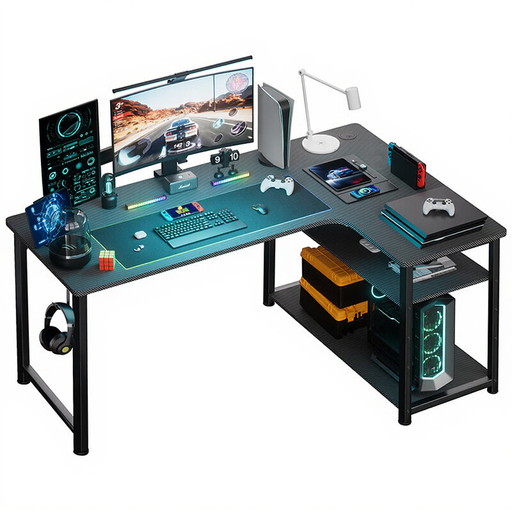
Why This Model Stands Out With its L-shape, the COMHOMA desk makes optimal use of corner space. The integrated power strip with two outlets and two USB ports powers all essential devices right at your workspace. An additional shelf helps keep the desk surface clear and organised.
Pros
Who Is It For? This model is ideal for home office users or gamers who want to set up a dedicated corner for their setup and value a tidy workspace with a built-in charging function.
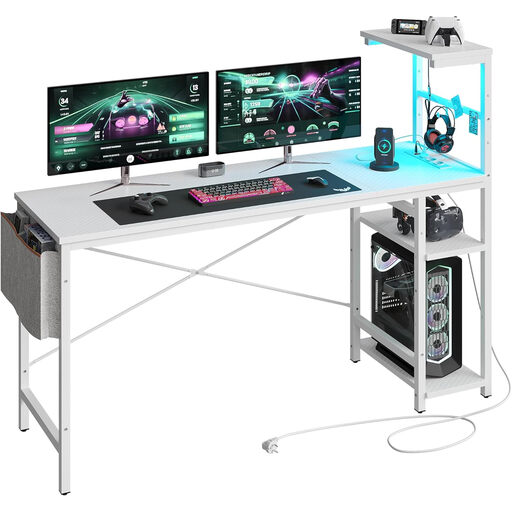
Why This Model Stands Out The Bestier desk combines functionality with customisable aesthetics. The integrated LED lighting offers 7 colours and 20 dynamic modes to create the perfect gaming atmosphere. In addition to the built-in outlets, the model features a side storage bag and a hook for headsets. The shelves can be flexibly mounted on the left or right side.
Pros
Who Is It For? This desk with LED is aimed at gamers and content creators who want a customisable setup and value atmospheric lighting and clever organisational solutions in addition to a power supply.
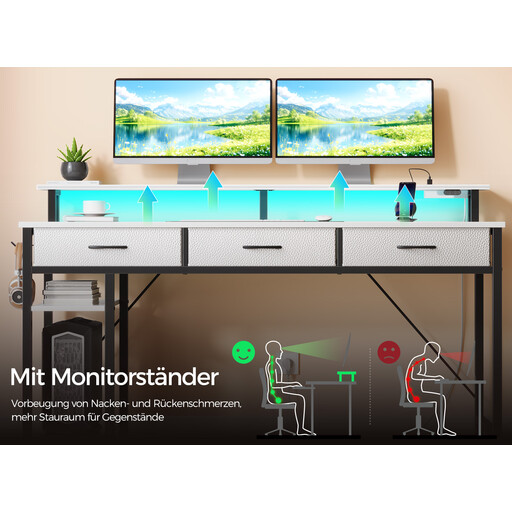
Why This Model Stands Out This model is a comprehensive solution for anyone needing maximum storage and advanced tech. It offers not only two outlets and two USB ports but also three fabric drawers, two side shelves, and a monitor stand. The RGB LED lighting is controllable via an app and offers over 60,000 colours as well as a music synchronisation feature.
Pros
Who Is It For? Ideal for power users, streamers, or home office workers looking for an all-in-one solution. Anyone who needs to accommodate a lot of accessories, documents, and devices while wanting highly customisable lighting will find this model a perfect fit.
The models featured provide a great starting point, but the requirements for a workspace or gaming setup are highly individual. If you haven't found the right solution yet, there are many more designs and configurations to explore.
Discover more models in our "Desks" category
1. What safety features should I look for in an integrated power strip? Ensure the power strip has a CE marking, which confirms compliance with EU safety standards. Integrated overload protection is also an important feature to protect connected devices from power surges. Do not connect high-power-consumption devices, such as space heaters or kettles, to the desk's power strip.
2. Is an L-shaped desk better for gaming? An L-shaped desk offers significant advantages for gamers who need a lot of space. It allows for the creation of multiple zones—one for the primary gaming setup and another for streaming equipment, work, or other hobbies. The larger surface area makes it easy to position multiple monitors comfortably. The downside is that it typically requires a corner and can feel bulky in smaller rooms.
3. How much space do I need for a gaming desk? Measure your available space carefully before buying. Consider not only the width and depth of the desk but also the room you'll need for your chair to move freely. Plan for at least 80 cm (about 32 inches) of space behind the desk. Also, make sure that nearby doors and drawers can still be opened without obstruction.