
Lieferung heute & morgen

Qualitätsgarantie

Willkommens-Angebote freischalten: KOSTENLOSE Lieferung | Bis zu 80 % RABATT | Kostenlose 30-Tage-JoyPlus-Testphase
App herunterladen
Choosing the right gaming hardware can be complex. The market is saturated with technical specs, marketing promises, and a constantly growing number of products. For enthusiasts looking to upgrade their gaming PC or build a new one, making informed decisions is crucial to optimising your budget and achieving balanced performance. However, many well-intentioned purchases end in disappointment because crucial details were overlooked. This guide highlights common pitfalls and reveals which core parameters truly matter.
Before investing in new PC components, it's helpful to understand the typical mistakes that often lead to unsatisfactory results.
To avoid these pitfalls, focus on the harmony between your components. The following parameters are crucial for a balanced system.
The choice between high resolution and a high refresh rate is one of the most fundamental decisions.
The technology behind the display is a key determinant of image quality.
Based on these criteria, we've compiled a selection of components tailored to specific user profiles.
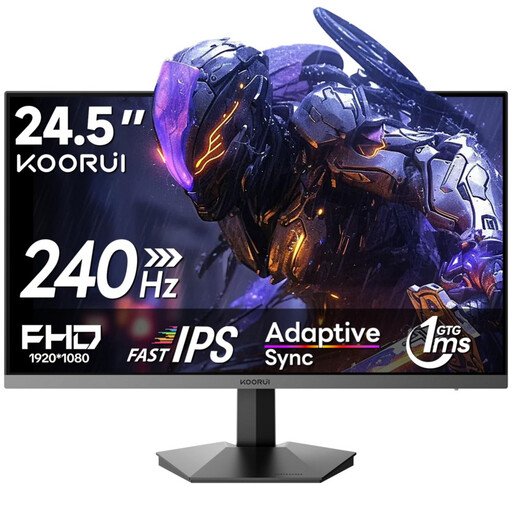
Why This Fits Their Persona: This monitor is engineered for maximum speed. For players of fast-paced FPS titles, a high refresh rate is more important than resolution. The 24.5-inch size allows them to keep the entire field of view in sight without needing to move their head.
It avoids the 'future-proofing' trap by focusing on what's essential: speed. Instead of investing in a 4K resolution, which is often unnecessary for competitive play, it offers an extremely high refresh rate that can be achieved by mid-range graphics cards.
240Hz Refresh Rate & 1ms Response Time: Ensures extremely fluid motion and minimal input lag.
Rapid IPS Panel: Combines the speed of a TN panel with the colour quality of IPS.

Why This Fits Their Persona: For gamers who want both fast-paced action and high image quality for story-driven games and media consumption. The WQHD resolution on a 27-inch screen provides high pixel density for sharp images, while the high refresh rate ensures fluid gameplay.
This monitor solves the bottleneck problem by offering a balanced combination of resolution and speed. It challenges modern graphics cards without overwhelming them, ensuring that the power you've invested in is visible on screen.
QHD Resolution & 200Hz (OC 210Hz): The ideal balance of sharpness and fluid motion.
SS-IPS Panel with 94% DCI-P3: Delivers fast response times and high colour accuracy for vibrant visuals.
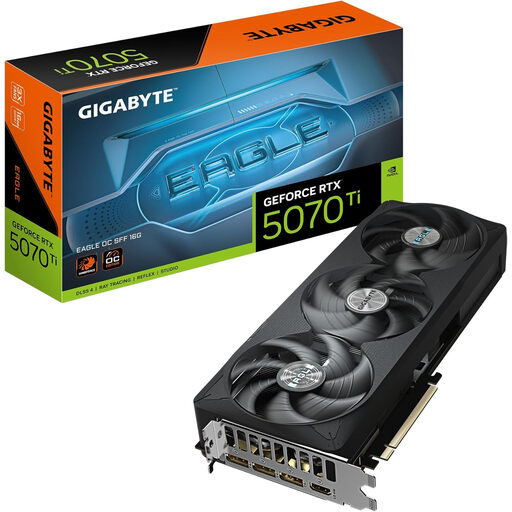
Why This Fits Their Persona: For gamers who refuse to compromise on visual quality. This graphics card is the foundation for a high-end system designed to handle modern games at 4K resolution with high settings and fluid frame rates.
It addresses the core bottlenecking problem at the source. Instead of buying an expensive 4K monitor only to find the GPU is insufficient, this card provides the necessary power to make such an investment worthwhile in the first place.
16 GB GDDR7 Memory: Provides ample capacity for high-resolution textures and future games.
PCI-Express 5.0 Interface: Ensures high bandwidth and compatibility with modern motherboards.
We have compiled a complete, real-time updated list of products that fully meet these strict selection criteria and UK safety regulations.
For 2026, VRAM requirements are heavily dependent on the target resolution. For Full HD (1080p) gaming, 8 GB of VRAM often remains sufficient. For WQHD (1440p), 12 GB should be considered a solid standard to ensure stable performance even with high-texture details. Anyone playing at or planning to upgrade to 4K (2160p) should consider a graphics card with at least 16 GB of VRAM, as games and their assets are becoming increasingly demanding.
A curved monitor can make the gaming experience more immersive, as the curved display better fills your peripheral vision and creates a sense of depth. This is particularly advantageous in racing sims, flight simulators, and expansive open-world games. However, for competitive shooters, some players prefer flat screens because straight lines (like the edges of buildings) are displayed without distortion. Ultimately, the decision comes down to personal preference and the genres you play most.
The answer depends on the biggest bottleneck in your current system.