
Lieferung heute & morgen

Qualitätsgarantie

Willkommens-Angebote freischalten: KOSTENLOSE Lieferung | Bis zu 80 % RABATT | Kostenlose 30-Tage-JoyPlus-Testphase
App herunterladen
The search for the right gaming headset can quickly become overwhelming. The market is flooded with technical jargon, marketing promises, and a vast selection ranging from budget-friendly entry-level models to high-end professional gear. As a Joybuy Product Recommendation Officer, I see every day where buyers fall into common traps, spending money on features they don't need or that fail to deliver in practice.
This guide is designed to help you separate the wheat from the chaff. We'll focus on the crucial features that define a great gaming headset and show you how to navigate the typical pitfalls.
Before we dive into the important specifications, let's look at the three most common sources of error that lead to disappointment.
To avoid a bad purchase, you should focus on verifiable, technical features. Here are the three most important aspects to check before you buy.
The drivers are the speakers inside the earcups. A large driver size (e.g., 50mm) is often advertised, but the quality of the material and the tuning are far more critical. A well-tuned 40mm driver can sonically outperform a poorly designed 50mm driver. Look for a frequency response of 20 Hz – 20,000 Hz, which covers the range audible to humans. This ensures that both deep explosions and high, subtle sounds like footsteps are reproduced clearly.
The choice of connection method depends on your platform and your priorities.
For clear communication, the microphone's design is crucial. A microphone with a Cardioid polar pattern primarily picks up sound from the front and suppresses noise from the sides and rear. This is ideal for isolating your voice and minimizing keyboard clicks or other ambient sounds. A detachable or flip-to-mute microphone offers additional flexibility. For professional streaming needs, a separate streaming microphone is often recommended.
Based on the criteria above, we have selected a few products that are suitable for different user profiles and requirements.
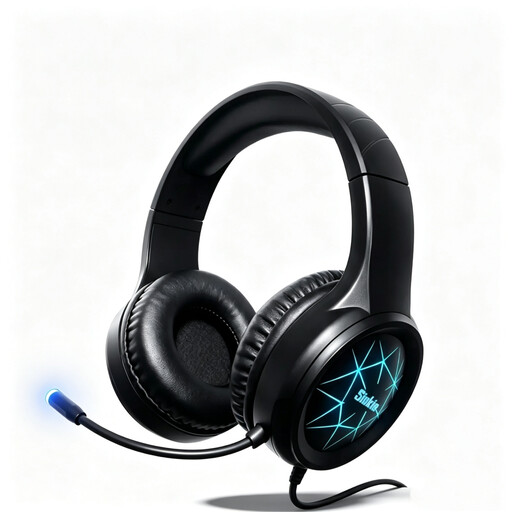
Why This Fits Their Persona: Ideal for gamers looking for a straightforward and affordable solution for PC and console. It offers all the basic functions without the premium for complex software or wireless technology.
It sidesteps the trap of overpriced "virtual surround sound" by focusing on solid stereo performance and a reliable wired connection via USB and 3.5mm jack. The plug-and-play functionality prevents compatibility issues.
Broad multi-platform compatibility (PC, PS5, PS4, Xbox, Switch) through dual connection options. For its price, the noise-cancelling microphone provides a solid foundation for team communication.
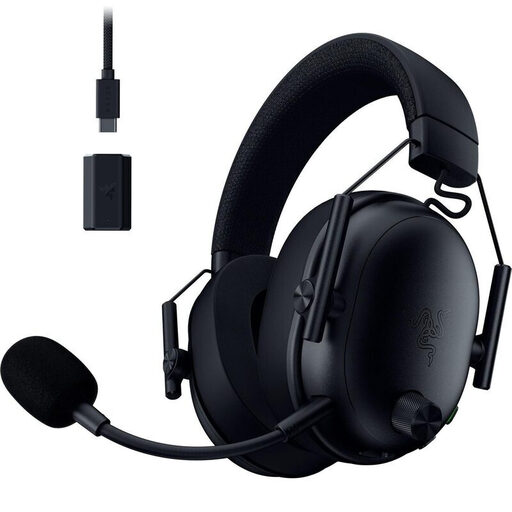
Why This Fits Their Persona: For demanding gamers who want the freedom of a wireless gaming headset without compromising on latency, sound, and microphone quality. Suitable for long gaming sessions on PC and PlayStation.
It directly addresses the comfort and microphone pitfalls. The breathable memory foam ear cushions are designed for marathon sessions. The detachable HyperClear microphone offers voice quality that is significantly above the standard of basic headsets.
The Razer HyperSpeed Wireless technology ensures an ultra-low latency connection. Dual connectivity (2.4 GHz + Bluetooth) allows for simultaneous connection to a console/PC and a smartphone.

Why This Fits Their Persona: Perfect for content creators who want to take their audio quality to the next level. This dedicated podcast microphone offers a more professional solution than any integrated headset microphone.
It solves the problem of the low-quality headset microphone at its root. Instead of a compromise, you get a specialised tool for voice recording. The dynamic capsule and cardioid pattern effectively isolate the voice from ambient noise.
The dual USB/XLR connectivity offers maximum flexibility: an easy start via USB and an upgrade path to a professional audio interface with XLR. It includes a built-in headphone jack for latency-free monitoring.
We've compiled a complete, up-to-date list of products that fully meet these strict selection criteria and all relevant safety standards.
Virtual 7.1 surround sound is a software-based technology that attempts to create a spatial audio experience. The quality varies greatly. On high-end models from brands like Razer or a JBL gaming headset, it can enhance immersion. However, an excellent stereo headset can often provide more precise enemy positioning than a cheap headset with poorly implemented surround sound. It's a "nice-to-have," but not a crucial buying criterion for competitive gaming.
Not necessarily. Compatibility depends on the connection type.
For casual gaming and voice chat with friends, a good gaming headset with a microphone is perfectly sufficient. However, if you are serious about streaming, producing videos, or need a podcast microphone, a dedicated USB microphone or an XLR microphone is a worthwhile investment. The audio quality, noise cancellation, and control over your voice are significantly better and contribute greatly to the professionalism of your content.