
Lieferung heute & morgen

Qualitätsgarantie

Willkommens-Angebote freischalten: KOSTENLOSE Lieferung | Bis zu 80 % RABATT | Kostenlose 30-Tage-JoyPlus-Testphase
App herunterladen
A gaming headset should deliver game audio, make voice chat easy to understand and remain comfortable even after extended use. In practice, however, some product claims can lead to disappointing purchases: a large driver size alone says little about the sound tuning, “surround sound” does not work identically on every platform, and a connector that fits a PC is not automatically suitable for every console.
This buying guide from the Joybuy Product Recommendation Officer takes an objective look at the most important criteria and shows which models suit different usage profiles.
50-mm drivers can help deliver powerful sound, but they do not guarantee clear voices or balanced reproduction. Sound tuning, earcup design and frequency range are also important. Specifications such as 20 Hz to 20,000 Hz describe the technical range, not necessarily the actual sound quality.
A surround-sound headset can simulate spatial effects. However, this feature may require specific software, a compatible operating system or a particular console. According to the product specifications, virtual 7.1 sound on the Razer BlackShark V2 X is only available on Windows. When using a 3.5-mm connection with a console, you should therefore check which audio functions are actually supported.
A wired gaming headset with a 3.5-mm connection can often be used with a PC, PlayStation, Xbox or Nintendo Switch. However, a PC may have separate sockets for headphones and the microphone. A Y-splitter may be required in this case. With USB gaming headsets, use also depends on whether the relevant device supports USB audio.
For a headset for PC and console, a 3.5-mm connection offers particularly broad compatibility. This type of 3.5-mm headset will usually connect directly to the controller or combined audio socket. Before buying, check the following:
A USB gaming headset is particularly suitable for PC workstations and devices with a compatible USB port. It may offer additional features such as virtual surround modes or integrated lighting, but is less flexible when connected to a console controller.
With a gaming headset with microphone, the microphone type, position and mute function are more important than marketing terms such as “crystal clear”. A directional microphone, such as one with a cardioid pickup pattern, primarily captures sound from the direction of your mouth. This can reduce background noise in the voice signal, although it cannot replace a quiet environment.
Useful features include:
An over-ear gaming headset surrounds your ears and can partially block out external noise thanks to its closed-back design. For long sessions, the key factors are the weight, clamping force, padding and size of the earcups. A lightweight gaming headset weighing between 220 and 240 grams may be more comfortable for many users than a heavier model, although the individual fit remains crucial.
Also look for memory-foam padding, breathable fabric covers and replacement ear pads. The latter can extend the product’s useful life if the covering material wears out over time.
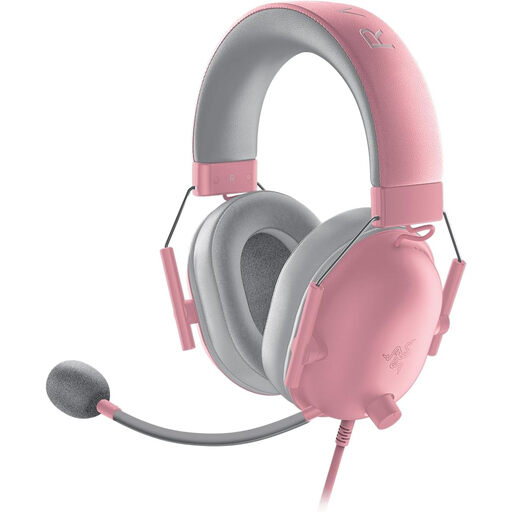
Why this product suits the profile: According to the product specifications, this wired headset uses a 3.5-mm connection and is compatible with PC, Mac, PS4, PS5, Xbox One and Nintendo Switch. Weighing 240 g, it is suitable for users looking for a lightweight gaming headset without a battery.
The supported platforms and analogue connection are clearly specified. You should still check whether a Y-splitter is required for your PC.
50-mm drivers, flexible cardioid microphone, passive noise isolation, plus volume and mute controls on the cable.
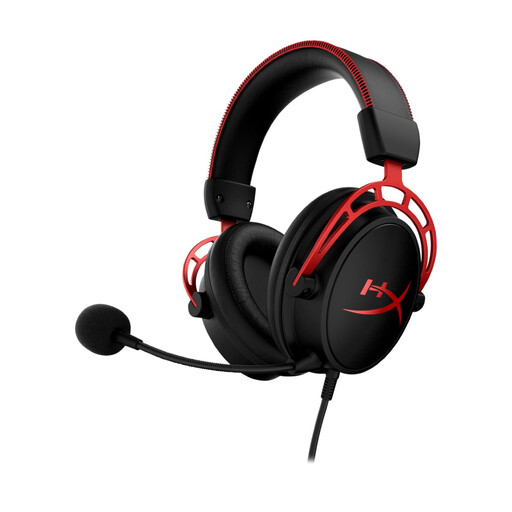
Why this product suits the profile: According to the manufacturer, the dual-chamber 50-mm drivers separate the bass from the mid and high frequencies. The aluminium frame, memory-foam padding and detachable microphone are designed for users who have high expectations of features and voice chat.
The microphone is detachable and the connection uses 3.5 mm. This means the headset can still be used without the microphone for other types of media.
Detachable noise-cancelling microphone, 3.5-mm connection, aluminium frame and 1.3-m cable plus 2-m PC extension cable.
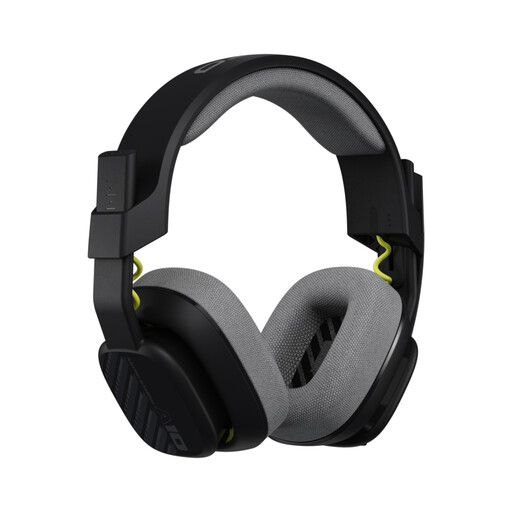
Why this product suits the profile: Replaceable ear and headband pads are practical for regular use. This 240-g model is listed as compatible with PS5, PS4, Xbox, Nintendo Switch, PC and Mac.
Wearable components can be replaced. This reduces the need to buy a new headset when the pads become worn after frequent use.
Flip-to-mute microphone, volume control on the cable, 32-mm drivers and replaceable pads.
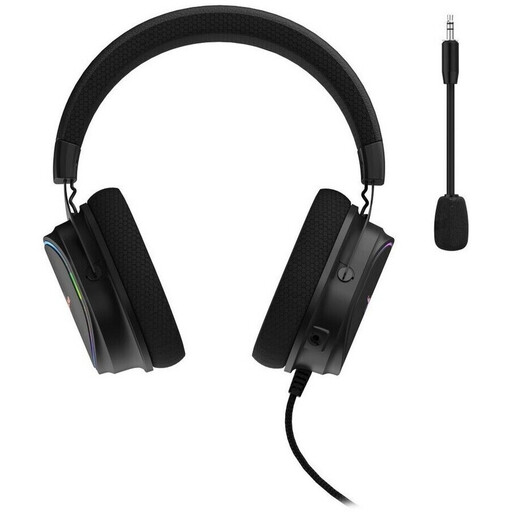
Why this product suits the profile: This USB headset is designed for PCs and gaming systems and has a 2.2-m cable. It suits desktop setups with a USB port readily available.
The USB connection and PC compatibility are clearly specified. Before buying, check whether your chosen console supports USB audio.
50-mm drivers, virtual 7.1 surround sound, flexible noise-cancelling microphone and 2.2-m USB cable.
We have put together a complete, regularly updated list of products that fully meet these strict selection criteria and the safety regulations applicable in the EU.
A 3.5-mm headset is usually the most flexible choice, provided that the controller or device has a suitable socket. With Xbox models, you should also check the stated compatibility. A USB model is mainly suitable for devices that support USB audio and will not automatically work with a controller.
It is not possible to give a reliable fixed lifespan. Cables, plugs and pads are typical wear points. Carefully connecting and disconnecting the plug, storing the headset in a dry place and using replaceable pads can help extend its practical service life. Damaged cables should no longer be used.
Comfort depends on the weight, padding and personal fit. Regardless of the model, you should keep the volume at a moderate level and take regular breaks during extended use. If you feel pressure or discomfort, adjust the headset or take a break.