Who is a gaming headset for?

Players who enjoy long story sessions

If you play lengthy, dialogue-heavy adventures, voices and subtle clues should remain clear without the headset becoming uncomfortable. The F.A.Z. Kaufkompass assesses the sound and fit of a specific model, but that can’t tell you whether it will suit you personally.

Console players on the sofa

When playing on the big screen, you need to consider the audio output and connection options on your controller, console or TV. PlayStation Support and Xbox Support explain the different connection options for their respective devices.

Players sharing a room

If you don’t want to disturb others with sound from the TV speakers, check that the console is actually using the headset as its audio output. You’ll also need a suitable microphone connection for voice chat.

What should you look for when buying?

Wired connection to your controller or gaming device

Best if: you mostly play in one spot and don’t want to charge your headset.

Consider: the cable needs to reach your seat, and the connection and microphone need to work with your platform. Xbox Support describes the 3.5 mm connection on compatible controllers.

Wireless connection via a supported console link

Best if: you want to move around while gaming without a headset cable, and the specific model is listed as compatible with your console.

Consider: battery life and, where needed, a USB receiver. According to PlayStation Support, standard Bluetooth audio isn’t a direct headset connection for the PS5.

Audio connection via your TV

Best if: your TV supports the audio output you want and you only need the features it actually provides.

Consider: connecting through your TV doesn’t automatically mean the headset is directly compatible with your console or that voice chat will work. Check the audio output and microphone connection separately.

Buying priorityWhat to checkWho should pay particular attention?
Suitable connection Compatibility of the exact model; for wired headsets, the plug and cable length; for wireless models, the receiver and supported protocol. When I play on the sofa, the connection needs to work with my console and controller. Around 29% of consumers put a reliable connection first.
Dialogue and game audio Reviews of the specific model’s sound and whether the audio features you want are available on your platform. For a detective adventure, I want to be able to distinguish conversations and audio clues clearly. Around 29% of consumers prioritise clear dialogue and distinguishable game sounds.
Comfort during long sessions The ear cushions, headband adjustment and weight of the specific model; try it on if possible. When I play through longer story sessions, I want my headset to feel comfortable. Around 21% of consumers pay particular attention to comfort.
Sound in a shared room Whether the headset is selected as the audio output device and the design of the specific model. When others are in the room, I don’t want game audio coming through the TV speakers. Around 14% of consumers put consideration for others first.
Voice chat Whether the microphone works with your intended connection, and whether the mute and volume controls are easy to reach. When I play with others, voice chat needs to work on my chosen platform. Around 7% of consumers prioritise this chat feature.

Avoid common assumptions

  • Assuming “Bluetooth” means direct console compatibility

    A Bluetooth headset won’t necessarily connect directly to your console for game audio. PlayStation Support says standard Bluetooth audio devices aren’t compatible with the PS5.

    Check the connection method listed for your exact console, and whether a USB receiver is included if you need one.

  • Assuming different model variants have the same features

    The wired HyperX Cloud III and wireless Cloud III S have different listed platform compatibility. The same is true of the Audeze Maxwell variants.

    Check the full model name and platform version, then confirm the connection and chat features.

  • Treating a review as a guarantee of personal fit

    A review can assess the sound and fit of a particular model, but it can’t tell you whether the headband and ear cushions will suit you.

    Consider the cushions and adjustment options, and try the headset on if possible before settling in for longer gaming sessions.

Key brands to consider

beyerdynamic

The wired MMX 300 PRO and the MMX 150 wireless use different connection methods, so make sure you don’t confuse them.

  • According to beyerdynamic, the MMX 300 PRO has replaceable cushions and cable; the manufacturer lists it for wired use with PlayStation and Xbox.
  • The F.A.Z. Kaufkompass gives the MMX 150 wireless a positive review for sound and fit, but notes its limited wireless range. This assessment doesn’t apply to the MMX 300 PRO.

HyperX

The wired Cloud III is an option if you want to use several devices via its listed connections.

  • HyperX lists 3.5 mm, USB-C and USB-A connections for the Cloud III, as well as compatibility with PC, PS5 and Xbox, among other devices.
  • The Cloud III S Wireless has a different compatibility list, which doesn’t include Xbox. So details for the wired Cloud III don’t automatically apply to this version.

SteelSeries

According to the manufacturer, the Arctis Nova 7X Wireless Gen 2 is a wireless option for switching between Xbox, PlayStation and PC.

  • SteelSeries describes game audio via a USB-C wireless adapter alongside Bluetooth audio from a smartphone; the manufacturer says a USB-A adapter is included.
  • Check which receiver you need for your setup and how the headset is charged. The manufacturer’s stated battery life doesn’t apply to other models in the range.

PlayStation

PULSE headsets are worth considering if you’re looking for a connection method specifically described for PlayStation.

  • For the PULSE Wireless Headset, PlayStation describes PS Link for game audio on PS5 and Bluetooth for simultaneous smartphone audio.
  • Bluetooth for your smartphone doesn’t mean standard Bluetooth audio will work as a direct PS5 headset connection. PlayStation Support describes supported wireless headsets that use a USB adapter.

Audeze

The original Maxwell was available in separate Xbox and PlayStation versions, so it’s important to check the exact variant.

  • Audeze specifically lists the included Dolby Atmos licence for the Xbox version only.
  • Audeze says the original Maxwell is no longer available directly from the company. This doesn’t tell you whether retailers have stock, or say anything about the newer Maxwell 2.

Gaming headsets at Joybuy

The selection includes wireless models with listed device connections, as well as wired headsets for compatible controllers or gaming devices.
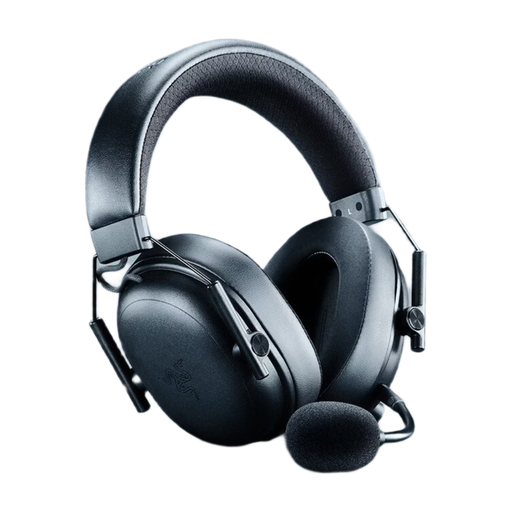
Razer BlackShark V3 Wireless Gaming Headset, Black

Razer BlackShark V3 Wireless, Black

A wireless option for listed platforms such as PS5 and PC, if you want freedom to move while gaming.

2.4 GHz wireless and USB connection; 40 mm drivers; detachable microphone; memory foam cushions; 270 g.

According to the product description, the internal battery isn’t user-replaceable.

View at Joybuy
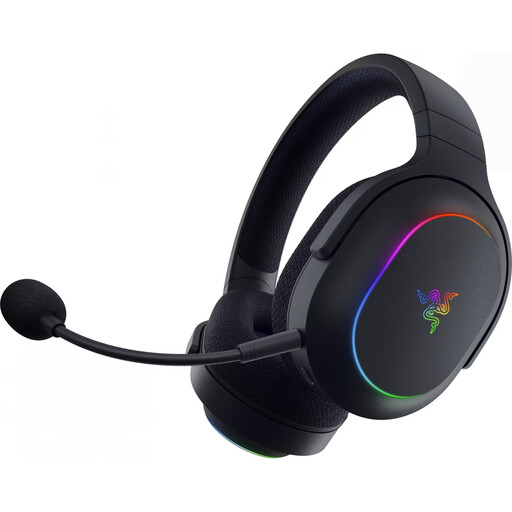
Razer Barracuda X Chroma Wireless Gaming Headset, Black

Razer Barracuda X Chroma Wireless, Black

A wireless option for the platforms listed in the product description, including PS4, PS5, PC and Switch.

2.4 GHz wireless and Bluetooth 5.3; USB-C receiver; 40 mm TriForce drivers; detachable microphone; 285 g.

The product listing states a battery life of up to 70 hours; this figure is based on the manufacturer’s claim.

View at Joybuy
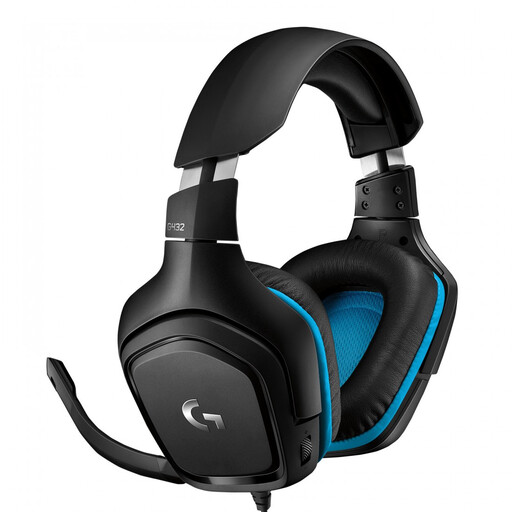
Logitech G G432 7.1 Surround Sound Wired Gaming Headset

Logitech G G432 7.1 Surround Sound, Wired

A wired option if your controller or gaming device has the right connection and you can manage the cable run to your seat.

3.5 mm connection for consoles; USB DAC for PC; according to the product description, compatible with PC, PS4, Xbox One and Nintendo Switch.

50 mm drivers; according to the description, DTS Headphone:X 2.0 is a PC feature that works via USB DAC. Flip the microphone up to mute it.

View at Joybuy

AOC Wired Gaming Headset for PS5 and Xbox

AOC Wired Gaming Headset for PS5 and Xbox

A wired option for the PlayStation and Xbox platforms named in the product title; check that your device has a suitable 3.5 mm connection.

40 mm drivers; 3.5 mm connection; 360° microphone; 207 g; adjustable headband and soft ear cups, according to the product description.

View at Joybuy
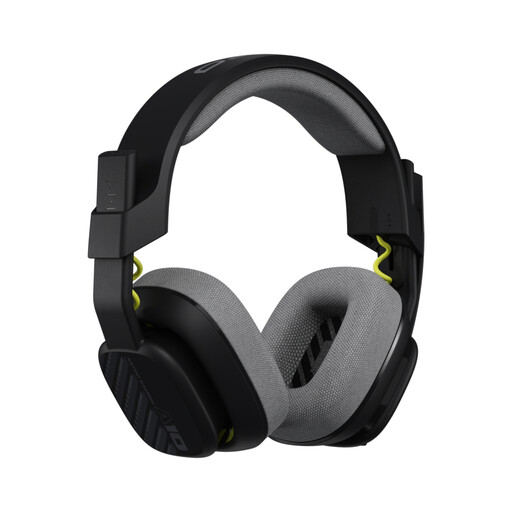
Astro A10 Gen 2 Wired Over-Ear Gaming Headset, Black

Astro A10 Gen 2 Wired Over-Ear, Black

A wired option for compatible devices with a 3.5 mm connection; make sure the cable will reach your seat.

32 mm speakers; 240 g without cable; unidirectional microphone with flip-to-mute function; replaceable ear and headband cushions, according to the product description.

The product description lists a 3.5 mm connection and compatibility with PlayStation, Xbox and Switch.

View at Joybuy

Frequently asked questions

Can I pair a Bluetooth headset directly with the PS5 for game audio?

According to PlayStation Support, standard Bluetooth audio devices can’t be used directly as a headset with the PS5. Instead, check whether the exact model supports a USB adapter or PS Link connection; Bluetooth for your smartphone is a separate connection.

How do I connect a headset when my Xbox is by the TV?

A compatible headset with a 3.5 mm plug can be connected to an Xbox Wireless Controller with the corresponding socket. The Xbox Wireless Headset uses Xbox Wireless to connect to the console; for another model, check its listed connection method.

Why is sound still coming from the TV after I connect my headset?

On PS5, check which output device is selected under “Settings > Sound > Audio Output”. PlayStation Support explains how to choose the audio output there; other devices have their own audio settings.

What should I plan for when using a wireless headset over the longer term?

Check the charging method, the receiver you need and whether replacement parts are available for the specific model. SteelSeries lists a USB-C dongle for the Arctis Nova 7X Wireless Gen 2; beyerdynamic lists replaceable cushions and cable for the MMX 300 PRO. These details don’t automatically apply to other models.

What rights do I have when buying a headset online in Germany?

When you buy from a business seller, you’re generally entitled to a statutory guarantee from the seller; Your Europe states that goods in the EU are covered for at least two years. This is separate from any voluntary guarantee. According to the Verbraucherzentrale, online purchases generally come with a 14-day right to cancel, although exceptions and the specific circumstances of the contract should be considered. Cancelling a purchase and making a claim about faulty goods are different rights.