
Lieferung heute & morgen

Qualitätsgarantie

Willkommens-Angebote freischalten: KOSTENLOSE Lieferung | Bis zu 80 % RABATT | Kostenlose 30-Tage-JoyPlus-Testphase
App herunterladen
A good Gaming Headset is essential for an immersive gaming experience and clear team communication. However, the market is flooded with marketing promises that are often more style than substance. Many gamers invest in models that become unusable after just a few months due to an uncomfortable fit, poor sound quality, or a faulty microphone. This guide will help you identify the crucial features and steer clear of common purchasing traps.
As a Joybuy Product Recommendation Officer, I filter the relevant information for you, so you can make an informed decision based on objective criteria, not marketing hype.
Before we dive into the important technical specs, let's highlight the most common issues that lead to disappointment and wasted money.
To avoid these traps, focus on the following three objective criteria. They are the key to a durable and high-performing gaming headset.
The audio drivers are the speakers in your headset. While many manufacturers advertise large 50mm drivers, the quality of the materials and the tuning of the drivers are more critical than sheer size. Neodymium magnets are a good indicator of precise sound reproduction. A well-tuned 40mm driver can sonically outperform a poorly designed 50mm one. Look for a wide frequency response (e.g., 20 Hz – 20,000 Hz) to perceive both deep bass and crisp highs in detail.
Nothing is more frustrating than a headset that doesn't work with your platform. Check the connection options carefully:
For clear communication, the microphone's pickup pattern is crucial. A unidirectional (cardioid) microphone primarily captures sound from the front, filtering out noise from the sides and rear. This is ideal for minimizing keyboard clatter or other distracting sounds for your teammates. An omnidirectional microphone picks up sound from all directions and is more susceptible to background noise, but can also deliver good results with high-quality implementation and in quiet environments. Features like "flip-to-mute" are a convenient bonus.
Here are some models that represent a considered choice for different user profiles, based on objective features.
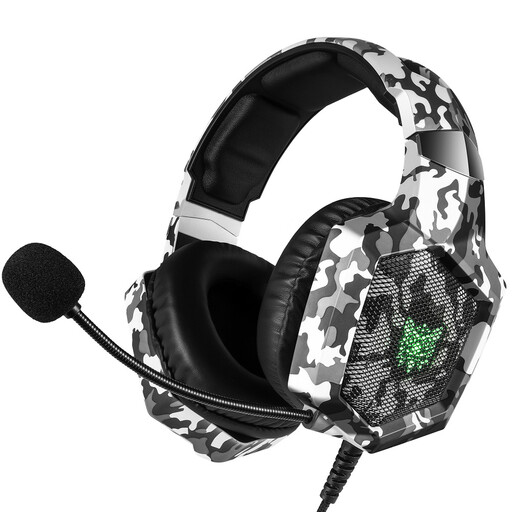
Why This Fits Their Persona: Ideal for gamers seeking a solid entry-level setup for various platforms without a large budget. It focuses on the essential features for a great gaming experience.
It doesn't promise over-the-top virtual surround sound, instead delivering solid stereo audio. The memory foam ear cushions address the long-session comfort issue better than many competitors in this price range.
Broad Compatibility: The 3.5mm connector makes it instantly compatible with PC, PS4, PS5, Xbox One, and Switch. The 50mm drivers provide a solid audio foundation for beginners.
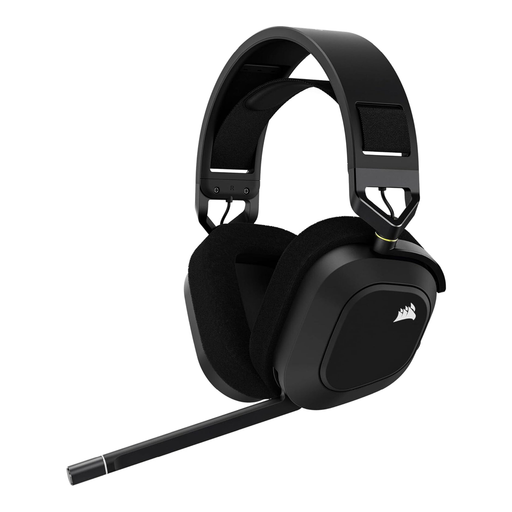
Why This Fits Their Persona: For gamers who value high audio quality, low latency, and a robust build. It offers premium features that can make a difference in competitive gaming.
Instead of generic virtual sound, it uses Dolby Atmos on PC, an established technology for spatial audio. The high-quality aluminum construction and soft fabric earcups guarantee durability and comfort, while the microphone boasts explicit broadcast quality.
Slipstream Wireless & Dolby Atmos: The combination of ultra-fast wireless transmission and precise 3D audio on PC provides a clear advantage. The omnidirectional microphone delivers exceptionally clear voice transmission.

Why This Fits Their Persona: Perfect for users who want a single, high-quality headset for gaming, music, and professional video conferences. Its subtle design and outstanding microphone technology make it extremely versatile.
This headset sidesteps the poor microphone quality trap because its core competency lies in the professional office space. The 8-microphone technology and advanced Noise Cancelling Headset (ANC) are designed for maximum voice clarity, which translates directly to gaming.
Superb Voice Clarity & ANC: The advanced active noise cancellation effectively filters out ambient sounds. Dual connectivity allows for seamless switching between a PC (via dongle) and a smartphone (via Bluetooth).
We have compiled a complete, up-to-date list of products that fully meet these strict selection criteria and German safety regulations.
For basic functions like stereo audio and microphone use, no software is typically required (plug-and-play). However, for advanced features like virtual surround sound, RGB lighting control, or equalizer adjustments, the manufacturer's software (e.g., Corsair iCUE, Edifier Professional) will be necessary.
Passive noise cancellation is created by the physical seal of the earcups, as is the case with a well-fitting over-ear design. Active Noise Cancellation (ANC), on the other hand, uses microphones to capture ambient noise and electronically neutralize it by generating opposing sound waves. ANC is particularly effective against low-frequency, constant noises like fans or the hum of an air conditioner.
Battery life varies by model and usage (e.g., with or without RGB lighting) but often ranges from 20 to 30 hours. Most modern wireless headsets can also be operated in wired mode via a USB cable while they are charging. This means you never have to interrupt your game.