
Lieferung heute & morgen

Qualitätsgarantie

Willkommens-Angebote freischalten: KOSTENLOSE Lieferung | Bis zu 80 % RABATT | Kostenlose 30-Tage-JoyPlus-Testphase
App herunterladen
A gaming headset with microphone should reproduce game audio clearly, transmit your voice intelligibly in team chat and remain comfortable over longer periods. When choosing one, however, it is not just large drivers, RGB lighting or terms such as “surround” that matter. The key factors are connectivity, compatibility, microphone design and comfort.
A wired gaming headset with a 3.5 mm jack can usually be connected directly to a controller, laptop or mobile device. USB models, on the other hand, require a suitable USB port and may offer additional features such as software EQ, virtual surround profiles or lighting.
This is particularly important: a headset with gaming headset USB and 3.5 mm jack is not automatically compatible with every platform with all features available. On a console, for example, the 3.5 mm connection may be intended for audio and the microphone, while USB may only activate certain additional functions on a PC. Before buying, make sure the connection type and platform compatibility are clearly stated in the technical specifications.
A surround-sound gaming headset can create virtual surround sound through software or the operating system. This feature is often tied to Windows, a specific app or a USB DAC. When used with a PS5, Xbox or Nintendo Switch, only analogue stereo transmission may be available instead.
This is not a drawback as long as your expectations are realistic. If you want to adjust footsteps, directions and voice channels precisely through software, check whether the feature is supported on your platform.
Specifications such as 40 or 50 mm refer to the driver diameter. They do not fully describe how evenly speech, high frequencies or bass are reproduced. For multiplayer games, the microphone position, voice recording quality and mute controls are also important.
An RGB gaming headset should not be chosen solely for its lighting either. RGB requires additional power on USB models and may not be active when connected via a 3.5 mm jack.
The following points are important if you plan to use the headset with several devices:
A detachable or flip-up microphone makes it easier to switch between gaming and listening to music. With a gaming headset with detachable microphone, make sure the connection is secure and that a mute function is available. A directional microphone can focus voice capture more strongly on the person speaking; actual intelligibility also depends on distance, positioning and the surrounding environment.
An over-ear gaming headset surrounds the ears. You should therefore check the inner dimensions of the ear cups and the padding. Ear cups that are too small can create pressure, while very tightly sealing pads may retain more heat.
Weight specifications should always refer to the headset itself, not the packaging. An adjustable headband, memory foam and breathable covering materials can affect the fit, but they cannot replace trying the headset on for yourself.
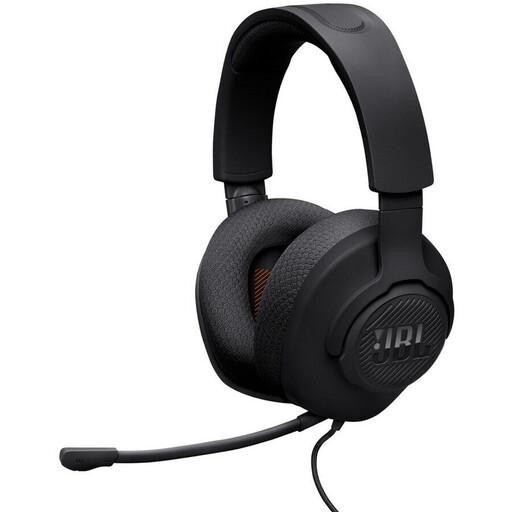
Why this product suits the profile: The 3.5 mm jack enables plug-and-play use with PCs, PlayStation, Xbox, Nintendo Switch, Macs, mobile devices and VR systems. The model is listed as weighing 220 g and has a detachable microphone.
The connection type and supported platforms are clearly specified. The microphone boom can be detached and muted using the mute function.
40 mm drivers, 32 ohm impedance, 1.2 m cable and memory foam padding according to the product specifications.
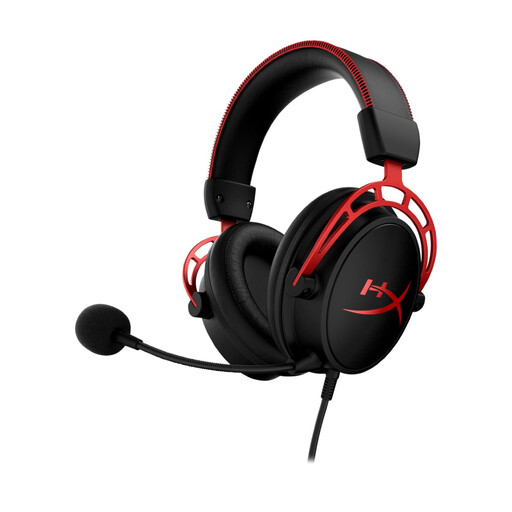
Why this product suits the profile: This closed-back over-ear headset features 50 mm drivers with separate chambers, memory foam and an adjustable aluminium headband.
The product specifications mention a detachable microphone design, in-line volume control and a 3.5 mm connection rather than unclear platform restrictions.
Compatible with PC, PS5, PS4, Xbox and Nintendo Switch; includes connection cable, extension cable and carry case.
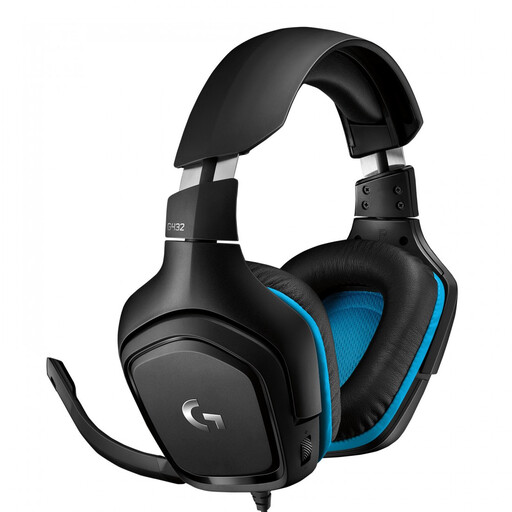
Why this product suits the profile: This model offers a USB DAC and a 3.5 mm cable. According to the product specifications, DTS Headphone:X 2.0 is activated on PC via Logitech G HUB; the jack connection is intended for consoles.
The two transmission methods clearly show the difference between PC configuration and console use. The microphone features flip-up muting.
50 mm drivers, in-line volume control and compatibility with PC, Mac, PS4, Xbox One and Nintendo Switch according to the manufacturer’s specifications.
We have put together a complete, regularly updated list of products that fully meet these strict selection criteria and the safety regulations applicable in the EU.
A 3.5 mm connection is versatile, provided your PC, controller or mobile device has a suitable socket. A Y-splitter may be required for a PC with separate audio and microphone inputs. USB is a good choice if you want to use software features or a USB DAC on your PC.
Its lifespan depends mainly on the cable, connectors, headband and padding. When disconnecting it, always pull the plug rather than the cable, and avoid tight cable loops. A dry cloth is sufficient for cleaning; keep the headset away from liquids and excessive heat.
There is no one-size-fits-all answer. Look for an adjustable headband, suitably sized ear cups, a comfortable weight and suitable padding material. Set the volume to a comfortable level and take regular breaks during longer sessions.