For gaming and recording a podcast at the same time in a guest room, a gaming headset is suitable only if your voice remains clear on a test recording at your usual gaming volume. If sound leakage is a concern, a closed-back model is the more obvious choice. RTINGS notes that open-back designs let more sound escape, but a closed-back headset won’t automatically eliminate room noise either. If you want to edit your voice and game audio separately or position the microphone freely, you could use a separate microphone with headphones. However, this takes more setting up and may require additional accessories (Shure; OBS Project).
Which setup is right for you?
Podcasters who prioritise voice quality
If you want to record your voice while gaming, assess the microphone audio with a test recording rather than relying on the headset’s chat description alone. Shure describes a microphone as part of podcasting equipment, while OBS Project explains how to record audio sources separately.
Recording in a room that isn’t completely quiet
If background noise or game audio could get into your recording, check the headset’s design and listen to a test recording at your usual gaming volume. RTINGS notes that open-back headphones tend to let more sound escape.
Gamers recording for long sessions
For longer episodes, a good fit and a connection that works with your recording device are important. COMPUTER BILD notes the high weight of the original Audeze Maxwell it tested. With wireless models, you should also check that your device is supported.
What should you look for when buying?
Closed-back and wired
A good fit if: you record in a fixed spot, don’t want to worry about battery life and want to minimise the amount of game audio that escapes.
The trade-off: The cable needs to suit your setup and connection; a closed-back design doesn’t guarantee a clean microphone recording.
Closed-back and wireless
A good fit if: you want to move around while recording and the receiver works with your recording device.
The trade-off: You’ll need to factor in charging and the wireless connection. COMPUTER BILD described the microphone audio of the Sony INZONE H9 II it tested as thin and tinny on PS5; this verdict applies to that platform.
Open-back and wired
A good fit if: you prefer a more open listening experience and a test recording shows that sound leakage doesn’t interfere with your voice track.
The trade-off: Open-back headphones tend to let more sound escape (RTINGS), so check carefully for audio leaking into your microphone.
Separate microphone and headphones
A good fit if: a headset test recording doesn’t meet your voice recording needs, or you want to choose your microphone and headphones separately.
The trade-off: You’ll need to factor in the microphone, possibly a stand or audio interface, and the extra setup (Shure).
When recording in a guest room, your decision should come down to a microphone test at your real gaming volume. Also check the fit, connection and whether you can record your voice and game audio separately.
| Priority |
What to check before buying |
Who should pay particular attention? |
| Voice recording |
Test the microphone audio at normal speaking volume and with typical game sounds; check whether you can record separate tracks. |
If I want to record my voice clearly and edit it later, I listen to a test recording using the connection I plan to use. Around 36% of consumers say voice recording is their top priority. |
| Sound leakage and room noise |
Check whether game audio is audible in the microphone track with open-back or closed-back headphones at your usual gaming volume. |
If there could be background noise in the guest room, I pay attention to what I can actually hear on the voice track. Around 29% of consumers put sound leakage and room noise first. |
| Comfort |
Try the fit and check for pressure points over a realistic period; check whether replacement ear cushions and cables are available for the model. |
For longer recording sessions, I want to wear my headset comfortably, so I check the fit before committing to a long episode. Around 21% of consumers make long-term comfort their main priority. |
| Connection and monitoring |
Check that the connection and platform support audio playback and microphone input; for wireless models, check the receiver and charging options. |
If I want to hear myself while speaking or move around as I record, I check that it works with the specific device I’ll be using. Around 14% of consumers prioritise setup compatibility, monitoring or freedom of movement. |
Common buying mistakes
-
Assuming a microphone praised for in-game chat will work for podcasting without testing it
Clear chat audio doesn’t automatically mean you’ll get a good voice recording in your own setup.
Before you buy or record your first episode, make a short test recording at your normal speaking volume with typical game sounds, then listen carefully to the voice track.
-
Choosing open-back earcups without checking for sound leakage
Open-back headphones tend to let more sound into the room. Whether game audio gets picked up by the microphone also depends on your specific recording setup.
Check whether game audio is audible on the microphone track at your usual gaming volume.
-
Choosing wireless or platform compatibility based on the brand name alone
Connections and supported devices vary by model and sometimes by version.
Check the full model name and test playback and microphone input on the device you plan to use.
Key brands to consider
beyerdynamic
The MMX 300 PRO and MMX 330 PRO differ in several ways, including their closed-back or open-back wired design.
- The manufacturer says that replacement ear pads and cables are available for both models.
- COMPUTER BILD rated the microphone on the MMX 300 PRO it tested positively, but noted that it picks up background noise easily. With the open-back MMX 330 PRO, check for game audio leaking out.
Sony
The INZONE H9 II is a wireless headset with a closed-back design, noise cancelling and a detachable boom microphone.
- Sony lists a USB-C wireless receiver for the 2.4 GHz connection.
- The advertised noise cancelling doesn’t, by itself, tell you how good the podcast recording will sound. COMPUTER BILD criticised the microphone audio of the H9 II it tested on PS5.
SteelSeries
The Arctis Nova range includes various wireless models, including the Nova Elite and Nova 7 Wireless Gen 2.
- SteelSeries says the Nova Elite can mix multiple audio sources. For the Nova 7 Gen 2, the manufacturer describes a sidetone setting that lets you hear your own voice.
- Mixing sources doesn’t mean your recording software will create separate tracks. Check that this feature works with the specific model and setup you plan to use.
HyperX
According to the manufacturer’s website, the wired Cloud III offers several connection options for different devices.
- HyperX lists a 10 mm microphone, 3.5 mm, USB-C and USB-A connections, and a mute indicator for this model.
- The manufacturer’s claims about clear in-game chat don’t automatically mean it will deliver a polished podcast voice track.
Audeze
The Maxwell and Maxwell 2 are different generations of the model. The Maxwell 2 is also available in separate PlayStation and Xbox versions.
- COMPUTER BILD rated the microphone and sound quality of the original Maxwell versions it tested positively.
- The review noted that the original Maxwell was heavy. This assessment doesn’t necessarily apply to the Maxwell 2.
Gaming headsets at Joybuy
This selection includes wired and wireless gaming headsets for gaming and talking at the same time. Pay particular attention to your microphone test, connection and recording environment.
 No image available
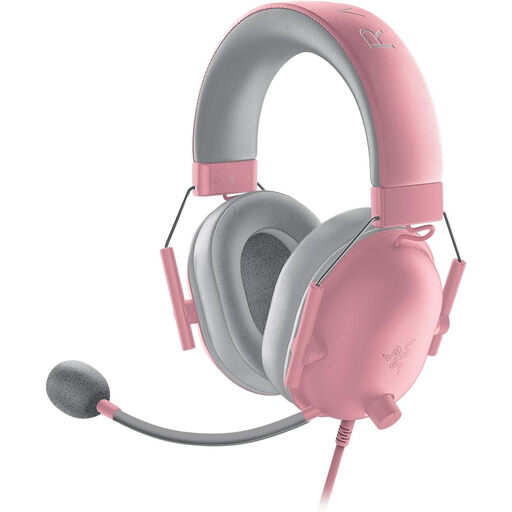
Razer BlackShark V2 X Quartz
An option for wired gaming with a closed-back design and flexible microphone.
3.5 mm connection; cardioid microphone; in-line volume control and microphone mute; 240 g.
View at Joybuy
 No image available
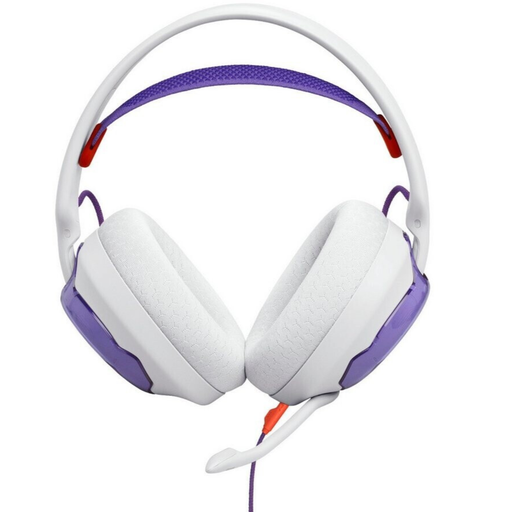
JBL Quantum 250, White and Purple
This wired model has a detachable microphone; check your voice track at your usual gaming volume.
3.5 mm connection; detachable unidirectional boom microphone. According to the description, a Y-splitter (not included) is needed for a PC with separate headphone and microphone connections.
View at Joybuy
 No image available
HyperX Cloud Alpha with In-Line Audio Control
An option with a detachable microphone and closed-back design; check that the connection works with your recording device.
3.5 mm connection; detachable microphone; memory foam leatherette ear cushions, plus additional fabric ear cushions.
View at Joybuy
 No image available
Razer Barracuda Wireless Multiplatform Headset
The wireless version could suit you if you want to move around and the connection works with your recording device.
HyperSpeed Wireless and Bluetooth; USB-C charging; stated battery life of up to 40 hours; built-in beamforming microphones with adjustable noise cancelling.
View at Joybuy
 No image available
Logitech G PRO X Gaming Headset, Black, USB
For voice recording on a PC, the description lists a detachable microphone with Blue VO!CE filters and an external USB sound card.
The Blue VO!CE features described require USB and a PC. Memory foam ear cushions are available in leatherette and fabric.
View at Joybuy
Frequently asked questions
How can I record game audio and my voice separately?
In OBS Studio, you can assign your microphone and game audio to separate recording tracks in Advanced Audio Properties, then enable those tracks in the output settings (OBS Project). Make a test recording before your episode; standard video players may only play one track at a time.
Will noise cancelling on my headphones automatically improve my voice recording?
No. The headphones’ advertised noise cancelling and the quality of the recorded microphone track need to be assessed separately. Test your recording with the actual room noise and on the platform you plan to use.
What should I consider if I’m recording other people in the guest room?
Section 201 of the German Criminal Code (StGB) makes it a criminal offence to record another person’s privately spoken words without authorisation. Before recording, check that you’re entitled to do so or that you have the necessary consent; using a headset doesn’t give you permission to record (Federal Ministry of Justice and Federal Office of Justice).
Who should I contact if my headset is faulty?
If you buy from a business seller, your statutory rights apply against the seller. According to EU consumer information, these rights apply for at least two years from the date you receive the goods; a separate manufacturer’s guarantee is a different matter (European Union, Your Europe).


