If someone else is talking in the room, check the microphone position and mute function separately from how well the closed earcups fit: one affects the voice you transmit, while the other affects what you hear. Wired headsets save you from charging, but limit your movement; wireless models give you more freedom to move, but come with a battery and receiver to consider. A manufacturer's claims about noise reduction don't prove that another person's voice in the room will reliably be filtered out.
Which headset features matter to you?
Team players with background conversations
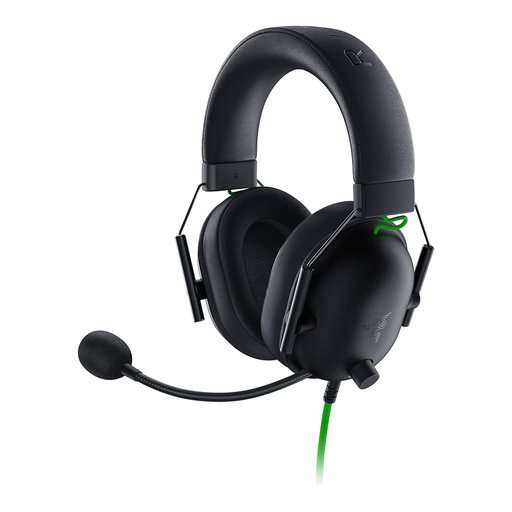
If you're practising callouts while someone else is talking in the same room, check the microphone position, how clearly it picks up your voice and whether the mute control is easy to reach. Razer describes the BlackShark V2 X as having an adjustable microphone, but that doesn't guarantee other voices won't be picked up too.
Considerate housemates
If you want to hear the game and your team without turning up the volume to overcome noise in the room, look for a good fit from the closed earcups and an easy-to-reach volume control. Closed earcups affect what you hear; they don't automatically affect the voice your microphone transmits.
Players with long practice sessions
If you wear your headset for long stretches, check the fit and cushioning material. HyperX lists memory foam for the Cloud III, but that alone doesn't tell you how comfortable the headset will feel to wear.
What to look for when buying
First, check what your team hears through the microphone and what you can hear in the room. Then make sure the connection and features are compatible with your platform.
| What matters when buying |
What to check |
Who is it important to? |
| Clear callouts |
Adjustable microphone and mute switch; for voice filters, check the software requirements for the specific model. |
If you want to speak clearly in team chat while someone else is talking in the room, voice pick-up is your top priority. Around 31% of consumers say clear callouts are their main concern. |
| Quieter listening |
Fit of the closed earcups and an easy-to-reach volume control. |
If noise in the room distracts you while you play, you'll want to hear your team and the game without turning the volume up unnecessarily. Around 25% of consumers prioritise quieter listening when there's background noise. |
| Comfort during long sessions |
Cushioning material and how firmly the headset sits; try the fit for yourself if possible. |
If you regularly practise for long periods, what matters is whether the ear cushions and fit remain comfortable over time. Around 19% of consumers prioritise a comfortable fit for long sessions. |
| Platform and features |
Check your device against the connection type; only count on software features if they work on your platform. |
If you want to use voice filters or a specific connection, make sure both work with your PC, console or mobile device. Around 13% of consumers put platform compatibility first. |
| Wired or wireless |
Consider cable management around your gaming area or, for wireless models, check the receiver, battery and how you switch between connection types. |
If a cable gets in your way or you'd rather not charge your headset, the choice between freedom of movement and never needing to charge is what matters most. Around 12% of consumers prioritise finding the right wired or wireless option. |
Avoid common buying mistakes
-
Confusing earcup isolation with microphone noise cancellation
Closed earcups can affect how much outside noise you hear. They don't automatically stop your microphone from picking up another person's voice.
Check the earcups and microphone separately, and if possible test the microphone in your usual gaming environment.
-
Assuming a PC software feature works on every console
According to Logitech, Blue VO!CE and the Logitech G PRO X's advanced surround features require a PC and G HUB. SteelSeries also lists Sonar noise cancellation as a PC feature.
Check that the feature you want works with your platform, not just that the plug fits.
-
Assuming similarly named versions are identical
The Razer BlackShark V2 X and BlackShark V2 X USB have different connections. Wireless models also bring a battery and receiver into the equation.
Before buying, check the full model name, connection and what's included with the specific version.
Key brands to consider
Razer
The BlackShark V2 X is a wired 3.5 mm option for buyers who want to practise without having to charge a battery.
- Razer lists an adjustable cardioid microphone, closed earcups and a weight of 240 g for this model.
- These specifications don't prove that another person's voice in the room will reliably be filtered out. The BlackShark V2 X USB has a different connection.
HyperX
The wired Cloud III may suit buyers looking for a range of connection options and controls on the headset.
- HyperX lists 3.5 mm, USB-C and USB-A connections for the Cloud III, along with a mute function with an LED indicator. Memory foam and microphone noise cancellation are features specified by the manufacturer.
- These features don't guarantee a comfortable fit for you or prevent another person from being picked up by the microphone. The Cloud III Wired and Cloud III Wireless are different versions.
SteelSeries
The Arctis Nova 5 Wireless is a wireless option for buyers who value freedom of movement and platform compatibility.
- SteelSeries lists a USB-C wireless receiver, Bluetooth and battery life of up to 60 hours.
- According to SteelSeries, Sonar AI noise cancellation requires a PC. Quick-Switch doesn't mean Bluetooth and 2.4 GHz audio play at the same time.
Logitech G
The wired PRO X is worth considering if you want to use configurable voice filters on your PC.
- Logitech lists Blue VO!CE and advanced surround features for use on a PC with G HUB.
- These requirements don't automatically apply to console use or every headset from the brand.
Joybuy products for team chat in a shared room
This selection includes wired headsets for 3.5 mm or PC use, as well as wireless models. Check the connection and platform features for each specific model.
 No image available
HyperX Cloud Alpha gaming headset with in-line audio controls
A wired option for team chat without battery charging; check that the connection is compatible with your device.
View at Joybuy
 No image available
ONIKUMA GT889 wireless gaming headset
A wireless option for greater freedom of movement; before buying, check which connections and microphone features work with your device.
View at Joybuy
 No image available
Razer BlackShark V2 X
For team chat with background conversations, Razer lists an adjustable cardioid microphone and closed earcups for this model. This doesn't prove another person's voice will be reliably filtered out.
The 3.5 mm connection is designed for use with a compatible device.
View at Joybuy
 No image available
Logitech G PRO X gaming headset, USB, Black
For voice filters while practising on a PC, Logitech says Blue VO!CE and advanced surround features require a PC and G HUB.
View at Joybuy
 No image available
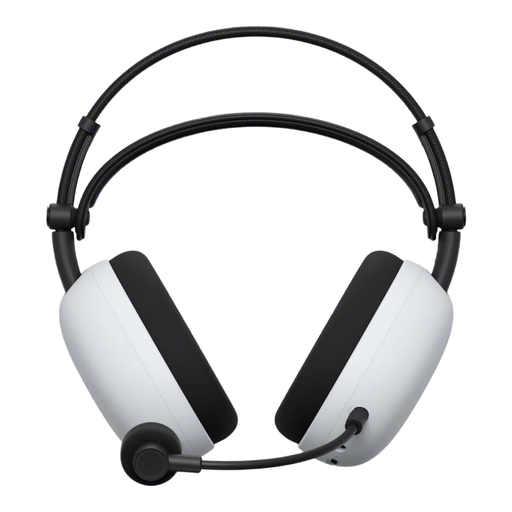
Sony Inzone H9 II wireless gaming headset
A wireless option for greater freedom of movement; check the available connections and features you want against your platform.
View at Joybuy
Frequently asked questions
Does “Noise Cancelling” mean my team won't hear the other person in the room?
No. Closed earcups mainly affect how much outside noise you hear; the microphone's directional pattern or voice filters affect the voice you transmit. Check these features separately for the specific model and, if possible, test the microphone in your usual room.
How do I set up a headset for team practice?
Select the connected microphone on your gaming device and in your chat app, position an adjustable microphone boom near your mouth, then test the microphone and mute function before you start practising. According to Logitech, Blue VO!CE for the Logitech G PRO X requires a PC and G HUB.
Should I simply turn the volume up if there's noise in the room?
No. The World Health Organization recommends considering volume and listening time together, rather than simply turning the volume up to drown out noise. Its guideline of 80 dB for up to 40 hours a week describes a possible exposure level, not a setting that a headset automatically maintains.
What are my rights if my headset is faulty in Germany?
For a consumer purchase from a retailer, statutory rights for faulty goods generally apply against the seller; these are separate from any voluntary manufacturer's warranty. The European Union's consumer information states that the minimum period is two years from receipt of the goods. This doesn't claim that a specific repair rule applies to this particular headset.
Can I put an old or faulty headset in general waste?
No. Germany's Federal Environment Agency advises that waste electrical and electronic equipment must be collected separately; local collection points accept it free of charge. Where possible, removable batteries should be handed in separately.


