If an audio cable gets in the way on your small desk, a wireless headset with a USB wireless adapter that suits your platform could be a good choice. If you’d rather not worry about charging and have a compatible connection, a wired model is a straightforward alternative. SteelSeries says the Arctis Nova 5 Wireless comes with a compact USB-C dongle, while PlayStation warns that Bluetooth audio devices may not be compatible with PS5. Whichever connection you choose, check the microphone controls, fit and support for your specific platform.
Which headset is right for you?
Squad players with a cramped desk
If you don’t want an audio cable running across your mouse and keyboard while you play, check there’s room for a wireless adapter and remember to plan for charging. SteelSeries says the Arctis Nova 5 Wireless comes with a compact USB-C dongle.
Players who communicate with their team frequently
If you regularly talk to your team, look for a microphone that can be positioned or detached as needed, and a mute control that’s easy to reach. HyperX says the wired Cloud III has a microphone mute indicator.
Players who use a PC and console
If you switch between devices, check the exact model variant and its intended connection against each platform. A Bluetooth specification alone doesn’t tell you whether game audio and voice chat will work on your console.
What should you look for when buying?
First, decide whether a clear desk or not having to charge your headset matters more to you. Then check the microphone, fit and connection for your gaming platform.
| What to consider |
What to look for |
Who is it most important to? |
| Hearing in-game cues |
Check reviews of the specific model and, where relevant, sound profiles that work with your device. |
If I want to hear in-game cues clearly alongside my teammates’ voices, clarity is my priority. Around 19% of consumers put in-game cues first. |
| Team communication |
Check the microphone type, positioning and mute controls for the device you plan to use. |
If I regularly coordinate with my squad, I need a microphone that I can adjust and use easily for my voice chat. Around 24% of consumers prioritise team communication. |
| Desk space |
For wireless headsets, allow space for the adapter and charging. For wired models, plan a practical cable route. |
If an audio cable gets in the way on my small desk, freedom of movement is my main concern. Around 24% of consumers put a clear desk first. |
| Fit during longer matches |
Consider the padding material and weight of the specific model; fit is a personal matter. |
If I play longer matches, I want a headset that feels comfortable to wear. Around 19% of consumers prioritise fit. |
| Connections and switching platforms |
Check your device, available ports and the manufacturer’s guidance for your preferred connection method together. |
If I want to use my headset and voice chat across several of my devices, the connection needs to work with each platform. Around 14% of consumers put switching between platforms first. |
Common misconceptions
-
“Bluetooth” automatically means game chat on PS5
PlayStation notes that some Bluetooth audio devices aren’t compatible with PS5. So the connection type alone doesn’t tell you whether game audio and voice chat will work with a specific headset.
Check the exact model variant, the intended adapter or wired connection, and the information on voice chat support.
-
Wireless means you don’t need any extra accessories
With a headset that uses a USB wireless adapter, you’ll still need a compatible port and a way to power it.
Make sure you have an accessible, supported USB port and a way to charge the headset. Compare this with the cable management needed for a wired model.
-
A product’s ranking automatically makes it right for your setup
An external ranking won’t tell you on its own whether the microphone, fit and connection suit your squad matches and small desk.
Use a ranking as a starting point at most, then check it against the specific needs of your setup.
Brands worth considering
SteelSeries
The Arctis Nova 5 Wireless is aimed at players looking for a compact USB-C wireless dongle, with Bluetooth available as an additional option.
- SteelSeries lists PC, PlayStation and Switch among the platforms supported by the dongle.
- Bluetooth and 2.4 GHz modes are selected by switching between them; this doesn’t mean both audio sources can play at the same time.
HyperX
The wired Cloud III is an option for a fixed gaming setup with several connection options; the Cloud III Wireless is a separate model.
- HyperX lists 3.5 mm, USB-C, USB-A and a microphone mute indicator for the wired Cloud III.
- The advertised battery life of up to 120 hours applies to the Cloud III Wireless, not the wired Cloud III.
Razer
BlackShark models have different connection and microphone features, so check the details for each model.
- Razer gives the BlackShark V2 X’s weight as 240 g and says the V3 can mix 2.4 GHz and Bluetooth audio at the same time.
- These details apply to the specific models mentioned. Manufacturer claims about comfort or competitive advantages don’t guarantee a good fit for everyone.
beyerdynamic
The MMX 150 wireless may suit buyers looking for Bluetooth connectivity and a detachable microphone.
- beyerdynamic lists velour ear pads, replacement pads, sidetone and battery life of up to 50 hours.
- The information on wired and Bluetooth compatibility relates to different connections. Check which connection is intended for your platform; fit is a personal matter.
Joybuy products for a small desk setup
This selection of Joybuy products includes wired and wireless gaming headsets for voice chat in a fixed gaming setup, or for keeping audio cables off your desk. Check that the connection and platform suit your setup for each product.
 No image available
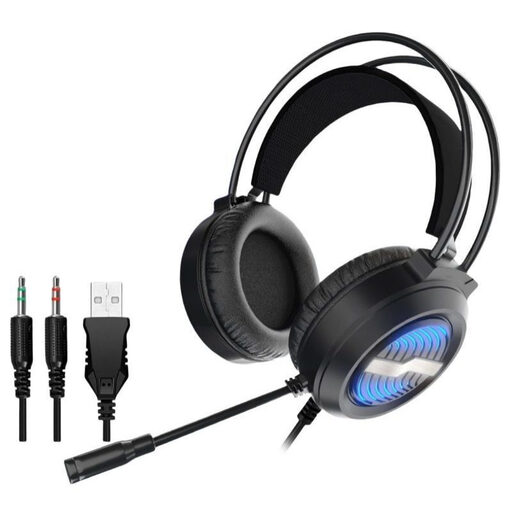
Wired gaming headset with LED lighting
This wired model could suit a fixed gaming setup, provided it has a compatible connection.
The product description lists USB, two 3.5 mm audio jacks and a detachable microphone.
The cable routing on your desk and the connection need to suit your setup.
Joybuy
 No image available
AOC wired gaming headset
This wired model is an option for voice chat in a fixed gaming setup, as long as the device has a compatible 3.5 mm connection.
The product description lists a flexible microphone and gives the weight as 207 g.
The listed platforms are PS5, Xbox Series X|S, Xbox One and PC.
Joybuy
 No image available
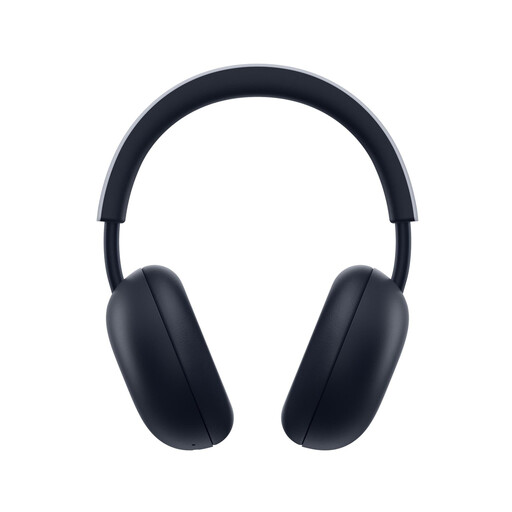
PlayStation PULSE Wireless Headset, White
This headset could be an option for wireless game audio on a supported PlayStation, provided the intended wireless adapter works with your setup.
The product description lists PlayStation Link with a USB adapter, Bluetooth, a built-in microphone and battery life of up to 30 hours.
According to the description, the PlayStation Link USB adapter is intended for wireless game audio; the headset needs to be charged.
Joybuy
 No image available
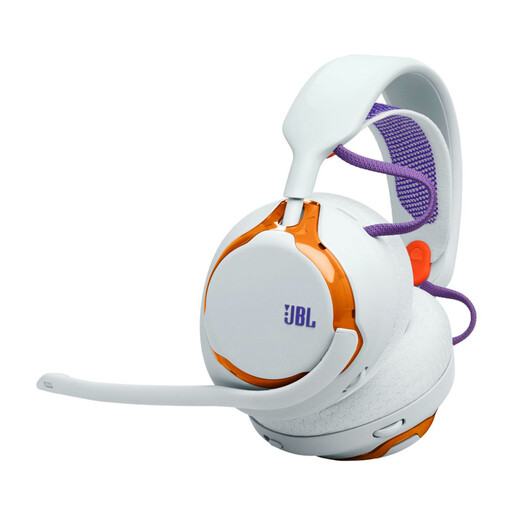
JBL Quantum 650, Light Teal and Orange
This model could suit wireless gaming at a small desk, provided the intended USB dongle works with your device.
The product description lists a 2.4 GHz dongle, Bluetooth, a detachable microphone and battery life of up to 45 hours.
Wireless use requires a compatible connection and a charged battery.
Joybuy
 No image available
JBL Quantum 360P Gaming Headset, White
This model could suit voice chat and use with additional devices, as long as you choose the right connection for game audio.
The product description lists Bluetooth 5, a detachable 3.5 mm cable, a flip-up microphone and battery life of up to 22 hours.
For PS5 game chat, don’t assume Bluetooth alone guarantees compatibility; the description also lists a 3.5 mm cable.
Joybuy
Frequently asked questions
Is Bluetooth enough for voice chat on PS5?
Not as the sole basis for choosing a headset. PlayStation notes that some Bluetooth audio devices aren’t compatible with PS5. For the specific model, check the intended USB adapter or wired connection and whether voice chat is supported.
How do I set up a wireless headset on a small desk?
Leave a clear, compatible USB port free for the intended adapter and follow your model’s instructions. PlayStation recommends, among other things, making sure the USB adapter is firmly connected when using its wireless headsets.
What should I bear in mind to protect my hearing during long sessions?
The World Health Organization recommends keeping the volume low and giving your ears regular breaks from loud sounds. This is general advice, not a guarantee that a particular setting is safe with every headset.


