What should you look for when buying?
At a small desk, the key considerations are chat controls, space for your mouse and cables, device connectivity and wearing comfort.
| Consideration |
What to look for |
Who is this especially important for? |
| Lobby chat |
Check the microphone connection, position and mute function for the device you plan to use. |
If I want to be clearly heard in chat and mute the microphone quickly when needed, I base my choice on these features. Around 29% of consumers say clear chat is their top priority. |
| Mouse space |
Check the cable route or whether there’s a free port for the receiver, as well as where it can be placed. |
If a cable gets in the way when I move my mouse, keeping my play area clear matters more than having another port on the headset. Around 29% of consumers say having clear mouse space is their top priority. |
| Device connectivity |
Check the gaming device, connection and microphone function for the specific model variant. |
If I switch between PC and console, I want to know which connection supports voice chat on each device. Around 24% of consumers say platform compatibility is their top priority. |
| Fit |
Try the fit for yourself if possible, and consider the ear cushions and charging needs of wireless models. |
For longer sessions, I check whether the headset feels comfortable to wear; weight and ear cushion details alone don’t settle the question. Around 18% of consumers say wearing comfort is their top priority. |
Gaming headsets at Joybuy
Here you’ll find gaming headsets with microphones, including wired and wireless models. Choose a connection that suits your device and the space you have at your desk for cables or a receiver.
 No image available
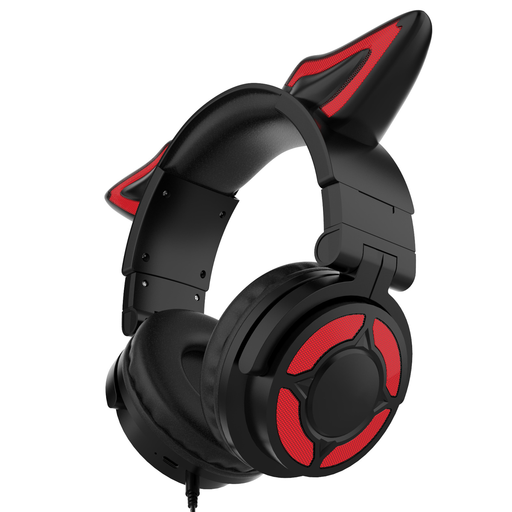
KINSI gaming headset with RGB lighting, over-ear
This over-ear design with a built-in microphone is an option if you prefer ear cushions to in-ear headphones.
The product title mentions RGB lighting, while the description lists an adjustable headband and breathable ear cushions.
View at Joybuy
 No image available
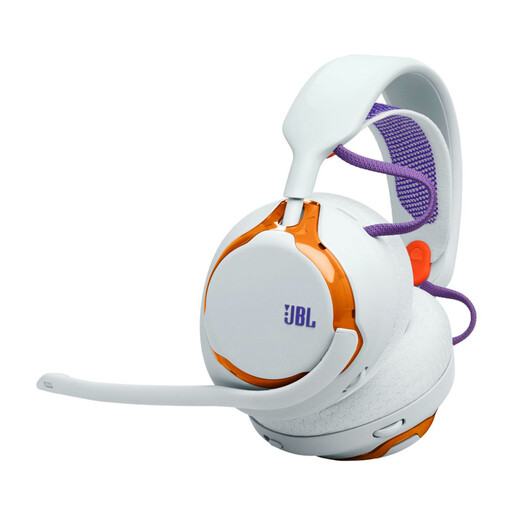
JBL Quantum 650 Wireless, Light Teal and Orange
The 2.4 GHz dongle is an option if you don’t want an audio cable running through your mouse area while gaming.
The product details list Bluetooth, a detachable microphone, up to 45 hours of battery life and replaceable components.
View at Joybuy
 No image available
HyperX Cloud Alpha gaming headset
The wired design could be a good fit if you can route the cable away from your mouse area at your regular gaming setup.
The product details list a 3.5 mm connection, a detachable microphone, and volume and mute controls on the cable.
View at Joybuy
 No image available
ONIKUMA GT889 wireless gaming headset
The listed 2.4 GHz USB receiver is an option for wireless gaming, provided you have a suitable port free.
The product details list Bluetooth, wired use, a detachable microphone and on-earcup controls. The title mentions 50 mm drivers.
View at Joybuy
 No image available
Logitech G G535 LIGHTSPEED wireless gaming headset
LIGHTSPEED connectivity and a flip-to-mute microphone are an option if you want to play wirelessly and control the mute function directly on the headset.
The product details list up to 33 hours of battery life, volume control and a USB-C charging port. Compatible devices listed are PS5, PS4 and PC.
View at Joybuy
Frequently asked questions
Is Bluetooth enough for multiplayer chat on my console?
Not based on the Bluetooth specification alone. Check the intended connection method and microphone function for the specific headset and your console. For compatible third-party headsets, PlayStation advises consulting the manufacturer’s instructions.
What should I set up before joining a lobby for the first time?
Check the input device, microphone level and mute settings in your audio and chat settings. According to HyperX, the Cloud III has a mute indicator directly on the microphone.
How can I use a headset comfortably during longer sessions?
Keep the volume at a moderate level and take listening breaks. The World Health Organization identifies volume and listening duration as factors that can contribute to hearing damage; this doesn’t indicate a safe volume setting for every headset.
What are the rules on returns and disposal in Germany?
For a standard online purchase from a business seller, you generally have a 14-day right to cancel from the date of delivery, although exceptions may apply. The European Union explains the conditions for consumers. End-of-life headsets are electrical waste and shouldn’t go in household rubbish; take them to a designated collection point, as explained by the German Environment Agency.


