Choose your headset based on how well you can place sounds in your game, how it fits and whether it works with your gaming device – not just because it promises surround sound. Wireless keeps a cable out of your movement area, but needs a compatible receiver and regular charging. A wired headset saves you charging, but its cable needs to stay out of the way on a small desk.
Which headset suits you?
Players focused on sound positioning
When you’re practising movement drills, you want to be able to place footsteps and other in-game sounds reliably. Try them out in your own game rather than assuming a sound feature will automatically give you an edge.
Players short on desk space
If cables get in the way of your mouse movements or hand position, going wireless can give you more freedom to move. Just remember that you’ll need a compatible receiver and a charging routine.
Team players who game for long sessions
If you play with others for long sessions, clear voice chat, an easy-to-reach mute button and a comfortable fit are all important things to check.
What to look for when buying
For movement drills at a small desk, focus on how well you can place sounds in your own game, room to move, a comfortable fit, team chat and the right connection for your device.
Wired headset
A good fit if: you play at a fixed desk and can keep the cable clear of your hands and mouse movements.
Keep in mind: the cable can get in the way on a small desk. The connector and microphone also need to work with your gaming device.
Wireless headset with a 2.4 GHz receiver
A good fit if: you don’t want an audio cable in your way while practising and have a suitable port free for the receiver.
Keep in mind: the receiver and charging will still be part of your setup.
Wireless headset with Bluetooth switching
A good fit if: you want to use a mobile device as well as your gaming device and switch between connection types.
Keep in mind: check which connections and features your particular device supports.
| Priority |
What to look for |
Who it matters most to |
| Sound positioning in games |
Listen to familiar sounds in your own game; compare stereo with optional sound profiles. |
If you want to place footsteps in your training sessions, what you hear in your own game matters more than a promise about sound. Around 28% of consumers rank sound positioning as their top priority. |
| Room to move |
Plan the cable route or check that you have space and a suitable port for the wireless receiver. |
If a cable gets in the way of your hands or mouse movements, keeping your practice area clear is your main aim. Around 22% of consumers put having room to move at the top of their list when using a small desk. |
| Comfort during long sessions |
Check the fit, pressure on your head and glasses, and room for your ears. Try the headset on if possible. |
If you practise for longer periods, you’ll want a headset that doesn’t distract you with an uncomfortable fit. Around 22% of consumers say long-term comfort is their main priority. |
| Team chat |
Test the microphone input, mute function and voice clarity in the chat app you use. |
If you need clear call-outs when practising with others, the microphone and mute button are essential. Around 17% of consumers prioritise team communication. |
| Device connection |
Check that your gaming device, available port and required microphone mode are compatible with the specific headset version. |
If you want to use both audio and the microphone with your existing gaming device, the connection you choose needs to work with it. Around 11% of consumers prioritise device compatibility. |
Common buying mistakes
-
Assuming surround sound or footsteps presets give you a competitive edge
A feature that claims to highlight certain sounds doesn’t prove that you’ll be able to place them more accurately in your game. PC-WELT notes that how people perceive sound is subjective.
Compare familiar in-game situations with and without the sound profile before making it the deciding factor in your purchase.
-
Assuming wireless means it will work with everything
2.4 GHz receivers and Bluetooth use different connection methods. Which features you can use depends on the specific headset and gaming device.
Before buying, check the exact model, the available port and the connection method you plan to use.
Brands to consider
Sony INZONE
The INZONE H9 II offers a wireless setup with a USB-C dongle and noise cancelling for a fixed gaming space.
- Sony lists the H9 II as weighing 260 g without the microphone, with up to 30 hours of battery life. These are manufacturer claims, not a guarantee of personal comfort or better performance in training.
- The receiver and charging are part of the setup. Check the fit and how it sounds in your game, too.
SteelSeries
The Arctis Nova 5 Wireless may suit players who want to switch between 2.4 GHz and Bluetooth.
- SteelSeries lists Quick-Switch between 2.4 GHz and Bluetooth 5.3, as well as sound presets.
- The advertised emphasis on footsteps isn’t a proven advantage in every game. Check compatibility with your devices and software, too.
beyerdynamic
The closed-back, wired MMX 300 PRO is an option for a fixed practice setup.
- beyerdynamic lists a weight of 314 g without the cable, along with replaceable ear pads and cables.
- The cable needs to sit neatly on a small desk. Technical specifications can’t tell you how the headset will feel to wear.
HyperX
The wired Cloud III and the separate Cloud III Wireless have different connection options.
- HyperX lists 3.5 mm, USB-C and USB-A connections for the wired Cloud III. For the Cloud III Wireless, the manufacturer claims up to 120 hours of battery life.
- The connection options listed for the wired model don’t automatically apply to the Wireless version.
Razer
The BlackShark V2 Pro is a wireless range aimed by Razer at esports players.
- Its esports focus gives you a starting point for comparing the microphone, fit and connection with your own requirements.
- Manufacturer claims about tournament use, isolation or comfort don’t prove a general advantage over other headsets.
Joybuy products for your practice setup
The Joybuy products below include wired and wireless gaming headsets for a fixed practice setup at a small desk.
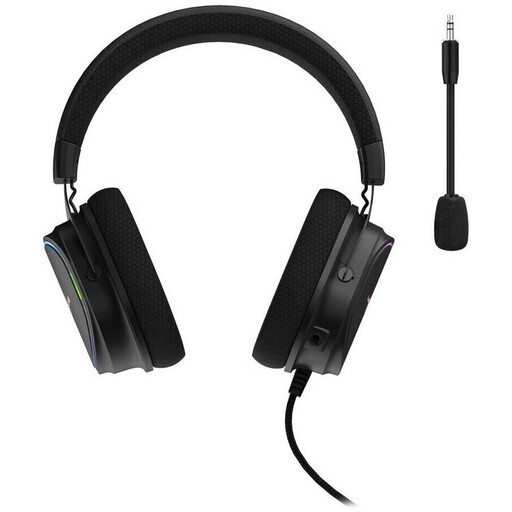 No image available
Hama uRage SoundZ 800 7.1 V2
For a fixed PC gaming setup, if you can keep the USB cable clear of your movement area.
Wired USB connection with volume control and microphone mute.
The advertised virtual 7.1 surround sound doesn’t guarantee better sound positioning in your game.
View at Joybuy
 No image available
AOC Wired Gaming Headset for PS5, Xbox Series X|S & Xbox One, PC
A wired option for a fixed gaming setup, as long as the cable doesn’t get in the way of your hands or mouse movements.
AOC lists a 3.5 mm wired connection and a flexible microphone.
The stated 3D surround sound doesn’t prove that you’ll have an advantage when placing sounds in your game.
View at Joybuy
 No image available
HyperX Cloud Alpha
For a fixed gaming setup if you want a closed-back, wired headset and can route the cable neatly.
The product details list a jack connection, in-line audio controls and a detachable microphone.
View at Joybuy
 No image available
ONIKUMA GT889
For a movement area free of audio cables, if you can use the receiver or Bluetooth connection with your device.
The product details list a 2.4 GHz receiver, Bluetooth 5.4 and a wired mode.
ONIKUMA claims up to 60 hours of playback. In wireless mode, the receiver and charging are part of the setup.
View at Joybuy
 No image available
Logitech G G535 LIGHTSPEED
For a gaming setup without an audio cable, if you’re using a compatible device and can keep it charged.
Logitech lists a wireless LIGHTSPEED connection, a flip-to-mute microphone and up to 33 hours of battery life.
The product details list PS5, PS4 and PC as compatible devices.
View at Joybuy
Frequently asked questions
Do I need virtual surround sound for accurate sound positioning?
No. A surround sound claim alone doesn’t prove that you’ll be able to place sounds more accurately in your game. Compare familiar sounds using the available settings; what you hear is a matter of personal preference.
How do I set up a headset at a small desk?
With a wired headset, keep the cable clear of your movement area and check that the connections work with your gaming device. For a wireless headset, check that you have room and a suitable port for the receiver. Once connected, test the sound and microphone.
How can I protect my hearing during long training sessions?
The WHO recommends limiting volume and listening time, taking breaks and not compensating for a noisy environment by turning your headphones up even louder. Its guidance of no more than 60% of the device’s maximum volume doesn’t tell you what volume is safe for every combination of devices.
What are my rights in Germany if a headset is faulty or doesn’t fit after an online purchase?
For faulty goods, your statutory rights are against the seller and are separate from any voluntary guarantee. Online orders generally come with a 14-day right to cancel from the date you receive the goods. Check the returns information and any exceptions that may apply to your purchase.
Is the CE mark a quality rating for sound and sound positioning?
No. It doesn’t assess a headset’s sound quality or sound-positioning performance. The EU explains that the CE mark is the manufacturer’s declaration that the product meets the requirements of the relevant EU product legislation.


