When you comment while gaming, your headset should work with your recording device, and it should stand up to a test recording with the sounds you actually hear in your room. Closed-back ear cups can make a difference to what you hear and to those sharing the room with you, but they won’t remove other people’s voices from your microphone recording. So check the fit, connection and recording separately.
Who needs a headset for walkthrough recordings
Walkthrough commentators
If you speak while gaming, you’ll need to assess your voice track and game audio separately. The OBS Project describes filters for background noise, but the best test is still a recording made in the conditions you have in your room.
People recording in a shared room
If you share a room, you’ll want to hear the game without disturbing others unnecessarily, while also checking whether room noise gets picked up on your voice track. HyperX and Razer describe features such as closed-back ear cups, but that doesn’t mean other people’s voices will disappear from your recording.
Gamers who switch between devices
If you switch between PC and console, check the connections, platform version and available features for each device separately. Logitech G, for example, notes that Blue VO!CE and the PRO X’s advanced software features are available only on PC with G HUB.
What to consider when choosing a headset
First, check the connection to your gaming and recording devices, then assess the microphone recording and how the headset fits in your room. Whether wired or wireless works better for you depends on things such as whether a cable gets in the way at your desk and whether your device supports the wireless connection you want.
| What to consider |
What to check before buying |
Who it matters most to |
| Clear commentary audio |
Check the microphone position and mute controls; listen to a test recording with typical room noise. |
If you speak while gaming, you’ll want to assess your voice in the recording rather than rely on a filter specification. Roughly 29% of consumers put clear voice audio first. |
| Room noise and consideration for others |
Take closed-back ear cups, volume and an actual recording in the room into account. |
If you share a room, you’ll want to hear the game without accidentally recording other people’s conversations. Around 23% of consumers prioritise how a headset handles shared spaces and room noise. |
| Comfort |
Check the fit and clamping force with your usual glasses, and wear it for as long as you expect to be recording. |
If you plan longer sessions, the headset should feel comfortable to you; the materials or padding alone can’t guarantee a good fit for everyone. About 18% of consumers prioritise comfort during recording. |
| Connection and workflow |
Check your device model, available ports, headset version and the recording features you want. |
If you use a PC and console or switch between devices, you need a connection that suits each setup. Roughly 18% of consumers prioritise compatibility with their devices. |
| Total cost |
Factor in any adapters and replacement parts you need, as well as the features that matter to you. |
If you’re a student keeping an eye on costs, what matters is a setup that works as a whole, not just the headset’s purchase price. Around 12% of consumers put total cost first. |
Common assumptions to avoid
-
Assuming microphone filters make a room completely quiet
Noise isolation around your ears and clear recorded speech are two different things. The OBS Project notes that noise suppression may be less effective when background noise is loud.
Listen to a test recording with the sounds you actually hear in your room, rather than assuming the result based on an ANC or microphone-filter specification alone.
-
Assuming software features work on every platform
According to Logitech, Blue VO!CE and the advanced software features of the Logitech G PRO X are available only on PC with G HUB.
Check that the feature you want works with the device and connection you’ll actually use for recording.
-
Assuming the Xbox and PlayStation versions are interchangeable
For the Maxwell, Audeze distinguishes between compatibility via USB and low-latency wireless, and connection via 3.5 mm.
Before buying, check the full model version and intended connection against your gaming and recording devices.
Brands and their relevant product ranges
HyperX
The Cloud III is a wired option if you need to check connections for several devices.
- HyperX lists 3.5 mm, USB-C and USB-A connections, as well as a mute indicator.
- The advertised microphone noise cancellation doesn’t prove that other people’s voices will disappear from a recording made in your room.
Logitech G
The PRO X may suit people recording on PC who want to use its microphone features with G HUB.
- Logitech lists an external USB sound card and Blue VO!CE.
- According to Logitech, the advanced features work only on PC with G HUB; you should still check your voice track in your own setup.
SteelSeries
The wired Arctis Nova 3 is an option if your setup has a compatible USB-C port.
- SteelSeries lists a retractable microphone and USB-C for compatible platforms.
- The AI features described require Sonar software and aren’t an independent measure of recording quality in your room.
Razer
According to Razer, the BlackShark V2 X is a closed-back model with a flexible boom microphone.
- The closed-back design and directional microphone may be relevant features for your setup.
- Passive noise isolation affects what you hear through the ear cups; it doesn’t guarantee clear voice recordings.
beyerdynamic
The MMX 150 wireless is an option if you’re weighing up a closed-back design, wireless or wired use, and replaceable ear pads.
- beyerdynamic lists a detachable microphone, sidetone and replacement ear pads. The stated battery life is up to 50 hours.
- Battery life is a manufacturer’s figure, not a measure of how long it will last in your use; check wired and Bluetooth compatibility separately.
Joybuy products for gaming commentary
The following Joybuy products include wired and wireless gaming headsets for spoken commentary. Check that each connection and platform works with your recording device; microphone and noise-filter specifications are no substitute for a test recording in your room.
 No image available
JBL Quantum 360P Wireless Headset
May suit a wireless setup with a boom microphone; check the connection and platform for your recording device.
The product name lists over-ear design, a 22h battery life, Bluetooth 5, and PlayStation, PC, Mac and Switch. ANC is also listed, but that doesn’t prove other people’s voices won’t be picked up.
View at Joybuy
 No image available
HyperX Cloud Alpha
May suit a closed-back, wired setup; check the specific connection option against your PC or console.
The product name lists an in-line audio control. A microphone noise cancellation specification doesn’t mean other people’s voices will disappear from your recording.
View at Joybuy
 No image available
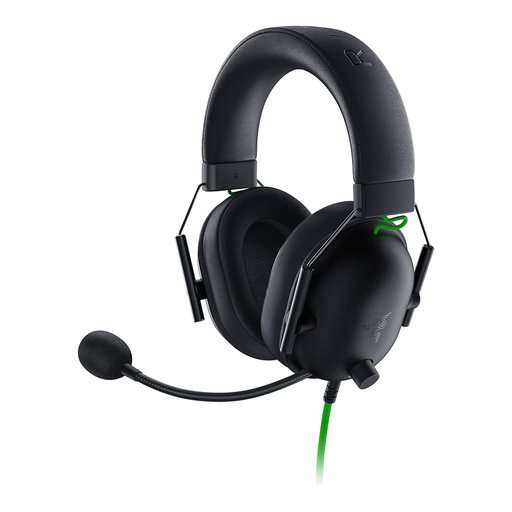
Razer BlackShark V2 X
May suit a wired setup with a flexible boom microphone; check that the connection works with your recording device.
The product name lists wired headphones and 50 mm drivers. Passive noise isolation around your ears doesn’t tell you how clear your voice track will sound in your room.
View at Joybuy
 No image available
Logitech G PRO X
May suit PC recording if you want to use the microphone features designed for it.
Logitech lists Blue VO!CE and an external USB sound card; according to the manufacturer, the advanced features are available only on PC with G HUB. Check the voice track with the room noise you actually have.
View at Joybuy
 No image available
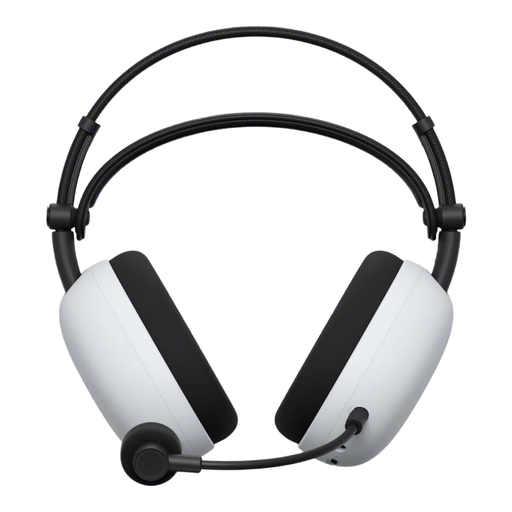
Sony Inzone H9 II
May suit a wireless setup; check that the connection you want works with your PC or PS5.
The product name lists USB Type-C and Bluetooth. The noise cancellation specifications are no substitute for a test recording in your room.
View at Joybuy
Frequently asked questions
Is a noise-cancelling microphone enough if my housemates are talking?
No. The specification alone doesn’t prove that conversations will be removed from your recording. The OBS Project describes the limitations when there’s a lot of room noise, so make a test recording in the conditions you actually have.
How can I edit my voice and game audio separately later?
With separate recording tracks in OBS, you can assign audio sources individually for editing later. The OBS Project explains how to assign sources in Advanced Audio Properties and enable tracks in the Output settings; then test the file in your editing software.
What if the headset is faulty or doesn’t fit after I buy it online?
If a product is faulty, you have statutory rights against the seller; these are separate from a manufacturer’s guarantee. Online purchases generally come with a right to cancel, usually within 14 days of receiving the goods. The Verbraucherzentrale explains these rights, but the terms of your specific purchase will apply.
Can I record other people talking in the room for my walkthrough?
In Germany, § 201 StGB generally prohibits recording another person’s private conversation without permission, as well as making such a recording available to others. If people might be talking in the room, check with them beforehand and take steps to avoid recording them by mistake.


