Players using online voice chat
If you give instructions while chatting, look for clear voice pickup and a mute control that’s easy to use.


If a teacher and a new player are in the same room, the player should still be able to hear instructions at a comfortable gaming volume. Strong noise isolation is not always helpful. For online chat, clear speech and an easy-to-reach mute control matter. Also check that the connection and fit suit the device and the person wearing the headset.
If you give instructions while chatting, look for clear voice pickup and a mute control that’s easy to use.
If you want to start playing straight away, check the connection you’ll actually use and make sure the game audio and microphone work as needed.
If the person giving instructions is sitting beside you, choose a game volume that lets you hear what they’re saying.
First, decide whether instructions will be given in person, over online chat or both. This will help you choose the right level of noise isolation, microphone controls and connection.
| What matters | What to look for | Who should pay particular attention? |
|---|---|---|
| Clear voice chat | Check the microphone position and how it picks up your voice on the device you plan to use; test the mute control without having to search through menus. | If I want to give online teammates quick instructions, I need clear voice pickup and an easy-to-use mute control. Around 33% of consumers name voice chat as their top priority. |
| The right connection for your device | Check the platform, connection and microphone support for the specific version; don’t assume 3.5 mm, USB and wireless connections are interchangeable. | If I want the headset to work with my existing PC or console without any connection guesswork, I’ll check exactly how it connects. Around 27% of consumers say device compatibility is their top priority. |
| Hearing instructions in the room | At a comfortable volume, check that ordinary speech is still easy to understand; distinguish between passive isolation, ANC and ambient mode. | If I’m sitting next to the new player, I want them to hear my spoken instructions without needing an online voice chat. Around 20% of consumers put in-room communication first. |
| An adjustable fit | Check the headband, ear cushions and pressure on the person who’ll wear the headset; weight alone doesn’t tell you how it will fit them. | If the headset will be worn for longer periods or shared between people, I want to be able to adjust the fit for each person. Around 20% of consumers say fit is their top priority. |
Noise isolation around your ears and how the microphone picks up your voice are two different things. If the person giving instructions is in the same room, strong isolation could actually muffle what the player needs to hear.
First decide whether instructions will be given in person or over chat. Check ear isolation and the microphone separately.
According to Xbox Support, the Xbox Stereo Headset connects to the controller via 3.5 mm. Xbox Support says the Xbox Wireless Headset does not support a 3.5 mm connection.
Compare the full model name and the intended connection method. Switching models may mean using a different connection or choosing another headset.
Adjustability and a manufacturer’s comfort claims don’t tell you how a headset will fit a particular person.
Check the headband and ear cushions on the specific model, and try it on the person who’ll be wearing it.
The wired G335 is worth considering if you want a simple 3.5 mm connection and an adjustable fit.
The wired Cloud III could be a good choice if you use different types of connection with multiple devices.
The wired Arctis Nova 1 may suit you if you want an adjustable fit for use with multiple platforms.
The BlackShark V2 X is designed for players looking for a closed-back design and an adjustable microphone boom.
The Stereo Headset and Wireless Headset offer Xbox players different ways to connect.
The INZONE H9 II is a wireless option for people who want to switch between noise isolation and hearing what’s happening around them.
The following wired and wireless gaming headsets are worth considering for voice chat, connecting to gaming devices and guiding a new player.
 No image available
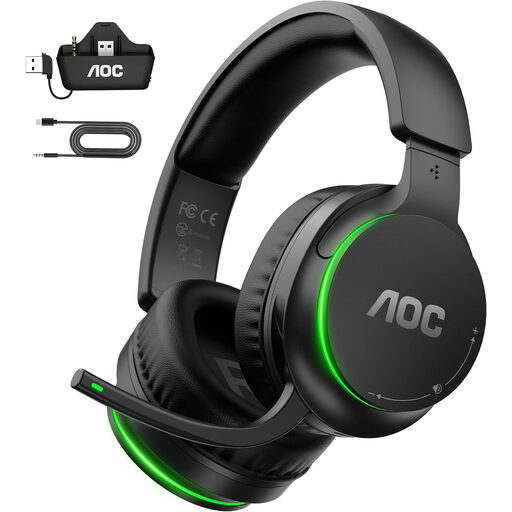
A wireless option if you want to mute chat directly at the microphone when needed.
The product description lists 2.4 GHz wireless, a USB-A adapter for other platforms and a flip-to-mute microphone. Check how it connects to your device: for Xbox, use the transmitter with the controller; for PC, PS5, Mac or Switch, use the USB-A adapter.
 No image available
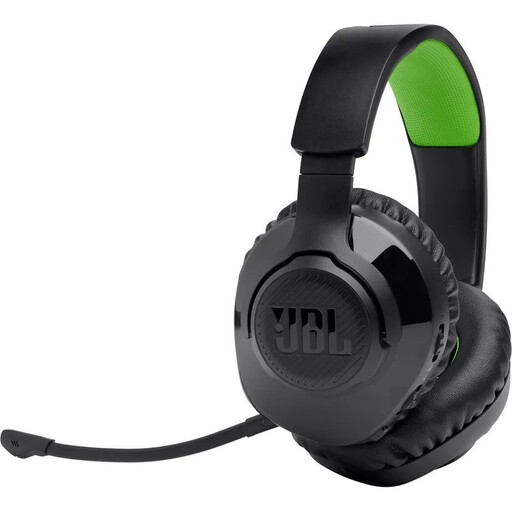
An option for Xbox players who want to use a wireless headset with a detachable microphone.
The product description lists 2.4 GHz wireless, Bluetooth, memory foam ear cushions and a microphone mute function. It states that battery life is up to 22 hours; wireless use means regular charging. Check the connection for the platform you’re using.
 No image available
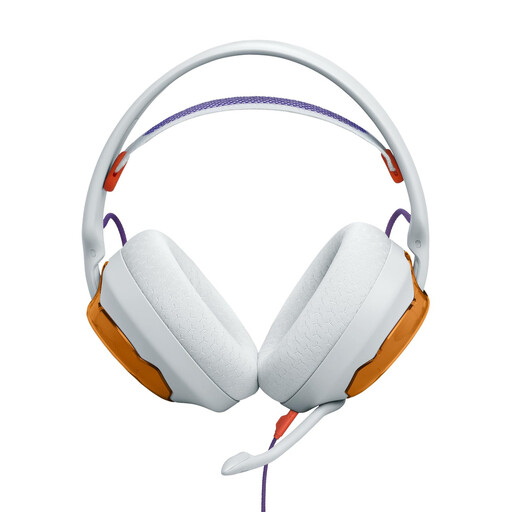
A wired model if you prefer a 3.5 mm connection and a detachable microphone.
The product description lists a 3.5 mm connection and PC, PlayStation, Xbox and Switch as supported platforms. For a PC with separate headphone and microphone sockets, the description says you’ll need a Y-splitter, which isn’t included.
 No image available
An option if you want to switch between wireless and wired use.
The product description lists 2.4 GHz wireless, Bluetooth, a wired mode and a detachable microphone with a physical mute button. Wireless use requires charging; the stated charging time is around two hours.
 No image available
A wired headset for anyone looking for an adjustable headband and a choice of connections.
The product description lists USB and 3.5 mm connections, along with an adjustable headband and microphone. Before buying, check which connection your gaming device needs.
No, not for a face-to-face conversation. If you want online teammates to hear you too, check the microphone connection, voice pickup and mute function on the device you plan to use.
Xbox Support says to connect it to the 3.5 mm socket on a Wireless Controller paired with the Xbox. Then check that the right audio input is selected on your device.
Start at a low volume and take listening breaks. The World Health Organization explains that the risk increases with volume and listening time. Its guideline of an average of 80 dB for up to 40 hours a week is not a limit you can read from the headset’s volume control.
Your statutory rights relating to faulty goods apply to the seller and are separate from any voluntary manufacturer’s warranty. According to the Verbraucherzentrale, many online purchases generally come with a 14-day right to cancel from the date you receive the goods; exceptions may apply.
An old headset is waste electrical equipment and must not go in your household bin. The German Environment Agency lists local collection points and retailer take-back schemes; removable batteries or rechargeable batteries should be handed in separately where they can be removed easily.