Who does commentary from home?

Live commentators who prioritise voice

If you speak throughout a game, your voice needs to be clear and easy to control. Try the microphone with the sounds in your room rather than relying on descriptions alone. SoundGuys and COMPUTER BILD both consider microphone quality and fit important factors when choosing a gaming headset.

Commentators during long sessions

For longer sessions, consider fit, warmth and voice monitoring together, and keep an eye on your listening volume. The World Health Organization notes that both sound level and exposure time matter.

Commentators with a flexible workspace

If you switch between devices or want to move around at your desk, the connection and microphone need to work with your specific setup. HyperX and SteelSeries list different wired and wireless connection options for individual models, so check that they’re compatible with your device.

What matters when buying?

What you need What to check Who should pay particular attention?
Clear commentary Test your voice with room noise and the software you use; check the mute function. If you comment throughout a game, your voice needs to stay clear over game or household noise. Around 33% of consumers put voice quality first.
Comfort during long sessions Assess the fit and clamping force over a realistic period of wear, if possible; weight alone can’t tell you how comfortable a headset will be. For longer commentary sessions, your headset should feel comfortable and not distract you while you’re speaking. Around 27% of consumers prioritise wearing comfort.
Connection to your commentary setup Check the plug or dongle, as well as the microphone input and audio output on the device you’ll use. If both game audio and your microphone need to reach your commentary software at the same time, a suitable, reliably configured connection is essential. Around 20% of consumers prioritise a connection that works with their setup.
Hearing your own commentary Test microphone monitoring with the device and software combination you actually use; choose the design to suit your room and how much sound it lets out. If you want to monitor your voice while listening and manage room noise, test both in your own space. Around 20% of consumers put this first.

Common selection mistakes

  • Assuming ANC means a microphone that blocks background noise

    Noise cancellation for listening and voice recording use different signal paths. Even a headset that scores well for sound or comfort may have microphone recording limitations in certain conditions.

    Listen to a voice test using the microphone mode you plan to use, and try it in your room and on your platform.

  • Assuming the plug type guarantees full compatibility

    Depending on the model and device, 3.5 mm, USB and wireless connections can all work differently. A compatible plug alone doesn’t guarantee that the microphone and audio output will be set up as you want in your software.

    Check the microphone input and audio output on your device, then test your commentary software. With wireless models, also check that you have the right dongle or connection mode.

  • Choosing open-back or closed-back without considering your room

    Open-back and closed-back earcups differ in how much sound they block and let out. If your microphone is recording at the same time, your room can therefore affect which design is right for you.

    Assess the design with the sounds you actually hear in your room, and check whether game audio is picked up in the recording.

Key brands at a glance

beyerdynamic

According to the manufacturer, the MMX range includes closed-back wired models such as the MMX 300 PRO and the open-back MMX 330 PRO. The design is another factor to consider for your home setup.

  • COMPUTER BILD rates the microphone and fit of the MMX 300 PRO positively.
  • COMPUTER BILD notes that the MMX 300 PRO microphone is sensitive to external noise. According to the manufacturer, the replacement ear pads offered for this model are only compatible with it.

HyperX

According to HyperX, the wired Cloud III offers several connection options for setups that use a cable rather than a wireless connection.

  • HyperX lists 3.5 mm, USB-C and USB-A connections for the Cloud III, as well as an LED indicator for microphone mute.
  • The manufacturer’s claims about voice clarity are no substitute for testing a recording with your device and in your room.

SteelSeries

According to the manufacturer, the Arctis Nova 5 Wireless is designed for flexible setups, with a USB-C dongle and switchable wireless or Bluetooth connections.

  • SteelSeries says this model lets you switch between 2.4 GHz and Bluetooth 5.3.
  • The connection details apply to this particular model and don’t, on their own, tell you how your commentary recording will sound.

Sony

Sony describes the INZONE H9 II as a wireless headset with a boom microphone and ANC. It may suit a setup where you want to reduce distracting background noise while listening.

  • Sony lists the model’s weight as 260 g without the microphone and describes noise cancellation for the microphone.
  • COMPUTER BILD describes the microphone on PS5 as tinny and thin. This assessment relates to that platform and doesn’t automatically indicate recording quality on PC.

Audeze

COMPUTER BILD lists the Maxwell in separate Xbox and PlayStation versions. Be sure to check the exact version when choosing one.

  • COMPUTER BILD gives the tested versions positive ratings for microphone noise isolation and sound.
  • The review notes that these versions are heavy and offer limited adjustment options; this doesn’t apply to every Audeze headset.

Joybuy models for commentary setups

The Joybuy models below include both wired and wireless headsets. Test the microphone, connection and comfort with your own device and software, and in your home workspace.
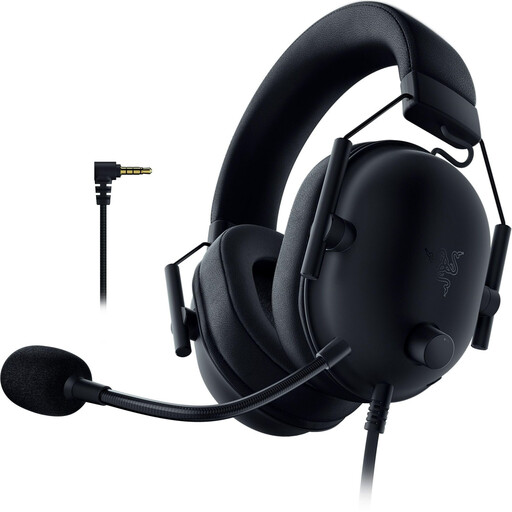
Razer BlackShark V2 X (PlayStation Licensed)

Razer BlackShark V2 X (PlayStation Licensed)

For a wired setup with microphone mute controls on the headset.

Features a 3.5 mm connection and closed-back earcups. The description lists a flexible cardioid microphone, volume control, a mute button and memory foam ear cushions.

The cable limits your freedom of movement at your desk.

Joybuy
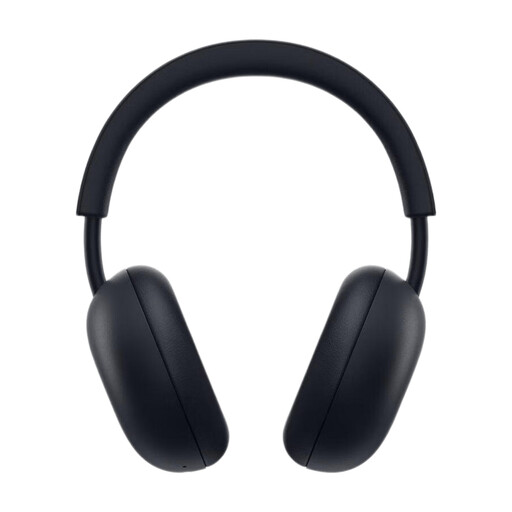
PlayStation PULSE Wireless Headset Midnight Black

PlayStation PULSE Wireless Headset Midnight Black

For wireless use with a compatible device and a noise-cancelling microphone.

The description lists PlayStation Link and Bluetooth, a built-in microphone and a control for balancing game and chat audio. Battery life is listed as up to 30 hours.

Joybuy
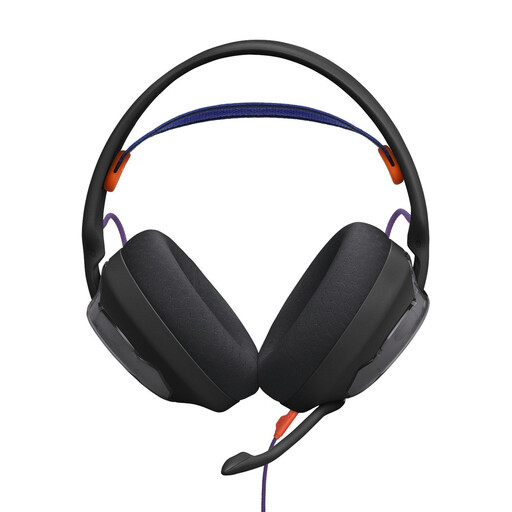
JBL Quantum 250

JBL Quantum 250

For a wired commentary setup with a detachable microphone.

The description lists a 3.5 mm connection and microphone settings through QuantumENGINE software. Breathable ear cushions and a padded mesh headband are also included.

The cable limits your freedom of movement at your desk.

Joybuy

HyperX Cloud Alpha

HyperX Cloud Alpha

For a wired setup with controls that let you make quick adjustments while commentating.

The description lists a 3.5 mm connection, closed-back earcups and a detachable noise-cancelling microphone. The in-line controls include volume and microphone mute.

The cable limits your freedom of movement at your desk.

Joybuy

ONIKUMA GT889

ONIKUMA GT889

For a setup that offers a choice of wireless or wired connection, as well as a physical microphone mute.

The description lists a 2.4 GHz USB dongle, Bluetooth and a wired connection. The microphone is flexible and detachable; the battery needs charging for wireless use.

Joybuy

Frequently asked questions

How can I check that my commentary sounds clear before buying?

Test the microphone with game audio, your usual speaking volume and the sounds in your room. Check the mute function too. An ANC specification for the earcups alone tells you nothing about how your voice will be recorded.

What should I check when setting up the headset?

Check that the connection is compatible with your device, then select the right microphone input and audio output in your commentary software. For wireless models, check which dongle or connection mode to use, and charge the battery before a longer session. Whether microphone monitoring works depends on your specific device and software combination. For wireless headsets sold in Germany, the Federal Network Agency lists correct CE marking and the required German-language information among the points to check.

How should I use a headset during long commentary sessions?

Keep the listening volume low and take regular breaks from listening. The World Health Organization explains that both sound level and exposure time matter for hearing. If the ear pads are worn, check whether replacement parts are available for your exact model: according to the manufacturer, the MMX 300 PRO ear pads offered by beyerdynamic are only compatible with this model.

What ongoing costs and returns conditions should I check?

Check what’s included with the specific offer, along with the applicable returns, warranty and spare parts terms. A wireless model needs to be charged for wireless use; beyerdynamic offers replacement ear pads specifically for the MMX 300 PRO. The returns and warranty terms depend on the specific offer and the circumstances.

Do I need permission to commentate on a game in Germany?

Buying a headset alone doesn’t determine what rights you need for a public broadcast. If you also want to make someone else’s broadcast, including its picture or sound, publicly available, you’ll need to check the relevant rights separately: Section 87 of the German Copyright Act (UrhG) grants broadcasters rights in their broadcasts. Whether your particular commentary format requires additional rights depends on the content you use and how you distribute it.