First, check that game audio and the microphone work through the intended connection on your PC or console. If you play in one place, a suitable wired model that doesn’t need a battery can be handy. A compatible wireless model gives you more freedom to move around, but needs a receiver and charging. Closed ear cups can help reduce background noise for you, but they won’t stop other people in your home from hearing you speak.
Who are these headsets for?
Players who rely on lobby chat
If you join chat from the next room, an adjustable microphone and an easy-to-reach mute control can make it easier to switch between gaming and talking to people in the room. HyperX lists a mute indicator for the Cloud III, while Razer describes the BlackShark V2 X as having a flexible microphone boom. Test how your voice sounds in your room.
Players on PC and console
If you want to use the same headset with several devices, check the connection, receiver and microphone function for each one. HyperX lists several connection types for the wired Cloud III; the Cloud Alpha Wireless is marked as being for PC on HyperX’s product page.
Players who game for longer sessions
For longer gaming sessions, fit, ear cushions and, for wireless models, charging needs all matter. Manufacturers list different cushions and battery life, but you can only tell how comfortable a headset is by trying it on.
What should you look for when buying?
Wired connection
A good fit if: You mainly play in one place and your device supports the connection needed for game audio and the microphone. HyperX lists 3.5 mm, USB-C and USB-A for the Cloud III; Razer’s BlackShark V2 X uses 3.5 mm.
Bear in mind: The cable stays at your gaming spot. Check whether the connection on your PC or controller supports both audio and microphone functions.
Wireless with a USB receiver
A good fit if: You want to move around while gaming without an audio cable, and your device supports the receiver supplied with that specific model. SteelSeries lists a USB-C dongle for the Arctis Nova 5 Wireless, compatible with PC, PlayStation and Switch.
Bear in mind: Wireless models need power and a suitable connection for the receiver. HyperX marks the Cloud Alpha Wireless as being for PC; Sony says ordinary Bluetooth audio headphones can’t be paired directly with PS5.
For lobby chat from the next room, start by choosing a connection and microphone controls that suit your gaming device. Comfort, freedom to move and noise isolation while listening will then depend on how and where you play.
| What matters |
What to check before buying |
Who is it important to? |
| Clear lobby chat |
Microphone position and an easy-to-reach mute control; test your voice with the background noise in the room. |
If clear communication matters to me, I want to be able to position the microphone properly and mute the chat quickly. This is the main priority for around 33% of consumers. |
| Compatibility |
Check the exact model, connection or receiver, and audio and microphone functions for each device. |
Before buying, I want to know whether game audio and the microphone will work on my PC or console using the intended connection. Around 27% of consumers put device compatibility first. |
| Comfort during long sessions |
Assess how the ear cups fit, how much pressure they apply and the cushion material on your own head. |
For longer gaming sessions, I want my headset to feel comfortable. Around 20% of consumers consider comfort their top priority. |
| Freedom to move |
Consider where the cable runs or where the receiver plugs in, and factor in charging for wireless models. |
If I want to move around my gaming space, I don’t want an audio cable attached to my headset. Around 13% of consumers prioritise freedom to move. |
| Noise isolation while listening |
Check how the ear cups fit, and don’t simply turn the volume up to drown out background noise. |
I want to hear less background noise while gaming without turning up the volume. Around 7% of consumers say noise isolation while listening is their main priority. |
Common misconceptions
-
‘Wireless’ doesn’t mean ‘works with every console’
A wireless or Bluetooth model will only work as intended if its connection is designed for your gaming device. Sony says ordinary Bluetooth audio headphones can’t be paired directly with PS5.
Check the platform listed for the exact version and the intended connection for game audio and the microphone.
If the receiver isn’t suitable, you may need an additional adapter. Before buying, check whether your device supports the receiver directly.
-
Wired and wireless versions with similar names aren’t the same model
HyperX lists several connections for the wired Cloud III, while the Cloud Alpha Wireless is marked as being for PC on its product page. Details for one version don’t automatically apply to the other.
Check the full model name, connection and what’s included in the box.
-
Closed ear cups don’t soundproof your room
Razer describes the BlackShark V2 X’s closed ear cups as providing passive isolation for the person wearing the headset. That doesn’t mean other people in your home won’t hear your spoken chat comments.
Think separately about the sounds you want to hear while gaming and how loudly you speak when chatting.
-
Battery life and surround sound don’t necessarily apply on every platform
Battery life figures are manufacturer claims for specific models. Razer says the virtual 7.1 sound advertised for the BlackShark V2 X is only available on Windows 11.
Check that the feature works on your platform and factor in charging if you choose a wireless model.
Key brands at a glance
HyperX
The Cloud III is a wired option with several connections listed by HyperX; the Cloud Alpha Wireless is marked as being for PC on its product page.
- HyperX lists a mute indicator and padded ear cups for the Cloud III.
- The compatibility information for the Cloud Alpha Wireless shouldn’t be assumed to apply to other Cloud models.
SteelSeries
The Arctis Nova 5 Wireless is a wireless option with a USB-C dongle that SteelSeries says works with several platforms.
- SteelSeries lists switching between 2.4 GHz and Bluetooth.
- Being able to switch sources doesn’t mean you can play audio from both connections at once; Xbox isn’t on the listed platform list.
Razer
The BlackShark V2 X is a wired model with a flexible microphone boom and closed ear cups.
- Razer lists a 3.5 mm connection, a flexible microphone boom and a weight of 240 g.
- According to the product page, the manufacturer’s claim about virtual 7.1 sound applies only to Windows 11.
Logitech G
The PRO X 2 LIGHTSPEED is aimed at anyone interested in wireless gaming and the different connection types listed by the manufacturer.
- Logitech lists LIGHTSPEED, Bluetooth and battery life of up to 50 hours.
- These claims don’t guarantee personal comfort or that every connection type will work with every console.
Corsair
The VOID RGB ELITE Wireless is a wireless model with controls on the headset.
- For this version, Corsair lists 2.4 GHz, battery life of up to 16 hours and a mute control on the headset.
- Connections listed for other VOID ELITE versions don’t necessarily apply to the Wireless model.
Joybuy products for lobby chat
This Joybuy selection includes gaming headsets for lobby chat with a wireless receiver or a wired connection.
 No image available
JBL Quantum 650 Wireless, White and Purple
A wireless option for lobby chat without an audio cable. Check that the intended receiver works with your gaming device.
Wireless, over-ear; white and purple colourway.
View at Joybuy
 No image available
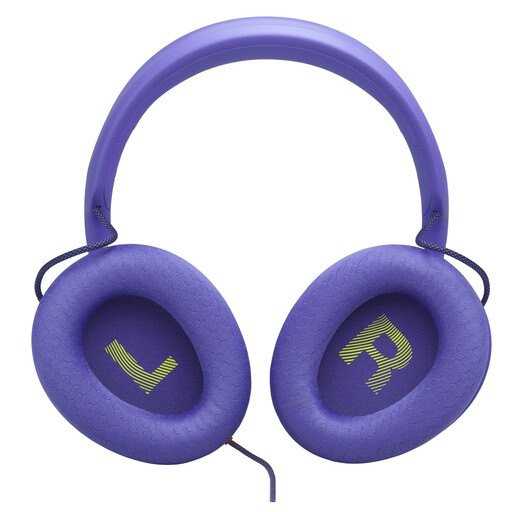
JBL Quantum 120 Wired, Purple
A wired option for a fixed gaming spot. Check that your device supports the connection for game audio and the microphone.
Wired, over-ear; purple colourway.
View at Joybuy
 No image available
HyperX Cloud Alpha
For lobby chat in a fixed spot, if your device has a suitable 3.5 mm connection.
Wired via 3.5 mm.
View at Joybuy
 No image available
ONIKUMA GT889 Wireless
For chat with or without an audio cable. Check which connection and microphone functions work with your device.
Connections listed in the product name: 2.4 GHz wireless and wired use.
View at Joybuy
 No image available
Logitech G G535 LIGHTSPEED Wireless
A wireless option for lobby chat without an audio cable. Check that the receiver and microphone work with your platform before buying.
PS5, PS4 and PC are listed as compatible platforms.
View at Joybuy
Frequently asked questions
How do I set up my headset for my first lobby chat?
Connect it using the connection intended for your model and gaming device, select the headset and microphone on your device, then do a quick voice test before joining. Check the mute function too: according to HyperX, an LED on the wired Cloud III shows when the microphone is muted.
Can I pair an ordinary Bluetooth headset directly with PS5?
No. Sony Germany says ordinary Bluetooth audio headphones can’t be paired directly with PS5. Alternatives listed by Sony include suitable wired connections and gaming headsets with a USB dongle. Sony doesn’t guarantee compatibility or performance for adapters from other manufacturers.
What can help during longer gaming sessions?
Check how the headset fits your own head and factor in charging if you choose a wireless model. The World Health Organization recommends keeping the volume low and giving your ears regular breaks. This is general hearing advice, not a feature that any particular headset automatically provides.
What rights do I have if a product is faulty or I buy online in Germany?
According to information from Your Europe, purchases from a trader are covered by a statutory guarantee of at least two years from receipt of the goods. This is separate from a voluntary manufacturer’s warranty. Distance purchases generally come with a 14-day right to cancel, although exceptions may apply. The specific terms depend on the purchase.


