Ranked players focused on in-game sound
If you want to judge audio cues during a match, look for sound tests of the specific model and a gaming connection that works with your device, rather than relying on surround-sound claims alone.


For tactical ranked matches, choose a headset with a gaming connection that works with your device and sound you can assess using your own game settings. Driver size and surround-sound claims alone don’t prove a gaming advantage. Choose a wired connection or a compatible 2.4 GHz receiver to suit your desk setup, then check the microphone, fit and noise isolation in your home-working environment. A closed-back model may suit a noisy room, while an open-back one may be a better fit for a quiet space where sound leaking out won’t disturb anyone.
If you want to judge audio cues during a match, look for sound tests of the specific model and a gaming connection that works with your device, rather than relying on surround-sound claims alone.
If you need to make call-outs clear while dealing with keyboard or background noise, check the microphone pickup and design in your actual working environment.
If you wear your headset for long periods, fit and padding matter just as much as the connection. With wireless models, check the battery claims too, and look for suitable replacement parts for any model.
First, check the connection for your gaming device. Then compare the sound and microphone using your usual settings, and factor in fit and background noise at home.
| Buying priority | What to check | Who is it important for? |
|---|---|---|
| In-game audio cues and positioning | Sound tests for the specific model; a suitable gaming connection and game settings. | If I want to distinguish audio cues in tactical matches, I need to assess them with my game and settings. Around 28% of consumers put in-game audio cues first. |
| Clear team chat | Microphone position and mute function; if possible, a listening or recording test. | If call-outs need to stay clear despite keyboard and background noise, I’ll check the microphone at my usual spot. Around 22% of consumers prioritise team chat. |
| Fit and background noise | Fit and padding; an open- or closed-back design to suit the room. | If I play for long periods or share the room with others, I want a comfortable fit and need to check whether game audio could disturb them. Around 22% of consumers prioritise comfort and a quiet room. |
| Suitable connection | Connection and microphone function on your own device; for wireless models, check the receiver and the intended gaming mode. | If I need freedom of movement at my desk or a particular device connection, I’ll check that it works with my setup. Around 17% of consumers put connection and freedom of movement first. |
| Replacement parts and product lifespan | Replacement parts compatible with the model; battery information for wireless models. | If long-term use matters to me, I’ll check which parts can be replaced on that specific model. Around 11% of consumers prioritise replacement parts and product lifespan. |
What you hear also depends on the model, software, operating system and game settings. Razer limits the advertised 7.1 feature on the BlackShark V2 X to Windows 11; that doesn’t mean it gives you an advantage in every game.
Compare the settings in your game and look at tests of the specific model, rather than assuming a feature name means better results.
A headset may offer different connection types, but that doesn’t mean they serve the same purpose or are equally suitable for your match. SteelSeries describes switching between 2.4 GHz and Bluetooth on the Arctis Nova 5 Wireless; an independent review of the PRO X 2 LIGHTSPEED names the USB-A receiver as its preferred PC gaming connection.
Before buying, decide which connection should handle audio and microphone during matches, and check that it’s compatible with your device.
Replacement parts and options for replacing components vary by model. Logitech states that the battery in the PRO X 2 LIGHTSPEED isn’t user-replaceable.
Check replacement parts and warranty terms separately from your statutory rights with the seller.
The PRO X 2 LIGHTSPEED may suit you if you want to choose between a wireless receiver, Bluetooth and a 3.5 mm cable.
The wired Cloud III is an option if you need on-headset controls and a choice of connection types.
According to the manufacturer, the Arctis Nova 5 Wireless lets you switch between 2.4 GHz and Bluetooth.
According to Razer, the wired BlackShark V2 X is designed for players looking for closed-back ear cups and an adjustable microphone.
The MMX series includes wired open- and closed-back models; the MMX 300 PRO is the closed-back option.
The Joybuy products below include wired gaming headsets and models with wireless connections. For each model, check that the connection and microphone work with your device and suit your team chat.
 No image available
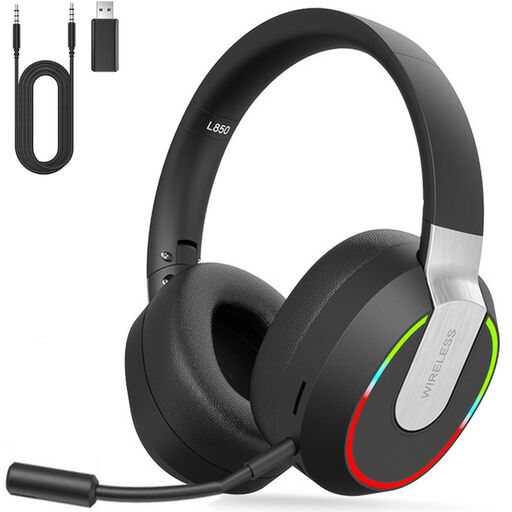
An option for PC or console gaming if your device supports the included USB dongle.
According to the product description: 2.4 GHz USB dongle, Bluetooth 5.1, 3.5 mm connection and detachable microphone.
 No image available
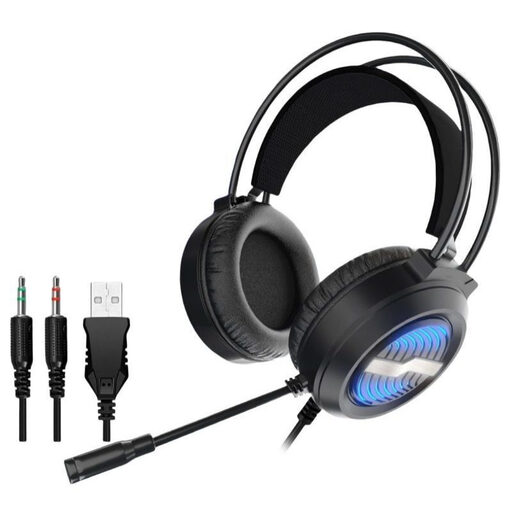
For a fixed gaming setup, if your device supports the connections offered.
The product name specifies an over-ear design and USB cable. The product description also lists two 3.5 mm audio connections and a detachable microphone.
 No image available
A wireless option with an additional 3.5 mm connection, if it suits your setup.
The product name lists Bluetooth 5, ANC, 22 hours of battery life and compatibility with PlayStation, PC, Mac and Switch. The product description lists a detachable 3.5 mm cable.
 No image available
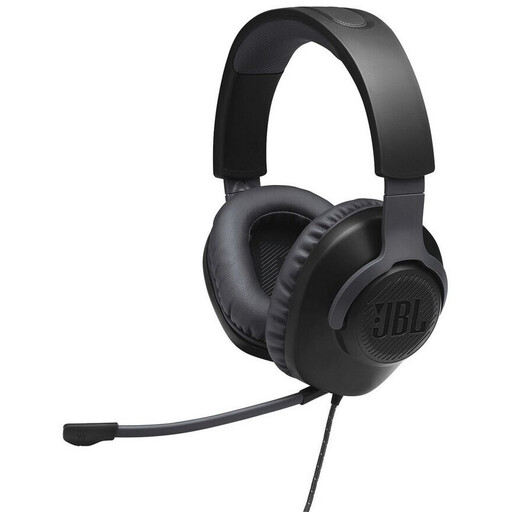
A wired option for a device with a compatible 3.5 mm connection.
The product description lists a closed-back design and memory foam ear cushions.
 No image available
For a wired setup with a compatible 3.5 mm socket.
The product description lists a closed-back over-ear design, dual-chamber drivers, a detachable microphone and memory foam ear cushions.
Not automatically: compare it with stereo in your game rather than assuming it’ll give you an advantage. Razer limits the BlackShark V2 X’s 7.1 feature to Windows 11.
Check audio output and microphone input, as well as the gaming connection intended for your model. HyperX lists 3.5 mm, USB-C and USB-A for the Cloud III; a review of the PRO X 2 LIGHTSPEED names the USB-A wireless receiver as its preferred PC gaming connection.
Keep the volume low and take listening breaks. The World Health Organization gives the example of up to 40 hours a week at an average of 80 dB, but only four hours at 90 dB; this isn’t a guaranteed safe headset setting. Check replacement parts for your specific model if the ear pads or cable become worn.
For faulty new goods, the Verbraucherzentrale says you can exercise your statutory rights against the seller within two years of receiving the product. A voluntary warranty is separate from these rights.
The Bundesnetzagentur explains that, by applying CE marking, the manufacturer confirms on its own responsibility that the product meets the applicable requirements. It isn’t an independent quality mark for gaming performance; check the information for the specific product.