Players focused on timing
You practise reacting to visual and audio cues, and want to check audio connection and TV picture delay separately.


For reaction training on a big screen, a wired connection or a wireless headset with its own explicitly compatible receiver is a sensible place to start. RTINGS.com recommends wired connections and dedicated low-latency transmitters for gaming. If you need freedom to move around, check the receiver and compatibility of the specific version with your console or PC; Bluetooth alone doesn’t guarantee suitable gaming latency. Also check your TV’s Game Mode, as image processing can contribute to delay too.
You practise reacting to visual and audio cues, and want to check audio connection and TV picture delay separately.
You’re not sitting right next to your gaming device and need a suitable wireless connection, rather than running a cable across the room.
You want to practise repeatedly without an uncomfortable fit getting in the way, while keeping an eye on volume and listening time.
First, find out how the headset connects to your gaming device and whether the picture and sound arrive in time with your setup. Fit, positional audio and voice chat are other things to consider if they matter for your practice.
| What matters | What to check before buying | Who will find it especially important |
|---|---|---|
| Connection and compatibility | Check the full model variant and the connection supported by your gaming device; consider game audio, chat and microphone support separately. | If I practise on a PC or console, I want to be sure this exact version works with my device. Around 26% of consumers prioritise connection compatibility. |
| Audio timing | Check for a wired connection or a dedicated wireless transmitter for your device; test the TV’s Game Mode separately. | For reaction training, I want sound and picture to line up, rather than blaming the headset for a delay too soon. Around 26% of consumers particularly value audio that’s in sync with the picture. |
| How clearly you can hear in-game cues | Compare listening samples or tests for the specific model and game you have in mind; check the sound settings available on your platform. | If I need to react to footsteps, directions or other audio cues, I want to be able to distinguish them clearly in-game. Around 21% of consumers prioritise how easy these cues are to hear and locate. |
| Comfort during repeated practice | Assess the adjustability, padding and fit for the length of your planned sessions; keep volume and listening time in mind. | For longer sessions, I want a headset that suits the shape of my head, without having to turn the volume up too high to hear quiet cues. Around 16% of consumers prioritise fit during longer use. |
| Team communication | Test the microphone, mute function and chat features with the gaming device you plan to use. | When I practise with others, I want to communicate clearly and be able to use chat easily. Around 11% of consumers put team communication first. |
A Bluetooth specification alone doesn’t confirm a direct PS5 connection or low gaming latency. What’s more, console versions of a model aren’t automatically interchangeable for wireless use.
Before buying, check the full model variant, your console and the receiver or connection explicitly specified for it.
Your TV’s image processing can also affect input lag. Sony Germany notes that the Game Mode setting varies by TV model.
Test Game Mode and the audio connection separately with the setup you’ll actually use for training.
In reviews of individual models, COMPUTER BILD noted differences in fit and microphone performance. A single product specification can’t tell you how a headset will feel or sound during your own practice.
Compare suitable reviews of the exact model and, if possible, try the headset on for a longer period.
The INZONE H9 II is a wireless option with a 2.4 GHz connection, Bluetooth and ANC. What matters is whether the specific connection suits your PC or console setup.
The Arctis Nova Elite is designed for setups with multiple gaming devices and a separate GameHub.
The Maxwell comes in separate Xbox and PlayStation versions, so make sure you choose the right one for your console.
The MMX 300 PRO is a closed-back wired option for devices with a suitable 3.5 mm connection.
The wired version of the Cloud III offers 3.5 mm, USB-C and USB-A as different connection options.
The models below include wired headsets and wireless models with their own receiver. Before choosing, check that the connection on each one suits your gaming device.
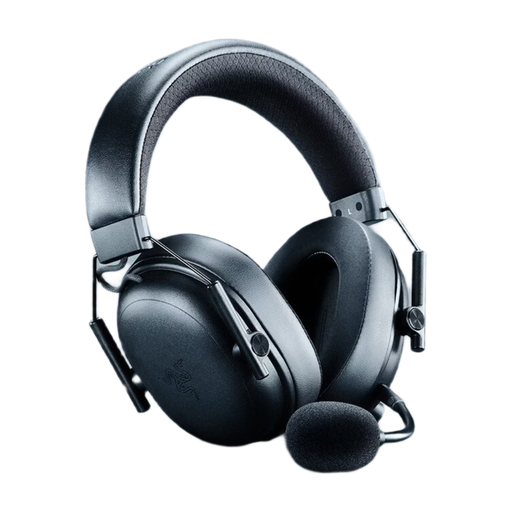 No image available
A wireless option if you want to play on PC or a supported console without a cable.
The product description lists 2.4 GHz HyperSpeed with a dongle, as well as compatibility with PC, PS5, PS4, Xbox and Switch.
It also lists a weight of 270 g, memory foam ear cushions and up to 70 hours of battery life.
According to the product description, THX Spatial Audio is supported on Windows 11 version 23H2 or later. The HyperSpeed dongle is required for the 2.4 GHz connection.
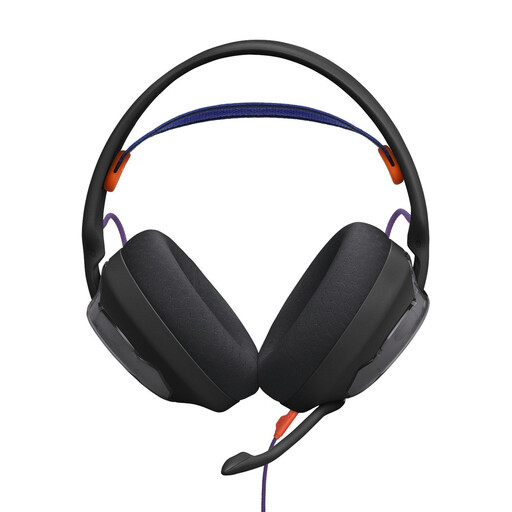 No image available
A wired option if your gaming device has a suitable 3.5 mm connection.
The product description lists compatibility with PC, PlayStation, Xbox and Nintendo Switch, as well as Quantum Spatial Sound and customisable sound profiles.
The microphone and cable are listed as detachable. The description also mentions breathable ear cushions and a padded headband.
 No image available
A wireless model for screen setups where a USB receiver can connect to your gaming device.
The description lists 2.4 GHz wireless with a USB receiver, as well as Bluetooth and a wired mode. Compatible devices include PS4, PS5, Switch, Windows and MacOS.
It lists 50 mm drivers and up to 60 hours of playback. The USB receiver is required for 2.4 GHz mode.
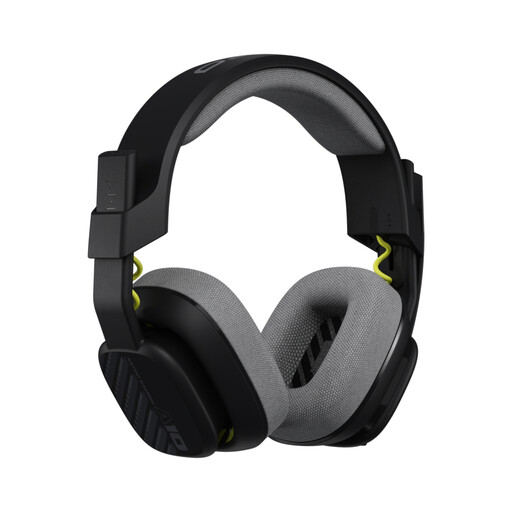 No image available
A wired option if your device has a suitable 3.5 mm connection.
The product description lists compatibility with PS5, PS4, Nintendo Switch, PC and Mac, as well as 32 mm drivers.
The microphone is listed as having a flip-to-mute function. The description also mentions replaceable ear and headband cushions, and a weight of 240 g without the cable.
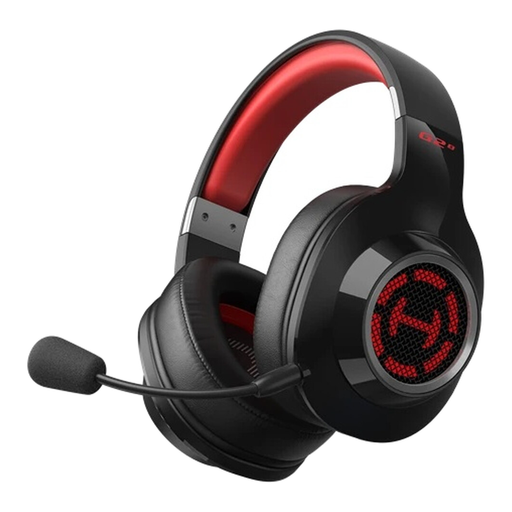 No image available
A wireless option for a PC, PS5 or Switch setup, provided the connection it uses suits your device.
The product description lists 2.4 GHz wireless, Bluetooth and a USB-A sound card, as well as virtual 7.1 surround sound and game and music modes.
The stated weight is 252 g. The description says the headset can be charged while you play.
Not just because it has Bluetooth. In its PS5 troubleshooting guide, PlayStation describes Bluetooth audio devices that connect directly as incompatible, and explains that its own wireless headsets connect via a USB adaptor. For other headsets, check that the PS5 connection is explicitly documented.
Check the Game Mode settings on your specific TV and test picture and sound using the connection you’ll use for practice. Sony Germany notes that game settings and how to access them vary by TV model.
Check whether replacement ear cushions or cables are available for your specific model; beyerdynamic lists these as replaceable parts for the MMX 300 PRO. For longer sessions, keep the volume down and take listening breaks.
When you buy from a business seller, you’re generally entitled to a legal guarantee lasting at least two years from the date you receive the goods. This is separate from any voluntary manufacturer’s guarantee. Distance purchases generally come with a 14-day right to cancel, although exceptions apply.
For products covered by the relevant EU harmonisation legislation and placed on the EU market, the Federal Network Agency explains that CE marking is required. The CE mark is the manufacturer’s declaration of conformity, not an independent quality mark guaranteeing low latency.