For narrative puzzle games in a shared bedroom, a well-fitting, closed-back headset is a sensible place to start, as this design tends to let less sound escape. It can’t guarantee silence, though: at your usual, moderate volume, check what the other person can hear. Wired models are a good fit if the connection and cable routing work for you; wireless is an option if the receiver is compatible with your gaming device and you’re prepared to keep it charged.
Who is this selection for?
Being considerate of the person sharing your room
You play while someone else is reading or sleeping, and want to keep audible game sounds in the room to a minimum. A closed-back design can be a sensible starting point, but even closed-back models can let sound escape; RTINGS.com highlights these exceptions.
Focusing on dialogue and puzzle clues
You want to make out voices and quiet clues without turning the volume up unnecessarily. Sound quality and fit matter more than a surround sound label.
Switching between gaming devices
For example, you use a PC and a console, or want to connect a mobile device as well. Check the connections and connection types explicitly supported by the specific model against your devices.
What should you look for when buying?
First, think about how much game audio is acceptable in the room. Then check that the connection, microphone and connectivity type work with your gaming device.
| Priority |
What to check when buying |
Who is this important to? |
| Sound in a shared room |
Closed-back design and ear cushion fit; listen from a little way away at your usual, moderate volume. |
If I play while someone else in the room needs peace and quiet, I want to judge the sound leakage for myself. Around 33% of consumers put being considerate of the person sharing their room first. |
| Dialogue and quiet clues |
Where possible, listen to dialogue scenes using the specific model and your own device’s audio settings. |
If voices and puzzle clues are important, I want to understand them without turning the volume up unnecessarily. Around 27% of consumers prioritise clear dialogue. |
| Fit during longer sessions |
Check the clamping force, room for your ears and how the cushions feel; the stated weight is no guarantee of comfort. |
If I spend a long time working through a puzzle, I want the headset to feel comfortable. Around 20% of consumers prioritise comfort. |
| Connection and freedom to move |
Check your gaming device and available ports against the exact model and its stated wired or receiver connection. |
If I switch between devices, I want to know whether the headset will work with my gaming device and how much freedom of movement the connection allows. Around 13% of consumers put device compatibility first. |
| Voice chat and muting |
Test the microphone with your device and check that the mute button is easy to reach. |
If I use voice chat while playing a puzzle game, I want to be able to check whether my microphone is muted and avoid catching the other person in the room off guard with my voice. Around 7% of consumers prioritise voice chat and microphone control. |
Common misconceptions
-
‘Closed-back’ doesn’t mean ‘inaudible to others’
Even closed-back models can let sound escape; open-back designs typically let more game audio through. How much sound reaches the room also depends on the model, the fit and the volume.
At your usual, moderate gaming volume, listen from where the other person will be to check what they can hear in the room.
-
Bluetooth, wireless receivers and audio mixing aren’t the same thing
Switching between wireless and Bluetooth doesn’t mean both connections can be mixed at the same time. And not every Bluetooth audio device is compatible with PS5.
Check your gaming device, the model variant, the receiver and the connection features explicitly promised before choosing a model.
-
Microphone features won’t automatically make the room quieter
A microphone feature won’t automatically change how loudly your own voice can be heard in the room.
When gaming with voice chat, consider how loudly you speak separately from the microphone, and keep the mute button within easy reach in case you need it.
Brands to consider
HyperX
The wired Cloud III is an example for gamers looking for several connection options and a microphone mute indicator.
- HyperX lists 3.5 mm, USB-C and USB-A connections, along with a microphone mute indicator, for the Cloud III.
- These manufacturer’s specifications don’t guarantee individual comfort or a particular level of sound leakage. The cable needs to suit your gaming setup.
SteelSeries
According to SteelSeries, the Arctis Nova 5 is designed for gamers who want to use a USB-C wireless receiver with supported devices and Bluetooth with a mobile device.
- SteelSeries lists a headset mute control and switching between 2.4 GHz and Bluetooth.
- Being able to switch connections doesn’t mean audio can be mixed from both at once, and it doesn’t indicate how much sound the headset blocks.
Logitech G
The G435 is a wireless model for gamers with a device that supports LIGHTSPEED.
- Logitech G lists a weight of 165 g, LIGHTSPEED support on PC, Mac, PS4 and PS5, and battery life of up to 18 hours.
- Its weight doesn’t guarantee a comfortable fit for you. Check Bluetooth support for other devices separately.
PlayStation
The PULSE Elite is an option for PS5 gamers who want to use PlayStation Link.
- PlayStation lists a USB adapter for PS5, PC and Mac, a retractable microphone and battery life of up to 30 hours.
- These are the manufacturer’s specifications. The Bluetooth connection described for mobile devices doesn’t replace checking how it connects to PS5.
Gaming headsets at Joybuy
Here you’ll find wired gaming headsets and one wireless model. For a shared bedroom, check the fit and sound leakage at your usual volume; product specifications can’t replace trying it out in your own setup.
 No image available
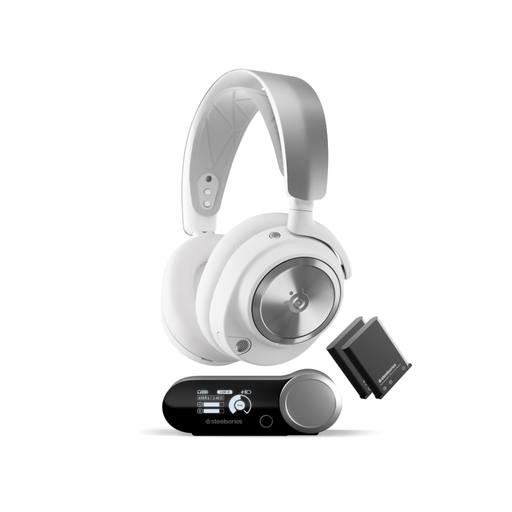
SteelSeries Arctis Nova Pro Wireless, White
If you want to switch between a gaming system and a mobile device, the stated base station and simultaneous Bluetooth connection may be worth considering; check that they work with your devices.
The product description lists ANC and replaceable batteries. ANC alone doesn’t prove that other people in the room will hear less game audio.
View at Joybuy
 No image available
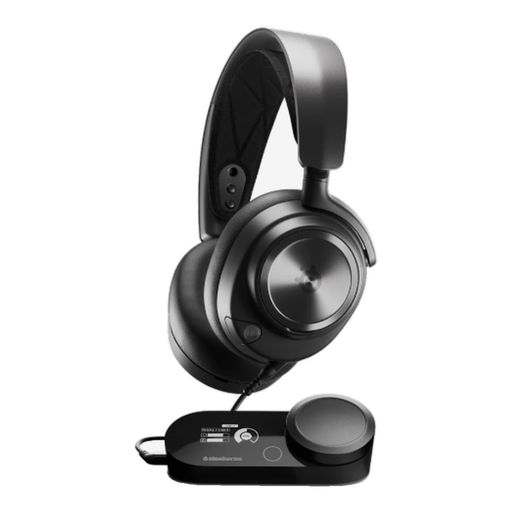
SteelSeries Nova Pro Wired, Black, PlayStation 5
This wired model may suit you if you’ve checked that it connects to your PS5 and that you have a compatible port.
The product specifications list a closed acoustic system, GameDAC Gen 2, a 3.5 mm connection and a retractable microphone. A closed-back design doesn’t guarantee silence in the room.
View at Joybuy
 No image available
AOC Wired Gaming Headset
An option if your gaming device supports the stated 3.5 mm connection and you need a microphone for voice chat.
The product specifications list a detachable connection, a detachable microphone and support for PC, Mac, PlayStation, Xbox, Nintendo Switch and mobile devices. Check the connection with your specific device.
View at Joybuy
 No image available
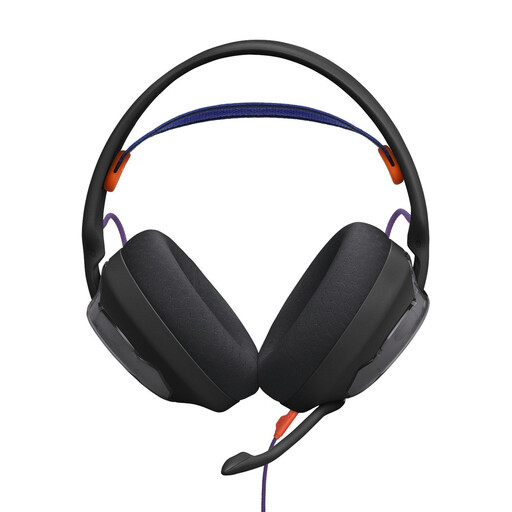
JBL Quantum 250, Wired
This model is worth considering if your gaming device has a compatible 3.5 mm audio connection and you want a microphone for voice chat.
The product specifications list stereo audio, a detachable microphone and support for JBL QuantumENGINE. The cable is detachable.
View at Joybuy
 No image available
HyperX Cloud Alpha with Inline Audio Controls
This wired model may suit you if your gaming device has a compatible 3.5 mm connection.
The product specifications list a closed-back design, a detachable microphone and inline audio controls. Closed-back doesn’t mean there’ll be no game audio audible in the room.
View at Joybuy
Frequently asked questions
Is an open-back headset suitable if someone else is sleeping in the same bedroom?
Probably not: open-back ear cups typically let more sound escape. A closed-back model can let sound out too, so check the volume and what the other person can hear from where they’ll be sitting.
How do I connect a headset for game audio and chat?
Check your device’s connections and audio features against the exact headset variant. The wired HyperX Cloud III lists 3.5 mm, USB-C and USB-A connections; the Arctis Nova 5 uses a USB-C wireless receiver with the gaming platforms listed. Test the microphone and mute function once it’s connected.
Does ANC help me avoid disturbing my flatmate?
ANC reduces background noise for the person wearing the headset; that doesn’t mean game audio will be quieter outside the headset or your voice quieter in the room. Check the fit and volume, and ask the other person what they can hear.
What should I bear in mind during longer sessions and when choosing a volume?
If possible, try the cushions and check the clamping force for yourself, and play at a moderate volume. The World Health Organization points out that volume, listening time and how often you’re exposed to loud sounds all matter for your hearing.
Does Bluetooth audio work directly with PS5?
Don’t rely on the headset’s Bluetooth specification alone: PlayStation Support says Bluetooth audio devices aren’t compatible in its PS5 compatibility guidance. Instead, check which USB receiver is listed for the specific model or whether it supports a wired connection.


