Support players practising team callouts
If you’re practising short, clear callouts, a positionable microphone and an easy-to-reach mute button are useful. Test a recording against the sounds you actually hear in your room.


For clear support callouts, a well-positioned microphone and an easy-to-reach mute button are good places to start. Test a voice recording against the noise in your room. Closed-back ear cups usually let less game sound escape than open-back ones, although closed-back models can still leak sound, as RTINGS explains. Then choose based on your gaming device, comfort and how much freedom of movement you need from a wired or wireless connection.
If you’re practising short, clear callouts, a positionable microphone and an easy-to-reach mute button are useful. Test a recording against the sounds you actually hear in your room.
If someone else in your bedroom is reading or resting, you can look for a headset that lets as little game sound as possible escape. Your own voice may still be a separate source of noise.
For longer sessions, a comfortable fit and ear cushions matter just as much as how the headset connects to your gaming device. Weigh up the freedom of movement offered by a wireless model against the need to charge it, and the simpler set-up of a wired headset.
A good fit if: you practise in one place and your gaming device has the right connection for audio and the microphone.
The trade-off: The cable limits your freedom of movement. How much sound escapes also depends on the model and volume level.
A good fit if: you want to move around more freely while practising and the receiver and microphone work with your platform.
The trade-off: Remember to charge the headset and check that your device has the right connection for the receiver. Wireless and Bluetooth features don’t automatically mean that every audio mix you want is supported.
A good fit if: the other person in the room won’t be disturbed by escaping game sound and you specifically want a more open listening experience.
The trade-off: According to RTINGS, open-back headphones typically let more sound escape. Closed-back models can also vary in how much sound they let through.
| What matters | What to look for when buying | Who it matters most to |
|---|---|---|
| Clear team callouts | Check the microphone position and mute function. Test a short recording against the usual room noise. | If I need to deliver short callouts clearly, I look for a microphone I can position as needed. Around 25% of consumers put clear callouts first. |
| Keeping game sound in | Compare closed-back and open-back ear cups, then check what people nearby can hear at your usual volume. | If someone else in the room needs peace and quiet, I want to keep as much game sound in as possible. Around 25% of consumers give this their top priority. |
| Comfort during long sessions | Check the ear cushions and how the headset fits around your head and ears. Weight alone doesn’t tell you whether it will be comfortable. | If I’m practising for a long time, a comfortable fit matters more to me than any single comfort feature. Around 20% of consumers focus mainly on comfort. |
| Game sound and team chat | Test the game and chat volume controls on your platform rather than assuming that an advertised feature will give you the mix you want. | If I need to hear in-game cues and understand team callouts at the same time, I look for the right balance. Around 15% of consumers prioritise the balance between game sound and chat. |
| Connection and controls | Check your gaming device, the exact model variant, the microphone input and, where applicable, the wireless receiver supplied. | If I want to use the headset easily with my own device, I check the connection and controls beforehand. Around 15% of consumers put connection to their gaming device first. |
Noise cancelling in the ear cups affects what you hear; it doesn’t stop other people in the room from hearing your voice. Microphone noise reduction, on the other hand, affects the sound that’s transmitted.
Check the ear cups, microphone recording and your own speaking volume separately. Test a recording against the usual background noise.
Open-back designs typically let more game sound escape. RTINGS also points out that closed-back models can vary in how much sound they let through.
If someone near you needs peace and quiet, compare closed-back models and check how much sound escapes at your usual volume.
Having several connection options doesn’t prove that every combination of game, phone and chat audio will work on your device.
Before buying, check the exact model variant, your platform, the receiver and the audio mix you want. With wireless models, charging is also part of the routine.
The wired Cloud III is an option for a dedicated practice spot.
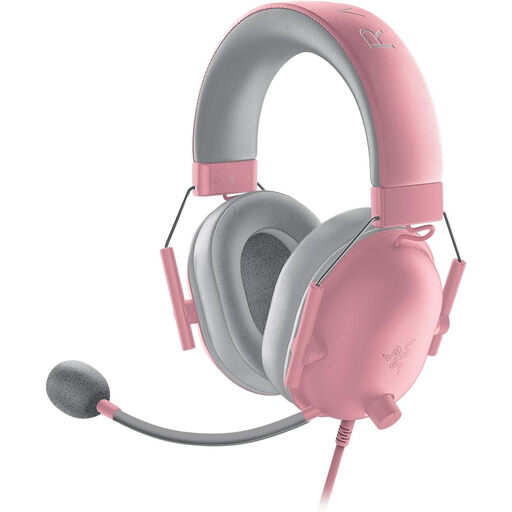
The BlackShark V2 X is a closed-back headset with a positionable microphone.
The Arctis Nova 7 Wireless Gen 2 is a wireless option if you want to listen to phone audio as well as game sound.
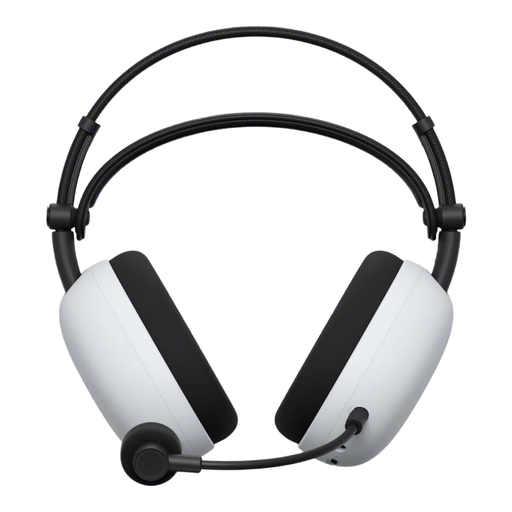
According to Sony, the INZONE H9 II combines a wireless headset and boom microphone with noise cancelling for the wearer.
According to the manufacturer, the MMX range includes both closed-back and open-back gaming headsets. These designs aren’t interchangeable in a shared room.
The following Joybuy options include wired and wireless gaming headsets for voice chat. Check the connection, microphone controls and sound leakage for the specific model in a shared room.
 No image available
The flexible microphone and mute function are handy for short team callouts. Test a voice recording in your room.
Closed-back ear cups; 3.5 mm connection; in-line volume control; 240 g. The product description says it’s suitable for PC and consoles.
 No image available
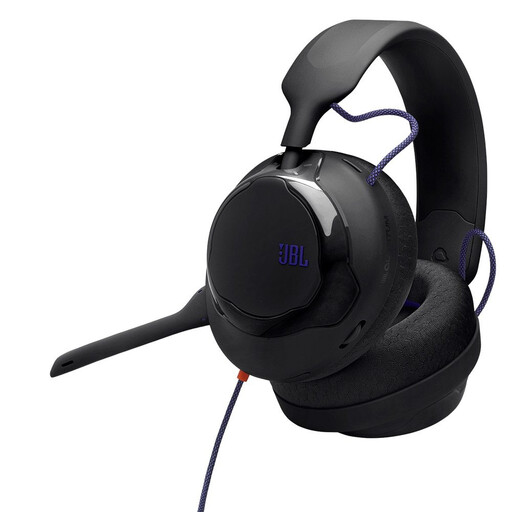
The product description lists a detachable cardioid microphone with noise reduction for team communication. Test a recording against the sounds in your room.
3.5 mm connection; 3.5 m cable. The product description says it’s suitable for games consoles and PC.
 No image available
The detachable microphone and in-line mute function can be handy for short callouts. Check that the connection works with your gaming device.
Closed-back design; 3.5 mm connection; in-line audio cable and PC extension cable. The product description says it’s suitable for PC and consoles.
 No image available
According to the product description, the microphone is designed for team communication and can be muted. Check that the wireless receiver works with your device.
2.4 GHz wireless, Bluetooth 5.4 and wired connection; USB receiver. The product description says it’s suitable for PC and consoles.
 No image available
The retractable microphone and mute function are useful for voice chat. Noise reduction on the microphone doesn’t tell you how much of your voice will be heard in the room.
2.4 GHz wireless via USB-C, Bluetooth 5.3 and wired 3.5 mm mode; 260 g without the microphone. The product description says it’s suitable for PC and PS5.
No. Noise cancelling in the ear cups affects what you hear, not how your voice carries around the room. Microphone filters affect the sound that’s transmitted. Test how well they work against the usual room noise.
Position an adjustable microphone boom towards your voice, select the right microphone input in your chat app or game, then test a short callout against the usual room noise. Discord describes Krisp as a filter for non-speech background noise. OBS notes that noise suppression can have limited effect in noisy rooms and may alter your voice.
The German Environment Agency recommends keeping the volume moderate when listening with headphones. Don’t turn it up just because background noise is masking in-game cues; check the fit and audio balance instead.
If a product is faulty, your statutory rights against the seller are separate from a voluntary manufacturer’s warranty. For ordinary online purchases from businesses, you generally have 14 days from delivery to cancel, as Your Europe explains. Exceptions and possible return costs should also be taken into account. The Verbraucherzentrale also explains the difference between statutory rights and a warranty.